Disclosure: As an Amazon Associate, we earn from qualifying purchases. If you click a link on this page and make a purchase, we may receive a small commission at no extra cost to you.
A portable soldering iron can save you time when you need to repair a wire, touch up a circuit board, or handle a small electronics job away from a full bench setup. The YHDZSWGZS Portable Soldering Iron is built around a compact body, quick 10 to 15 second heat-up time, a listed 1100mAh battery, and four adjustable voltage settings. This review helps you decide if its size, battery-powered design, and included accessories are enough for your repair work. It looks useful for light soldering and hobby projects, but battery life and long sessions are the main tradeoffs to consider.
Quick Verdict
Rating: 7/10, Recommended with caveats
Best For: Hobbyists, quick wire repairs, small electronics work, and portable backup use.
Bottom Line: The YHDZSWGZS Portable Soldering Iron makes sense if you want a small, battery-powered tool that heats quickly and fits in a pocket or toolbox. Skip it if you need long continuous runtime, heavy-duty soldering power, or a full temperature-controlled bench station.
| Specification | Detail |
|---|---|
| Brand | YHDZSWGZS |
| Product type | Portable battery-powered soldering iron |
| ASIN from product link | B0FKPSW6CJ |
| Length | 7.3 inches |
| Weight | Listed as 3.0 to 3.52 ounces in the supplied article |
| Battery | Upgraded 1100mAh battery |
| Heat-up time | About 10 to 15 seconds |
| Voltage settings | 3.3V, 3.8V, 4.3V, and 4.8V |
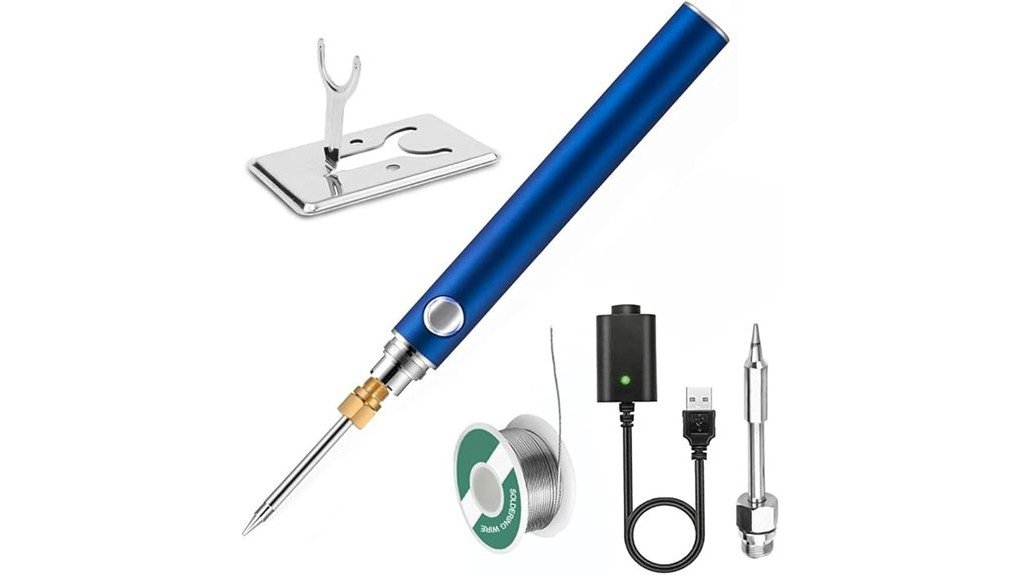
| Included accessories | Two charging cables, soldering tip, Y-shaped stand, and solder wire |
| Best use | Small electronics repairs, circuit work, cable repairs, and portable touch-up jobs |
| Safety note | Use on a stable, heat-safe surface and follow soldering safety practices. |
What Is the YHDZSWGZS Portable Soldering Iron?
The YHDZSWGZS Portable Soldering Iron is a compact soldering tool made for smaller repair jobs where a large station may be more than you need. Its 7.3-inch body and light weight make it easy to keep in a toolbox, repair kit, drawer, or travel case.
The main appeal is convenience. You get a listed 1100mAh battery, a fast 10 to 15 second heat-up time, and four voltage settings so you can adjust the output for different small soldering tasks. The package also includes basic starter accessories, including two charging cables, a soldering tip, a Y-shaped stand, and solder wire.
This is not the same type of tool as a full-size soldering station with precise temperature control and a heavy power supply. It is better viewed as a portable repair tool for light projects, quick fixes, and occasional electronics work.
Before You Buy: Product verification was limited during this review update, so the safest buying approach is to confirm the current Amazon listing photos, included accessories, return terms, and battery details before you order.
Who Should Buy It?
Best For
- Hobbyists who need a small soldering iron for simple electronics projects.
- DIY users who want a portable backup tool for wire and cable repairs.
- Buyers who value quick heat-up and compact storage over bench-station power.
Skip If
- You need long runtime for repeated solder joints or larger projects.
- You want precise temperature control instead of basic voltage settings.
- You work on heavy gauge wire, large connectors, or high-mass metal parts.
Product Features and Specifications
The strongest feature is the size. At 7.3 inches long and roughly 3.0 to 3.52 ounces based on the supplied details, this soldering iron is built for portability. You can store it in a small repair kit without giving up much space.
The upgraded 1100mAh battery is meant to support cordless use for short tasks. That makes the tool practical when you need to fix a loose wire, repair a small appliance cable, or work on a circuit board without setting up a full station.
The four voltage settings, 3.3V, 3.8V, 4.3V, and 4.8V, give you more control than a single-output pocket iron. Lower settings can help with delicate touch-up work, while higher settings are better when the joint needs more heat. You still need to match the setting to the solder, joint size, and material.
Design and Portability
The compact design is the main reason to consider this soldering iron. A 7.3-inch tool is easier to carry than a plug-in station, and the light body helps reduce hand fatigue during short jobs.
Portability also helps if you keep a small emergency repair kit for electronics, RC equipment, automotive wiring touch-ups, or hobby work. The included Y-shaped stand gives you a basic place to rest the iron, but you should still use it on a stable, heat-safe surface.
The design is best for quick access, not heavy production work. If you solder for long stretches, a larger station with a weighted base, better stand, sponge or brass tip cleaner, and precise controls will usually feel safer and more efficient.
Heating Performance and Voltage Settings
The supplied article lists a 10 to 15 second heat-up time, which is fast enough for short repair sessions. That speed helps when you need to make one or two joints without waiting for a traditional iron to warm up.
The adjustable voltage settings are useful because soldering tasks do not all need the same heat level. Small circuit board work, thin wires, and quick touch-ups often need a more careful approach. Thicker wire or larger joints may need more heat, but this compact iron still has natural limits.
The YHDZSWGZS Portable Soldering Iron is best for small solder joints, light wire repairs, and quick electronics work, not high-volume bench soldering.
Because the control system is based on voltage settings rather than a verified temperature display, you should test on scrap wire or a non-critical joint before using it on a sensitive component.
Battery Life and Charging
The listed 1100mAh battery is a helpful feature for portable work. It lets you handle short repairs without staying tied to a wall outlet, which is useful for field kits, hobby benches, and quick fixes around the house.
The original article states that battery life may be a concern for some users. That is a realistic limitation for a compact cordless soldering iron. Heating metal takes power, and small batteries usually cannot match the runtime or recovery speed of a plug-in soldering station.
For best results, charge the tool before a planned project and keep one of the included charging cables in the same kit. If you need to make many joints in one session, have a backup tool ready.
Pro Tip: Before working on a real repair, make a test joint on scrap wire at each voltage setting. This helps you learn how fast the tip heats solder and reduces the risk of overheating a small component.
Included Accessories
The included accessories make the package easier to use right away. The supplied article lists two charging cables, a soldering tip, a Y-shaped stand, and solder wire in the box.
The two charging cables are useful if you want one cable at your bench and another in a portable kit. The included solder wire helps beginners start without buying a separate spool immediately, though you may still want higher-quality solder for cleaner or more consistent joints.
The Y-shaped stand is a basic support accessory. Treat it as a convenience item, not a substitute for a full soldering station stand. Always place the iron where the hot tip cannot touch plastic, fabric, cords, paper, or your work surface.
Applications and Versatility
The YHDZSWGZS Portable Soldering Iron is most useful for light electronics work. You can use it for simple circuit board touch-ups, loose wire repairs, small connector jobs, and quick fixes on cables or small appliances.
Its small size also makes it useful for hobby tasks. RC vehicles, LED strips, small battery leads, and low-voltage wiring are the kinds of projects where a portable iron can be convenient. You should still choose the right solder, flux, wire size, and heat setting for the job.
For larger soldering jobs, this tool may feel limited. Heavy terminals, thick automotive wires, and high-mass metal parts can pull heat away from the tip faster than a compact battery-powered iron can recover.
Safety and Handling Notes
A soldering iron is a hot tool, even when it is small. Use eye protection, work in a ventilated area, and keep the hot tip away from skin, cords, plastics, and flammable materials.
If you work on electronics, disconnect power before soldering. Avoid soldering on live circuits, batteries, or devices that may still hold a charge unless you know the correct safety process for that device.
Keep the soldering tip clean and tinned during use. A dirty or oxidized tip can make the iron feel weaker because heat will not transfer well to the joint. Let the iron cool fully before storing it.
How It Performs in Real Use
For Quick Wire Repairs
For a loose wire, small connector, or simple cable repair, the fast heat-up time is the biggest advantage. You can power it on, make a quick joint, and put it away after the tip cools. This is where the portable design makes the most sense.
For Circuit Board Touch-Ups
For small circuit board work, the four voltage settings give you some flexibility. Start low on delicate parts and increase only when needed. Because the article does not verify a precise temperature display, careful testing matters.
For Travel or Emergency Kits
The 7.3-inch size and light weight make it easy to pack in a small repair bag. It is a practical backup tool if you sometimes need to fix low-voltage wires, hobby gear, or electronics away from your main bench.
For Longer Projects
For long sessions, the battery-powered design becomes the main limitation. If you need to solder many joints, desolder components, or work with larger materials, a corded station will usually be more consistent.
How to Use It Correctly
Charge the soldering iron before use and check that the tip is properly installed. Place the Y-shaped stand on a flat, heat-safe surface so you have a safe resting spot between joints.
Choose the lowest voltage setting that still melts solder smoothly on your test joint. If the solder balls up or does not flow, the joint may need more heat, better cleaning, or flux. If insulation melts quickly or pads lift from a board, the setting or contact time may be too aggressive.
Touch the iron to the joint area, not just the solder wire. A good joint needs heat on both surfaces so the solder flows and bonds cleanly. Remove the solder first, then remove the iron, and let the joint cool without movement.
Common Mistakes to Avoid
Do not assume the highest voltage setting is always best. Too much heat can damage small components, soften plastic connectors, or lift pads on a circuit board.
Do not use the included stand on an unstable surface. A lightweight stand can tip if bumped, so keep the work area clear and avoid placing the hot iron near the edge of a table.
Do not store the iron while the tip is still hot. Let it cool fully, clean the tip, and keep the charging cables and solder wire organized so the kit is ready for the next job.
Customer Feedback and Ratings
The supplied article reports mixed customer feedback, with users praising the quick heat-up time while noting battery-life concerns. That pattern makes sense for a compact cordless soldering iron because speed and portability often come with runtime tradeoffs.
Buyers who need a small tool for occasional soldering are more likely to appreciate the design. Buyers expecting the power and control of a full soldering station may be less satisfied.
The most useful way to judge this tool is by your project type. If you mostly handle small, fast repairs, it fits the job. If you solder often or work with larger wires, treat it as a backup instead of your main iron.
Pros and Cons
Pros
- Compact 7.3-inch body is easy to store in a toolbox or repair kit.
- Fast 10 to 15 second heat-up time helps with quick jobs.
- Four voltage settings give you more control than a single-output pocket iron.
- Listed 1100mAh battery supports portable use away from a wall outlet.
- Includes useful starter accessories such as solder wire, cables, tip, and stand.
Cons
- Battery life may not satisfy buyers who solder for long sessions.
- Voltage settings are less precise than a verified temperature-control station.
- Not ideal for large connectors, thick wire, or high-mass soldering jobs.
Is It Worth the Price?
The YHDZSWGZS Portable Soldering Iron is worth considering if you need a compact tool for light soldering and occasional repairs. The strongest value comes from its quick heat-up time, portable battery design, four voltage settings, and included starter accessories.
It is a smart buy for everyday small repairs if you do not want to set up a full soldering station every time. It is not the best fit if your main concern is long runtime, precise temperature control, or heavy-duty soldering performance.
Before deciding, check the current Amazon listing for the latest package contents and return policy. Small electronics tools can vary by seller or batch, so confirming the details at checkout is a good habit.
How It Compares to Alternatives
Compared with compact USB-C style soldering irons such as the Pinecil or Miniware TS80-style tools, the YHDZSWGZS model focuses on simple portable use with four voltage settings and an included accessory bundle. Those alternatives may be better if you want a more established platform, display-based control, or a larger accessory ecosystem.
Compared with a full corded soldering station, this portable iron is easier to store and faster to grab for a quick fix. A bench station is still the better choice for frequent soldering, longer runtime, and more consistent heat control.
Frequently Asked Questions
Is the YHDZSWGZS Portable Soldering Iron good for beginners?
Yes, it can work for beginners who want to practice simple soldering on wires and small electronics. Start on scrap wire first so you can learn how each voltage setting affects heat and solder flow.
How fast does it heat up?
The supplied article lists a heat-up time of about 10 to 15 seconds. That is useful for quick repairs, but actual performance can depend on battery charge, solder type, tip condition, and joint size.
What voltage settings does it have?
The listed voltage settings are 3.3V, 3.8V, 4.3V, and 4.8V. Use lower settings for delicate touch-ups and higher settings only when the joint needs more heat.
How long does the battery last?
The supplied article mentions about one hour on a full charge, but it also notes battery-life concerns from users. Runtime can vary based on voltage setting, how often the tip reheats, and the size of the joints you solder.
Can you replace the soldering iron tip?
The supplied article says the soldering tip can be replaced. Before buying extra tips, check the Amazon listing or product documentation to confirm the correct tip style and compatibility.
What comes in the package?
The supplied article lists two charging cables, a soldering tip, a Y-shaped stand, and solder wire. Confirm the current listing before purchase because accessory bundles can vary by seller.
Is it safe for circuit board work?
It can be used for small circuit board touch-ups if you work carefully and use the right heat setting. Disconnect power first, avoid long contact with pads, and test on scrap material before working on a valuable board.
Who should skip this soldering iron?
Skip it if you need a main soldering station for daily work, large wires, heavy connectors, or long sessions. A corded temperature-controlled station is usually better for those jobs.
The Bottom Line
The YHDZSWGZS Portable Soldering Iron is a practical pick if you want a small, quick-heating soldering tool for light electronics work, small wire repairs, and portable backup use. Its main strengths are compact size, fast heat-up, four voltage settings, and included accessories, while its main limitation is battery-powered runtime for longer projects.
Buy it if you need a grab-and-go soldering iron for occasional use. Skip it if you need the power, precision, and stability of a full soldering station.