As an Amazon Associate I earn from qualifying purchases. Buying through these links costs you nothing extra.
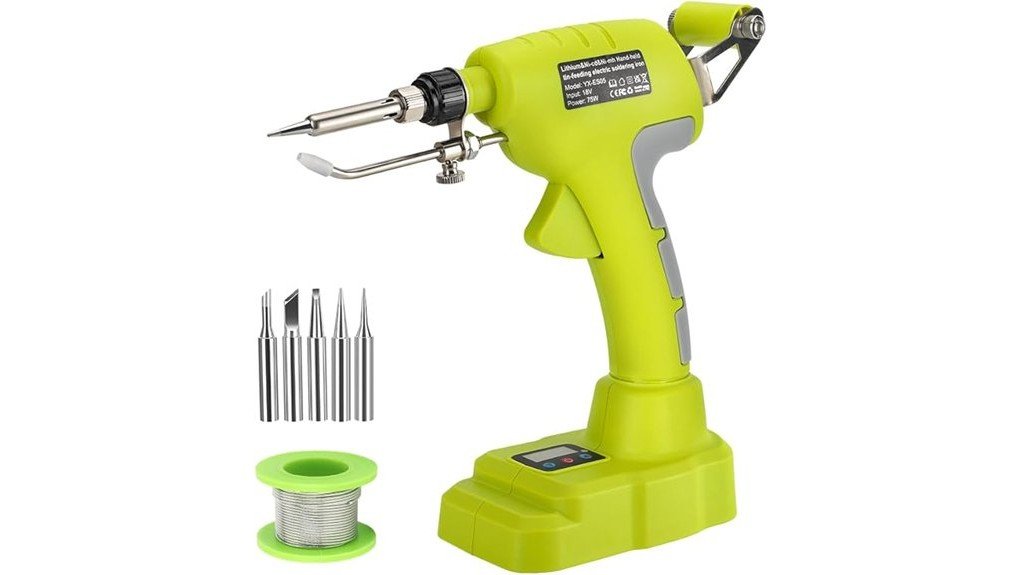
A cordless soldering iron can be useful when your repair is nowhere near a wall outlet, but portability means little if temperature control and tip choice are too limited. The Choerinton Soldering Iron combines Ryobi 18V battery compatibility, adjustable heat, a digital display, automatic solder feeding, and several tips in one portable tool. Its main appeal is convenience for electronics repairs, wiring, hobby projects, and occasional field work. The main tradeoff is that you need a compatible Ryobi battery, and this type of handheld tool is better suited to portable repair work than demanding bench production.
Quick Verdict
Verdict: Worth considering with caveats
Best For: Ryobi 18V battery owners who want a cordless soldering tool for electronics, wiring, hobbies, and mobile repairs.
Bottom Line: The Choerinton gives you a useful 200–460°C temperature range, digital control, automatic solder feeding, and five tips without tying you to an outlet. Its biggest limitation is battery-platform dependence, and it is not the strongest choice for continuous professional bench soldering.
| Specification | Detail |
|---|---|
| Brand | Choerinton |
| Product type | Cordless handheld soldering iron / soldering gun |
| Power | 75W |
| Temperature range | 200–460°C |
| Default start temperature | 350°C |
| Battery compatibility | Ryobi 18V ONE+ lithium-ion batteries |
| Battery included | No |
| Display | Digital temperature display |
| Solder feed | Handheld automatic-feed system |
| Supported solder wire | Approximately 0.03–0.04 inch diameter |
| Included tips | Five interchangeable soldering tips |
| Best use | Electronics repair, wiring, circuit boards, hobby work, jewelry work, and portable DIY repairs |
Key Takeaways
- The Choerinton is designed around Ryobi 18V ONE+ battery compatibility, so it makes the most sense if you already own that battery platform.
- Its 200–460°C adjustable temperature range gives you more control than a basic fixed-temperature cordless iron.
- The tool starts at a default setting of 350°C and uses a digital display for temperature monitoring and adjustment.
- An automatic solder-feed mechanism can free one hand during suitable wiring and repair jobs.
- Five interchangeable tips give you more flexibility for different soldering points and project sizes.
- The battery is not included, so buyers without compatible Ryobi batteries should factor that into the purchase decision.
What Is the Choerinton Soldering Iron?
The Choerinton is a 75W cordless soldering tool designed to run from compatible Ryobi 18V ONE+ lithium-ion batteries. Instead of connecting the iron to a wall outlet, you attach a compatible battery directly to the tool. This setup is useful when you need to solder in a garage, vehicle, workshop corner, outdoor work area, or another location where running an extension cord is inconvenient.
The tool combines adjustable temperature control with a digital display and automatic solder feeding. Its listed range of 200°C to 460°C covers many common electronics and DIY soldering temperatures, while the included five-tip set lets you choose a tip better suited to the size of the connection.
It is best viewed as a portable repair and hobby tool rather than a replacement for a temperature-controlled professional bench station. A bench station can provide a more stable work area and may be better for long sessions, but the Choerinton focuses on mobility and battery-platform convenience.
Who Should Buy It?
Best For
- Ryobi 18V ONE+ owners who already have batteries and a charger.
- DIY users who need a portable iron for wiring, electronics, circuit-board, or hobby repairs.
- People who value adjustable temperature and automatic solder feeding in a cordless design.
Skip If
- You do not own compatible Ryobi 18V batteries and do not want to join another battery platform.
- You need a dedicated bench station for long, repetitive, precision soldering sessions.
- You primarily work on applications requiring specialized high-power soldering or industrial equipment.
Before You Buy: The battery is not included. Confirm that your Ryobi 18V battery physically matches the supported ONE+ system before ordering, and do not assume batteries from unrelated brands will fit or operate safely.
Cordless Design and Battery Compatibility
The biggest reason to choose this iron is mobility. A conventional corded iron keeps you within reach of an outlet or extension cable. With the Choerinton, your working range is determined by the battery instead. That can make small electrical repairs, hobby projects, and field jobs easier to set up.
The tool is intended for Ryobi 18V ONE+ lithium-ion batteries. This is especially useful if you already use Ryobi drills, saws, lights, or other ONE+ tools because you can use a battery you already own instead of maintaining another charger and battery system.
The limitation is just as important. Battery compatibility is not universal. You should not force another manufacturer’s pack into the tool or use an improvised connection. A soldering iron draws meaningful power and produces high heat, so correct battery fit and safe electrical contact matter.
Heating Capabilities and Temperature Control
The Choerinton is rated at 75W and provides an adjustable 200–460°C temperature range. When started, its default setting is 350°C. You can then use the controls beside the digital display to raise or lower the selected temperature for the job.
This range is useful because soldering tasks do not all require the same heat. Small electronics work often benefits from controlled temperatures and short contact times, while larger connections may need additional heat to bring the joint to soldering temperature. The digital display makes the selected setting easier to track than a simple iron with no temperature readout.
Temperature settings are not a substitute for good technique. Using excessive heat can damage pads, insulation, components, or nearby plastic. A temperature that is too low can make the solder flow poorly and encourage you to hold the tip on the joint for too long.
Pro Tip: Start with the lowest practical temperature for your solder and joint, then increase it only when needed. Keep the tip clean and tinned because a dirty or oxidized tip transfers heat poorly even when the display shows a high temperature.
Automatic Solder Feed and Controls
One of the more unusual features is the automatic solder-feed system. The design is intended to feed compatible solder wire through the handheld tool, reducing the need to hold a separate strand of solder in your other hand during suitable jobs.
The supported wire diameter is approximately 0.03 to 0.04 inch. Using solder outside the intended range may affect how smoothly the feed mechanism works. Keep the feed path clean and load the wire according to the tool’s instructions rather than forcing it through the mechanism.
This feature can be especially convenient when you are working in a cramped location where one hand is already stabilizing the tool. However, traditional two-handed soldering may still offer more control for delicate circuit-board work, so the automatic feed should be treated as an option rather than a requirement for every joint.
Ease of Use and Tip Selection
The digital controls are straightforward. You power the tool on, monitor the temperature on the display, and use the adjustment buttons to change the setting. Cordless operation also removes the problem of a power cord pulling against your hand or catching on the edge of a workbench.
The kit includes five interchangeable soldering tips. Different tip shapes can change how much surface area contacts the workpiece, so having several options is more useful than relying on one general-purpose tip for every repair.
For a small joint, a narrower tip can help you work around neighboring components. For a larger wire or connector, a tip with more contact area can transfer heat more effectively. Always allow the iron to cool before changing a tip unless the manufacturer’s instructions specifically provide a safe hot-change procedure.
How It Performs in Real Use
Electronics and Circuit-Board Repairs
The adjustable heat range and tip selection make the Choerinton suitable for many basic electronics repairs. You can select a smaller tip for confined solder pads and use the digital control to avoid treating every component with the maximum temperature. Care is still required because prolonged contact can damage circuit-board pads and temperature-sensitive parts.
Wire and Connector Repairs
Cordless operation is particularly useful when repairing wires in a garage, workshop, or other location away from a convenient outlet. The automatic solder feed may also help when access is tight. The quality of the result still depends on clean conductors, suitable solder, proper mechanical preparation, and enough heat at the joint.
Jewelry and Hobby Projects
the listing also positions the tool for craft and jewelry-related soldering tasks. The five included tips give you flexibility for small hobby work, but you should make sure the solder, flux, temperature, and base material are appropriate for the specific project. Not every jewelry process uses the same type of soldering equipment.
Mobile and Outdoor Repairs
This is where the battery-powered design has a clear advantage. You can bring the tool to the job instead of bringing the job to a bench. Keep in mind that outdoor wind, cold surfaces, and larger metal parts can draw heat away from the joint and affect soldering performance.
Setup Tips Before First Use
- Confirm the battery: Use a compatible Ryobi 18V ONE+ battery that is in good condition.
- Choose the right tip: Match the contact area of the tip to the joint rather than automatically choosing the smallest tip.
- Load compatible solder: Use solder wire within the supported feed diameter if you plan to use the automatic-feed function.
- Tin the tip: A thin coating of solder helps protect the tip and improves heat transfer.
- Set an appropriate temperature: Do not begin every job at the maximum 460°C setting.
- Secure the workpiece: Use a suitable holder or stable work surface so you are not trying to hold the work and hot iron at the same time.
Compatibility and Safety
A soldering iron can reach temperatures high enough to cause serious burns and ignite heat-sensitive materials. Work on a stable, nonflammable surface, keep the hot tip away from battery packs and wiring insulation, and never leave a heated tool where someone can accidentally touch it.
Use suitable ventilation when soldering and follow the safety instructions for the solder and flux you choose. Wash your hands after handling solder and related materials. If you are working on powered electronics, vehicles, or mains-voltage equipment, disconnect energy sources and follow the proper service procedure before beginning work.
The Ryobi-compatible battery is also part of the safety equation. Inspect the battery and contacts for damage before use. Do not use damaged packs, makeshift adapters, or batteries that do not match the intended interface.
Pros and Cons
Pros
- Uses compatible Ryobi 18V ONE+ batteries for fully cordless operation.
- 75W output with a broad 200–460°C adjustment range.
- Digital display makes temperature settings easy to monitor.
- Automatic solder feeding can simplify certain one-handed repair situations.
- Five interchangeable tips provide useful flexibility for different joint sizes.
Cons
- Battery is not included, which reduces the value if you do not already own Ryobi 18V packs.
- Battery compatibility is limited rather than universal.
- A dedicated soldering station may be better for long professional bench sessions and very delicate repetitive work.
Is It Worth the Price?
The Choerinton offers the strongest value to someone who already owns Ryobi 18V batteries. In that situation, you are buying the soldering tool rather than adding another battery and charger system, and you gain adjustable temperature, a digital display, automatic feed, and multiple tips in one portable setup.
For occasional DIY work, mobile electrical repairs, and hobby use, that combination makes it worth considering. The value is less convincing for someone starting with no Ryobi batteries because the battery cost becomes part of the overall purchase.
It is also not the best fit if your main priority is a permanent electronics bench. A quality corded or rechargeable soldering station can provide a more stable holder, dedicated controls, and a layout better suited to long sessions.
How It Compares to Alternatives
Other cordless irons run on AA batteries or their own rechargeable pack and may suit lighter portable electronics work, so compare power, battery type and included tips on each listing before you choose.
The Choerinton makes more sense when you want the listed 75W output, adjustable 200–460°C temperature control, automatic solder feeding, and use of batteries you already own in the Ryobi 18V ecosystem.
Related guides: compare the auto-feed soldering iron kit, or the TI-SMART 60W soldering iron kit, both mains-powered options.
Frequently Asked Questions
What battery does the Choerinton Soldering Iron use?
It is designed for compatible Ryobi 18V ONE+ lithium-ion batteries. The battery is not included with the tool, so it offers the best value if you already own batteries from that platform.
What temperature range does it provide?
The adjustable range is 200–460°C, with a default starting setting of 350°C. You can raise or lower the setting using the controls next to the digital display.
Does it automatically feed solder wire?
Yes. The handheld design includes an automatic-feed mechanism for compatible solder wire. The listed wire diameter is approximately 0.03–0.04 inch, so using the proper size is important for reliable feeding.
How many soldering tips are included?
The kit is listed with five interchangeable soldering tips. Having several tip shapes lets you choose a contact area that better matches small circuit-board joints, wires, connectors, or hobby work.
Can I use batteries from another brand?
You should use the battery system the tool is designed to accept. Do not force another manufacturer’s battery into the connection or use an improvised adapter unless the manufacturer specifically approves that setup.
Is it suitable for professional soldering?
It can be useful for mobile repairs and occasional professional service work where cordless operation matters. For continuous precision bench soldering, a dedicated temperature-controlled station may offer a better working setup and more specialized accessories.
Who should skip this soldering iron?
It is a weaker fit if you have no Ryobi 18V batteries, need an all-day bench station, or regularly perform specialized heavy soldering. In those situations, compare the total battery cost and the advantages of a dedicated soldering station before buying.
The Bottom Line
The Choerinton Soldering Iron is a practical choice for Ryobi 18V battery owners who want cordless mobility, 75W power, adjustable 200–460°C heat, automatic solder feeding, and multiple tips in one tool. Its main limitation is that the battery is not included and the Ryobi-focused design reduces its appeal if you use a different battery platform.
For portable DIY repairs, wiring, electronics, and hobby work, it is worth considering. Buyers who spend most of their time at a permanent electronics bench may be better served by a dedicated soldering station.