Disclosure: As an Amazon Associate, we earn from qualifying purchases. If you click a link on this page and make a purchase, we may receive a small commission at no extra cost to you.
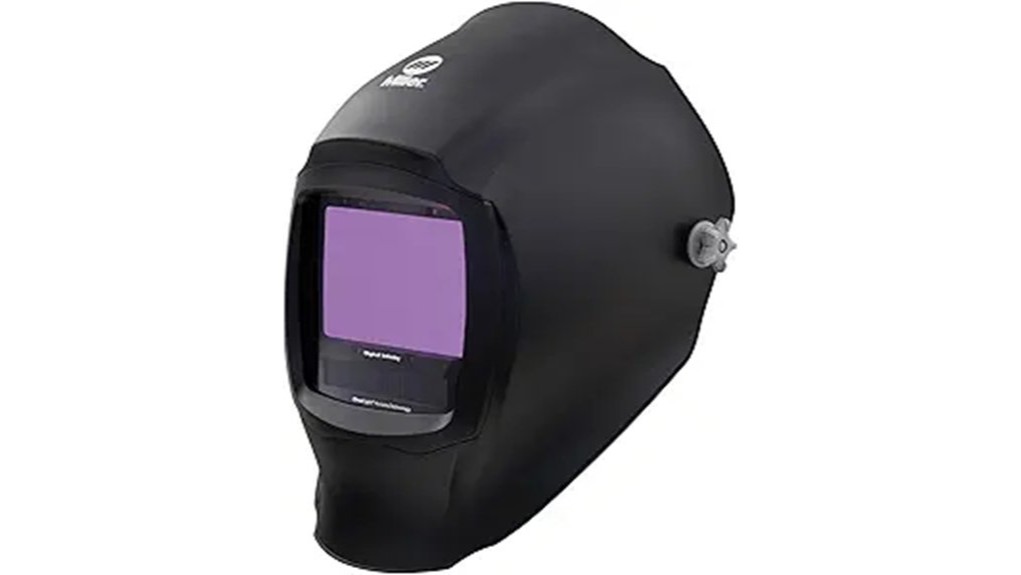
A narrow viewing window can make fit-up, tack placement, and long seams feel harder than they should. The Miller Digital Infinity™ Black, ClearLight™ 4x, part #296786 addresses that problem with a 13.4-square-inch auto-darkening viewing area, four arc sensors, and a brighter 2.5 light state. This review explains how its optics, controls, headgear, operating modes, and safety limits affect real welding work. It is a strong premium choice for frequent welders, but its 21.4-ounce weight and higher-end feature set may be unnecessary for occasional projects.
Quick Verdict
Rating: 9.0/10, recommended with caveats
Best For: Fabricators, shop welders, and serious hobbyists who want a wide view and repeatable digital settings.
Bottom Line: The Digital Infinity gives you an unusually large viewing field, ClearLight 4x optics, and useful modes for welding, cutting, and grinding. The tradeoff is a heavier, premium helmet that offers less value if you weld only a few times per year.
Key Takeaways
- The 13.4-square-inch viewing field gives you more surrounding context during fit-up, positioning, and bead placement.
- ClearLight 4x optics, HDV Technology, and a 2.5 light state are designed to show the workpiece, wire, and puddle with more natural color and detail.
- Four modes cover Weld, Cut, Grind, and X-Mode, while four sensors support low-amp and partially obstructed work.
- Legacy Headgear, sensitivity and delay controls, half-shade settings, and two memory presets make the helmet easier to tune for repeated jobs.
- The main drawbacks are its 21.4-ounce weight, premium positioning, and the need to protect the large cover lens from scratches and spatter.
Key Specifications at a Glance
| Specification | Detail |
|---|---|
| Brand | Miller |
| Model | Digital Infinity™ Black, ClearLight™ 4x |
| Part number | 296786 |
| Product type | Auto-darkening welding helmet |
| Viewing area | 13.4 sq. in. |
| Light state | Shade 2.5 |
| Variable shades | Weld 8–13; Cut 5–8 |
| Operating modes | Weld, Cut, Grind, and X-Mode |
| Arc sensors | Four independent sensors |
| Reaction time | 1/25,000 second |
| Shell material | Nylon |
| Helmet weight | 21.4 oz |
| Controls | Digital shade, sensitivity, delay, AutoSense, half-shade settings, and two memory presets |
| Included items | Helmet bag, two inside cover lenses, five outside HDV cover lenses, and clip-on top comfort cushion |
| Warranty | Four years from purchase, subject to Miller’s warranty terms and proof-of-purchase requirements |
| Best use | Frequent shop work, detailed fabrication, outdoor welding, cutting, and grinding |
What Is the Miller Digital Infinity?
The Miller Digital Infinity 296786 is a black, auto-darkening welding helmet built around the company’s largest viewing area. Its 13.4-square-inch lens is paired with ClearLight 4x and HDV Technology, which are designed to improve color, detail, and clarity across the lens.
This model is aimed at detail-focused welders who spend enough time under the hood to benefit from digital controls, four operating modes, four sensors, arc tracking, and saved settings. It is not a basic fixed-shade hood or a stripped-down entry-level auto-darkening helmet.
Who Should Buy It?
Best For
- Fabricators who want more side-to-side and vertical context during fit-up and long seams.
- Welders who move among welding, cutting, and grinding during the same shift.
- Professionals and serious hobbyists who reuse specific shade, delay, and sensitivity settings.
Skip If
- You want the lightest Miller helmet and do not need a 13.4-square-inch view.
- You weld only occasionally and would not use InfoTrack, memory presets, or X-Mode.
- You prefer simple analog controls with fewer settings to manage.
Before You Buy: This helmet weighs 21.4 ounces. The Legacy Headgear helps distribute that weight, but buyers who are sensitive to neck strain should compare it with a lighter model and check the fit before committing.
Viewing Area and ClearLight 4x Clarity
The 13.4-square-inch viewing area is the main reason to choose the Digital Infinity over a smaller helmet. You can see more of the joint, nearby clamps, torch position, and surrounding work without moving your head as much. That wider context is especially useful during fit-up, out-of-position work, and long passes.
ClearLight 4x allows a broader range of colors through the lens than traditional green-tinted optics. Miller pairs it with a 2.5 light state and HDV Technology, so the workpiece remains easier to inspect before the arc starts and the image stays detailed when your viewing angle changes.
The large lens does create a practical ownership cost. Its outside cover lens has more surface area to collect spatter and scratches, so keeping replacement covers nearby matters if you work in a busy fabrication shop.
Weld, Cut, Grind, and X-Mode
The helmet gives you four dedicated modes instead of forcing one sensitivity range to handle every task. Weld mode covers most arc-welding work with shades 8 through 13. Cut mode provides shades 5 through 8, while Grind mode keeps the lens in a light state for metal preparation.
X-Mode senses the weld electromagnetically. It is useful outdoors, where bright sunlight can interfere with optical sensors, and during low-current or obstructed work where one or more sensors may not have a clear line to the arc. Four independent arc sensors provide another layer of detection support.
Grind mode is convenient, but you still need to confirm the selected mode before striking an arc. The helmet’s indicator helps, yet a deliberate pre-weld check remains the safest habit.
Digital Controls, AutoSense, and InfoTrack 2.0
Large push buttons let you adjust mode, shade, sensitivity, and delay without relying on small analog dials. Half-shade settings give you finer control when a full shade step feels too bright or too dark, and the two memory positions let you save repeatable setups for common jobs.
AutoSense can set sensitivity based on the welding environment. This reduces setup time when shop lighting, amperage, or work position changes. It does not remove the need to test the lens and confirm that it darkens correctly before welding.
InfoTrack 2.0 records arc time and arc count. That data can help you compare active welding time with setup time, estimate repeat work, or document how often the arc was started during a job. It is useful for production and quoting, but casual users may rarely open it.
Legacy Headgear, Fit, and Comfort
Legacy Headgear is adjustable for crown depth, tightness, helmet angle, and the distance between your face and the lens. Those adjustments matter because a balanced helmet feels lighter than one that sits too far forward or presses unevenly on your head.
The 21.4-ounce weight is reasonable for a feature-heavy helmet with a large lens, but it is not especially light. For all-day use, take time to center the headgear, match both side adjustments, and set the pivot tension so the shell lowers smoothly without dropping.
Safety glasses can fit under the helmet when the face-to-lens distance is set correctly. If you use prescription glasses or an optional magnifying lens, check clearance through the full up-and-down motion before welding.
Pro Tip: Save one memory preset for your most common indoor process and the second for outdoor or low-amp work. You will still need to verify the shade, sensitivity, and delay for the actual job, but the presets give you a faster starting point.
Included Accessories and Ongoing Maintenance
Miller includes a helmet bag, two inside cover lenses, five outside HDV cover lenses, and a clip-on top comfort cushion. The extra outside covers are useful because the large front lens is exposed to grinding dust, spatter, and scratches.
The quick-release cover lens design makes routine replacement easier. Clean the cover lenses with a soft cloth and mild soap-and-water solution, then let them air dry. Do not use solvents, abrasive cleaners, or immerse the auto-darkening lens in water.
Keep the sensors clear and replace scratched, cracked, or pitted cover lenses promptly. The helmet’s owner manual also advises removing the batteries for storage longer than six months. For official care, setup, and parts guidance, review the Miller Digital Infinity owner’s manual.
How It Performs in Real Use
Shop Fabrication and Fit-Up
The wide lens helps you keep the joint, torch, filler, and nearby fixtures in view. This is the Digital Infinity’s clearest advantage over smaller hoods, especially when you are moving between tacks or checking alignment without raising the helmet.
Outdoor Welding
X-Mode is designed for bright conditions where sunlight may confuse standard optical sensing. It also continues to detect the arc when the front sensors are partly blocked, which can help when your work angle or position is awkward.
Low-Amp TIG and Obstructed Work
Four sensors, sensitivity control, and X-Mode give you several ways to improve response at low amperage. You should still run a test strike and stop immediately if the lens fails to darken, flickers, or behaves inconsistently.
Cutting and Grinding
Dedicated Cut and Grind modes reduce helmet changes during prep and finishing. The main risk is user error, so confirm the mode indicator before returning to welding and never assume the lens has switched itself back.
Setup Tips Before First Use
- Inspect the shell and lenses: Do not use the helmet if the shell, auto-darkening lens, or cover lenses are cracked, deeply scratched, or incorrectly installed.
- Adjust the headgear: Set crown depth, tightness, angle, and face distance so the viewing field is centered and the helmet feels balanced.
- Select the correct mode and shade: Follow Miller’s manual and the applicable shade guidance for your process and amperage. You can also review this plain-English guide to adjustable welding shades.
- Test the lens response: Confirm that the lens turns on and darkens before beginning the job.
- Set sensitivity and delay: Increase sensitivity for low-current work when needed, and adjust delay to match the brightness and afterglow of the process.
- Check mode after grinding: Grind mode does not provide a welding shade. Switch back and verify the setting before striking an arc.
Safety and Compatibility Notes
The Digital Infinity is intended for welding, cutting, and related grinding applications. Miller states that it is not for laser welding or laser cutting, and the helmet does not replace a hard hat or protect against falling objects. Use approved safety glasses with side shields under the helmet and add hearing, respiratory, skin, and body protection required for the job.
The owner manual also warns that the helmet is not rated for direct overhead welding unless additional precautions protect you from arc rays, spatter, and other hazards. Stop welding immediately if the lens does not darken when the arc starts. For broader eye-protection guidance, see OSHA’s welding eye-protection fact sheet.
Miller lists compatibility with optional magnifying-lens and hard-hat adapters, but those accessories are separate. Confirm the exact adapter and helmet combination before purchase rather than assuming every Miller accessory fits every shell.
Pros and Cons
Pros
- Large 13.4-square-inch viewing area improves surrounding awareness.
- ClearLight 4x, HDV Technology, and a 2.5 light state support a detailed, more natural view.
- Weld, Cut, Grind, and X-Mode cover a broad range of shop tasks.
- Four sensors, AutoSense, half-shade control, and two memory presets add useful adjustment range.
- Includes a helmet bag, seven replacement cover lenses, and a top comfort cushion.
Cons
- The 21.4-ounce weight is heavier than Miller’s smaller Digital Elite.
- Premium features add cost and complexity that occasional welders may not use.
- The large cover lens needs regular cleaning and replacement in dirty or high-spatter work.
Price and availability can change on Amazon.
Is It Worth the Price?
The Digital Infinity sits in the premium tier of auto-darkening welding helmets. Its value comes from the combination of the 13.4-square-inch view, ClearLight 4x optics, X-Mode, four sensors, digital adjustment, arc tracking, and all-day headgear rather than from one feature alone.
It is worth considering if you weld often enough to benefit from better visibility and repeatable settings. It is not the best fit if you need a basic helmet for occasional repairs, or if low weight matters more than the widest possible Miller viewing area.
How It Compares to Alternatives
The Miller Digital Elite ClearLight 4x uses a smaller 9.2-square-inch viewing field and weighs 17.5 ounces, so it makes more sense when you want similar Miller controls in a lighter shell. The Digital Infinity is the better Miller option when maximum viewing area is the priority.
The Lincoln Electric VIKING 3350 ADV is a strong alternative if you prefer Lincoln’s 4C lens platform and an 11.8-square-inch viewing area. The ESAB Sentinel A60 is worth comparing if you prefer its low-profile shell, external grind control, and 4.65-by-2.80-inch viewing window.
Frequently Asked Questions
Is the Miller Digital Infinity 296786 the ClearLight 4x version?
Yes. Part #296786 is the black Digital Infinity model with ClearLight 4x optics. Confirm the part number on the listing and packaging because older Digital Infinity versions may use earlier lens technology.
How large is the viewing area?
The viewing field is 13.4 square inches. That extra area helps you see more of the joint and surrounding work than you can through Miller’s smaller Digital Elite or Digital Performance lenses.
Can you use it for TIG, MIG, stick welding, cutting, and grinding?
The helmet supports Weld, Cut, Grind, and X-Mode and is listed for low-amp TIG use. Choose the correct mode and shade for the process, then test the lens response before beginning work.
What does X-Mode do?
X-Mode detects the electromagnetic field created by the weld. It can reduce sunlight interference outdoors and maintain detection when optical sensors are partly blocked.
Is the helmet comfortable with glasses?
It can work with safety or prescription glasses when you adjust the face-to-lens distance correctly. Check for frame pressure and full helmet movement before welding, and always wear approved safety glasses with side shields underneath.
How long does the auto-darkening lens last?
Miller does not give the helmet a fixed expiration date. You can continue using it while the shell remains undamaged and the lens switches normally, but scratched, cracked, pitted, or malfunctioning parts require immediate replacement.
What comes with the helmet?
Miller lists a helmet bag, two inside cover lenses, five outside HDV cover lenses, and a clip-on top comfort cushion. Check the seller’s package description before ordering in case the listing is a return, open-box unit, or different bundle.
What is the warranty?
Miller’s helmet manual states a four-year warranty from the purchase date for the auto-darkening lens helmet. Keep your original invoice or receipt and review the current warranty terms for exclusions and claim instructions.
The Bottom Line
The Miller Digital Infinity 296786 is a strong fit for frequent welders who want the broadest Miller viewing area, ClearLight 4x optics, X-Mode, and repeatable digital controls. Skip it if your main priorities are low cost, minimal weight, or very simple operation. Its biggest strength is the 13.4-square-inch view, while its main limitation is the added weight and expense that come with a premium, feature-rich helmet.
Ready to Buy?
Check the latest price, seller, package contents, and product details before you decide.