Disclosure: As an Amazon Associate, we earn from qualifying purchases. If you click a link on this page and make a purchase, we may receive a small commission at no extra cost to you.
Choosing a soldering kit can be tricky because the right tool needs to heat quickly, hold a steady temperature, and feel safe enough for longer repair sessions. The 90W LED Digital Soldering Iron Kit reviewed here is built around fast heat-up, adjustable temperature control, and a compact accessory set for common electronics and craft work. Its biggest strength is flexibility, especially if you work on circuit boards, small repairs, stained glass, or jewelry projects. Its main limitation is verification: the available product details do not confirm brand, dimensions, weight, warranty, or specific safety certifications, so you should check the live Amazon listing and packaging before buying.
Quick Verdict
Rating: 8.4/10
Best For: hobby electronics users, DIY repairers, beginners who want adjustable heat, and makers who need several tip options.
Bottom Line: This soldering kit is worth considering if you want a 90W iron with a 15-second heat-up time, LED temperature display, and five interchangeable tips. Skip it if you need a verified professional-grade station with published dimensions, warranty terms, and listed safety certifications.
| Specification | Detail |
|---|---|
| Product type | LED digital soldering iron kit |
| Power | 90W |
| Temperature range | 180 to 480°C (356 to 896°F) |
| Heat-up time | About 15 seconds |
| Display | LED temperature display |
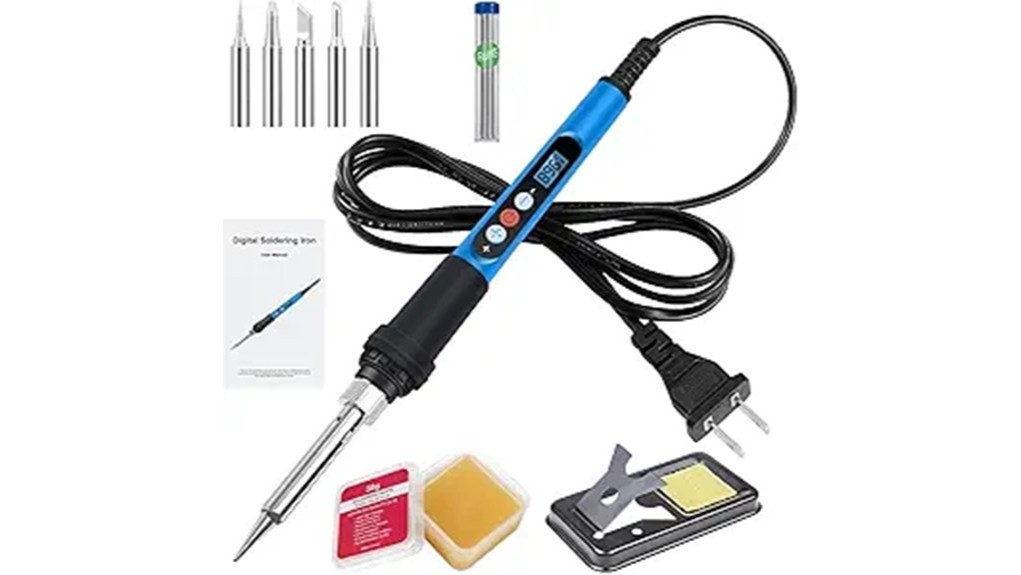
| Included tips | Five interchangeable soldering tips |
| Accessory set | 10-in-1 tool set |
| Safety features | Upgraded steel tube design, heat ventilation holes, cool-handle design, and automatic sleep mode |
| Best use | PCB work, circuit board soldering, home appliance repair, phone and computer repair, stained glass, and jewelry projects |
| Verification note | Brand, exact dimensions, weight, warranty, and certification details were not confirmed in the available product details. |
What Is the 90W LED Digital Soldering Iron Kit?
The 90W LED Digital Soldering Iron Kit is a plug-in soldering tool set designed for small electronics, repair, and craft tasks. The main iron uses an LED temperature display so you can check the selected heat level without guessing. The temperature range runs from 180 to 480°C, which gives you more control than a fixed-temperature pencil iron.
The kit includes five interchangeable tips and a 10-in-1 tool set, so it is made for more than one type of job. You can use a finer tip for circuit board work and a broader tip for tasks that need more surface contact. That versatility makes it useful for beginners who are learning basic technique and for hobby users who work on different materials.
Before You Buy: This kit is a heated electrical tool, not a toy. Confirm the live listing, package contents, voltage details, replacement tip compatibility, and any safety markings before you buy, especially if you need it for school, workplace, or professional use.
Who Should Buy It?
Best For
- DIY users who want adjustable heat for electronics, small repairs, and craft projects.
- Beginners who want a visible LED temperature display instead of guessing the heat setting.
- Hobbyists who need several tip shapes for PCB work, wire soldering, stained glass, or jewelry tasks.
Skip If
- You need a full soldering station with a separate base, holder, and verified professional specifications.
- You require published certification, warranty, weight, and dimension details before buying.
- You mainly work on heavy-gauge automotive wiring or large metal parts that may need higher-capacity equipment.
Key Features and Specifications
Fast 15-Second Heat-Up
The strongest everyday feature is the 15-second heat-up time. Faster heating helps when you need to make quick repairs or move between small solder joints without waiting for the tool to catch up. It can also make short bench sessions easier because you spend more time working and less time watching the iron warm up.
Adjustable 180 to 480°C Temperature Range
The adjustable range of 180 to 480°C gives you room to match the heat to the job. Lower settings can be useful for delicate electronics, while higher settings may help with larger joints or materials that draw heat away quickly. You should still start low, test on scrap material when possible, and raise the temperature only when the solder joint needs it.
LED Temperature Display
The LED display gives you a clear way to monitor the selected temperature. This is helpful if you switch between tip sizes or materials because you can return to a setting that worked well before. For beginners, the display can also reduce the guesswork that comes with basic pencil-style irons.
Five Interchangeable Tips
The five included tips make the kit more flexible than a single-tip iron. A fine tip helps with small circuit board points, while broader tips can help transfer heat across a wider joint. Tip choice matters because the wrong tip can make soldering harder, even when the iron has enough power.
10-in-1 Tool Set
The included 10-in-1 tool set adds value for users who do not already have basic soldering accessories. It can help you start small electronics and craft tasks without buying every item separately. The exact accessory mix should still be checked on the live Amazon listing before purchase, since package contents can vary by seller or listing update.
Performance and Usability
In daily use, the 90W power rating and fast heat-up time are the main reasons to consider this kit. A higher-powered iron can recover heat more quickly after touching a joint, which helps you avoid holding the tip in place for too long. That matters on circuit boards because too much heat time can damage pads, insulation, or nearby components.
The ergonomic design and cool-handle focus are also useful for longer sessions. A handle that stays more comfortable can reduce hand fatigue when you are repairing several wires or practicing multiple joints. Even with a cool-handle design, you should treat the metal shaft and tip as hot any time the iron is plugged in or recently used.
Automatic sleep mode adds a helpful safety layer if you pause during a project. It should not replace safe habits, though. Turn the iron off when you are done, unplug it before leaving the work area, and let the tip cool fully before storage.
Pro Tip: Match the tip to the joint before raising the temperature. A better tip shape often solves slow solder flow without forcing you to use the highest heat setting.
Applications and Versatility
This soldering kit is best for smaller repair and maker tasks. It is suitable for circuit board soldering, PCB assembly, home appliance repairs, phone and computer fixes, stained glass, jewelry making, and other hands-on projects where controlled heat and tip choice matter.
The kit is especially useful when you move between different task types. You might use a fine tip for a small electronics board, then switch to another tip for a wire repair or craft project. That flexibility is the main advantage over a basic fixed-temperature iron with one permanent tip.
For automotive use, keep expectations realistic. The kit may help with light electrical repairs, small wire joints, and electronics work, but it is not the right choice for structural metal work, battery cable repairs, or heavy-gauge wiring that requires specialized tools and proper safety procedures.
How It Performs in Real Use
For PCB and Circuit Board Work
The LED display, adjustable heat, and fine-tip options make the kit useful for circuit board practice and small PCB repairs. The key is to use the lowest effective heat, keep the tip clean, and avoid holding the tip on the board longer than needed.
For Home Appliance and Electronics Repair
For small appliance, phone, computer, or electronics repairs, the fast heat-up time helps when you only need a few quick solder joints. The 90W rating should give the iron enough recovery for many common small repairs, but you still need the right solder, flux, and technique for a clean joint.
For Creative Projects
For stained glass, jewelry, and craft work, the interchangeable tips give you more control over contact area and solder flow. Creative projects often involve repeated joints, so handle comfort and ventilation become more important during longer sessions.
For Beginners and Practice Sessions
Beginners benefit from the display and adjustable range because they can see how heat changes the soldering result. Practice on scrap wire or spare boards before working on anything valuable. This helps you learn how quickly solder flows and how much heat each tip transfers.
Setup Tips Before First Use
- Read the included instructions first. Confirm the correct voltage, safe operating steps, and any warnings on the package or manual.
- Use a stable stand or safe resting point. Never place a hot tip directly on a desk, fabric, plastic, or paper.
- Start with a moderate temperature. Increase heat only if the solder does not flow after the joint and tip are clean.
- Tin the tip before work. A thin layer of solder helps heat transfer and protects the tip surface.
- Clean the tip during use. Oxidation and old solder can make even a powerful iron feel weak.
- Let the iron cool before changing tips. Handle tips only when the tool is off, unplugged, and cool enough to touch safely.
Safety and Maintenance Notes
Soldering creates heat, fumes, and burn risk, so your setup matters. Work in a well-ventilated area, keep flammable items away from the hot tip, and use eye protection when clipping wire or working near small parts. Keep children and pets away from the workspace while the iron is heating, in use, or cooling down.
The upgraded steel tube design, ventilation holes, cool-handle design, and automatic sleep mode all help make the kit easier to manage. They do not remove the need for careful handling. A soldering iron can remain hot after you unplug it, so allow enough cooling time before packing it away.
For maintenance, keep the tip clean, tin it before storage, and avoid scraping it with hard tools that can damage the coating. If performance drops, check whether the tip is oxidized, loose, worn, or the wrong shape for the job. Replacement tips may be available, but you should confirm compatibility with this specific kit before ordering extras.
Pros and Cons
Pros
- 90W power rating supports faster heat recovery for many small soldering tasks.
- 15-second heat-up time helps you start projects quickly.
- 180 to 480°C temperature range gives you more control across different materials.
- LED display makes temperature settings easier to check at a glance.
- Five interchangeable tips and a 10-in-1 tool set add flexibility for electronics, repairs, and crafts.
Cons
- Brand, exact dimensions, weight, warranty, and certification details were not confirmed in the available product details.
- Not a full soldering station with a separate base and professional bench controls.
- Tip replacement requires compatibility checking before you buy extra tips.
Is It Worth the Price?
This kit looks like a strong value for the price if you need adjustable temperature control, fast heat-up, and multiple tips in one package. It is a smart buy for everyday use when your projects include small electronics, circuit boards, light repairs, and maker work.
The best value goes to buyers who do not already own a full accessory setup. The 10-in-1 tool set and five tips can reduce the need for separate starter purchases. The tradeoff is that the available product details do not confirm every spec a professional buyer may want, such as exact size, weight, certifications, or warranty terms.
How It Compares to Alternatives
Compared with a basic fixed-temperature pencil iron, this kit gives you more control because it has an LED display and an adjustable 180 to 480°C range. That makes it better for users who switch between delicate electronics and larger joints.
Compared with a full soldering station, this kit is more compact and beginner-friendly, but it may not offer the same bench stability, holder design, or professional controls. Compared with portable USB-style soldering tools, it is better for users who want a plug-in kit with a higher listed power rating and included accessories.
Frequently Asked Questions
Can I use this soldering kit for circuit boards?
Yes, the kit is suitable for PCB and circuit board work when you use the right tip and temperature. Start with a lower heat setting, keep the tip clean, and avoid applying heat to the board longer than needed.
Is the 180 to 480°C temperature range useful?
Yes, the range gives you flexibility for different materials and joint sizes. Lower settings help with delicate work, while higher settings may help when a joint needs more heat transfer.
Can I use this kit for automotive repairs?
You can use it for light automotive electrical tasks, small wire joints, or electronics work if the job matches the tool and your skill level. Do not use it for heavy-gauge cables, battery wiring, safety-critical circuits, or structural repairs unless you have the right training and equipment.
Does automatic sleep mode make it safe to leave plugged in?
No. Automatic sleep mode is a helpful safety feature, but you should still turn the iron off and unplug it when you are finished. Always let the tip cool before storage.
Are replacement tips easy to buy?
The kit uses interchangeable tips, but replacement compatibility should be checked before buying extra tips. Match the tip style and size to this specific kit rather than assuming all generic tips will fit.
What safety certifications does this soldering iron have?
The available product details do not confirm a specific safety certification. Check the live Amazon listing, product packaging, and manual for safety marks before using it in a school, workplace, or professional setting.
How long can the soldering iron last with regular use?
Lifespan depends on how often you use it, how well you clean the tip, and whether you store it safely. Keeping the tip tinned, avoiding overheating, and using the right tip for the job can help extend service life.
Who should skip this soldering kit?
Skip it if you need a verified professional soldering station, confirmed certification details, or published warranty terms before purchase. You should also skip it for heavy-duty soldering jobs that need specialized equipment.
The Bottom Line
The 90W LED Digital Soldering Iron Kit is recommended with caveats for DIY users who want fast heat-up, adjustable temperature control, an LED display, and multiple tips in one kit. Its main strength is versatility for electronics, repairs, and craft projects, while its main limitation is the lack of verified brand, warranty, size, weight, and certification details in the available product information. If you want a compact starter-friendly kit and will confirm the live listing details before purchase, it is worth considering.