Disclosure: As an Amazon Associate, we earn from qualifying purchases. If you click a link on this page and make a purchase, we may receive a small commission at no extra cost to you.
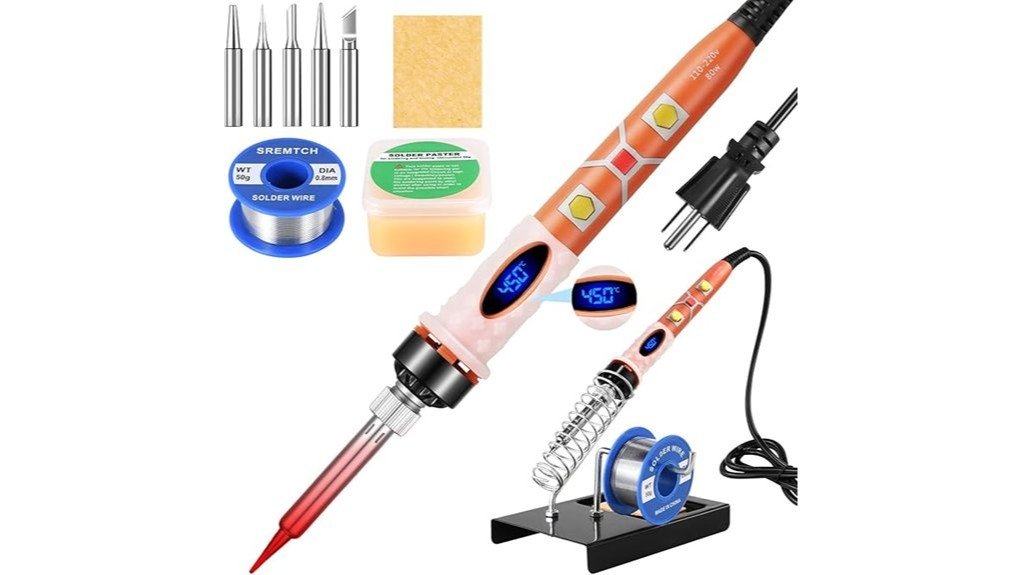
A basic soldering iron can become frustrating when it heats slowly or gives you no control over tip temperature. This 80W LCD Soldering Iron Kit aims to solve both problems with a 200 to 450°C adjustable range, a digital temperature display, and an inner-heated ceramic core described as reaching working temperature in about 30 seconds. You also get five interchangeable tips, which makes the kit more flexible for circuit boards, DIY repairs, jewelry work, and other small soldering jobs. Its main tradeoff is that it remains a compact hand-held kit rather than a full soldering station, so buyers who need heavy daily bench use may want a more robust setup.
Quick Verdict
Rating: Recommended with caveats
Best For: Hobby electronics, DIY repairs, small bench projects, and buyers who want temperature control without a large station.
Bottom Line: The adjustable 200 to 450°C range, LCD display, 80W power, and five tips give you useful control for many small soldering tasks. The compact format is convenient, but frequent professional users may prefer a dedicated soldering station with a heavier bench setup.
Key Takeaways
- Adjustable temperature: You can set the iron from 200 to 450°C for different soldering jobs and materials.
- Fast warm-up: The article describes an inner-heated ceramic core that reaches working temperature in about 30 seconds.
- 80W, 110V design: The supplied specifications list 80W power and 110V operation.
- Clear controls: An LCD screen, “+” and “−” buttons, an On/Off switch, and a working indicator make basic adjustments easy to see and manage.
- Five replaceable tips: Different tip shapes give you more flexibility for circuit boards, general repairs, jewelry work, and similar small projects.
- Compact kit format: At a listed weight of 0.9 pounds (14.4 ounces), the kit is easy to store or carry compared with a larger bench station.
Product Features and Specifications
| Specification | Detail |
|---|---|
| Product type | Digital adjustable-temperature soldering iron kit |
| Power | 80W |
| Voltage | 110V |
| Temperature range | 200 to 450°C |
| Heating technology | Inner-heated ceramic core |
| Claimed heat-up time | About 30 seconds |
| Display | High-definition LCD temperature display |
| Controls | “+” and “−” temperature buttons, On/Off switch, working indicator light |
| Tip count | Five interchangeable tip shapes |
| Listed weight | 0.9 pounds (14.4 ounces) |
| Included accessory noted in article | Rosin paste flux, plus other basic kit accessories |
| Typical uses | Electronics, DIY projects, jewelry work, guitar repairs, and general small soldering tasks |
What Is the Soldering Iron Kit?
This is a corded 80W soldering iron kit built around adjustable digital temperature control. Instead of relying on a fixed heat level, you can use the “+” and “−” controls to work within a 200 to 450°C range while the LCD shows the selected or current temperature status.
The kit is aimed at buyers who want one compact tool for more than a single type of task. The five interchangeable tips let you choose a tip shape that better matches the joint, component, wire, or small repair in front of you. The supplied article also lists rosin paste flux among the included accessories, which supports basic soldering work without requiring you to assemble every small item separately.
Who Should Buy It?
Best For
- DIY users who want adjustable heat for several types of small repair work.
- Electronics hobbyists who need a compact iron with an LCD temperature display.
- Occasional bench users who value portability and multiple tip shapes more than a full station setup.
Skip If
- You need a heavy-duty soldering station for long, daily professional sessions.
- You need a tool for unsupervised use by children or inexperienced users.
- You require a specific brand, certification, or long warranty that is not established in the supplied article.
Before You Buy: The article states that safety glasses are not included. You should plan to provide proper eye protection, keep the hot tip away from flammable materials, and work with suitable ventilation.
Performance and Usability
Temperature Control and LCD Display
The 200 to 450°C adjustment range is the feature that makes this kit more flexible than a simple fixed-temperature iron. Lower settings can help when a job needs more restraint, while the upper end gives you additional heat for joints that draw heat away from the tip. You still need to choose a suitable temperature for the solder, component, and workpiece instead of assuming hotter is always better.
The LCD screen gives you a clear temperature reference, and the “+” and “−” buttons keep adjustment straightforward. An On/Off switch and working indicator also make the tool easier to manage at the bench because you do not have to rely only on unplugging the cord to control power.
Heating Speed and 80W Output
The supplied article describes an 80W inner-heated ceramic core that reaches operating temperature in about 30 seconds. That short wait is useful when you are making a quick repair, changing between tasks, or working in short sessions where a slow warm-up becomes annoying.
Power alone does not guarantee a good joint. Tip condition, tip size, temperature choice, surface preparation, and contact time still matter. The 80W rating is best viewed as available heating capacity, while the adjustable temperature controls how you apply that heat.
Five Interchangeable Tips
Five tip shapes give you more options than a single general-purpose tip. A narrower tip can help you reach small joints, while a broader contact area can transfer heat more effectively on larger connections. The article confirms that the tips are replaceable, so you can change the installed shape to suit the task instead of forcing one tip to do everything.
Tip maintenance is important. Clean the tip after use and keep it properly tinned so heat transfers efficiently. A dirty or oxidized tip can make even a powerful iron feel weak because the heat is not reaching the joint effectively.
Portability and Handling
At a listed 0.9 pounds, or 14.4 ounces, the kit is easy to store and move compared with a larger soldering station. That can matter if you work in different rooms, carry tools to hobby projects, or only solder occasionally and do not want permanent bench equipment.
The tradeoff is the same one that applies to many compact irons: you get a smaller footprint, but not the desk-mounted holder, separate control unit, or heavier-duty work layout of a full station.
Applications and Versatility
The article positions this kit for electronic circuit boards, DIY work, jewelry crafting, guitar repairs, and similar small soldering jobs. Its adjustable range and five tip shapes let you match heat and tip contact more closely to the joint instead of treating every project the same way.
Pro Tip: Start with the lowest temperature that reliably melts and flows your solder for the specific joint, then increase heat only as needed. Keep the tip clean and tinned to improve heat transfer and reduce the urge to use excessive temperature.
How It Performs in Real Use
For Small Electronics Repairs
The adjustable heat and LCD display are the strongest features for circuit-board work. You can see the temperature setting and change it for smaller or larger joints. The five tip shapes also give you options when access is tight. Care still matters because too much heat or too much contact time can damage pads, insulation, or nearby parts.
For DIY and Household Projects
For occasional wire repairs, hobby builds, and other small jobs, the roughly 30-second warm-up and compact size reduce setup time. You can take the kit out, choose a tip, set the temperature, and begin without dedicating much bench space to the tool.
For Jewelry and Detail Work
The range of tip shapes can help when you need a smaller contact point or more controlled access. The adjustable heat is useful because small pieces can react quickly to excess heat. You should still match the soldering method to the material and project, since not every jewelry task is suitable for an electronics-style soldering iron.
For Portable Tool Storage
The 0.9-pound listed weight makes this kit easier to move than a full station. It can work well as a secondary or portable iron for hobby use, field-style repairs, or a compact home toolkit. You still need a safe heat-resistant place to rest and cool the iron during and after use.
How to Use It Correctly
- Choose the right tip first. Match the tip size and shape to the joint so you get useful contact without heating a larger area than necessary.
- Set a sensible temperature. Use the LCD and controls to start conservatively, then increase temperature only when the joint needs more heat.
- Keep the tip clean and tinned. A properly maintained tip transfers heat more efficiently and gives you more consistent solder flow.
- Work in a ventilated area. Soldering can produce flux fumes, so do not work in a poorly ventilated enclosed space.
- Use eye protection. The article states that safety glasses are not included, so provide your own suitable protection.
- Power down after use. Turn the iron off and allow the tip to cool fully before storage or tip changes.
Compatibility and Safety
This is a high-temperature tool, with a listed operating range that reaches 450°C. The hot tip can cause serious burns and can damage surfaces, wires, plastics, or electronic parts if used carelessly. Keep the active iron in a stable heat-safe position, avoid flammable materials, and never touch or change a hot tip.
The article specifically says the kit is not safe for children to use without proper supervision and safety training. Adult oversight is essential. For sensitive electronics or unfamiliar materials, follow the component or project guidance rather than relying on a single temperature for every job.
The source article also recommends cleaning the tip after each use and storing the tool safely. Those simple habits help maintain heat transfer and reduce accidental contact with a dirty or damaged tip.
Customer Reviews and Feedback
The buyer feedback summarized in the original article focuses on adjustable temperature control, fast heating, and the included tips and accessories. The article does not provide a verified star rating or review count, so this review does not add one.
Pros and Cons
Pros
- 200 to 450°C adjustable temperature range for different small soldering jobs.
- 80W inner-heated ceramic core with an article-stated warm-up time of about 30 seconds.
- LCD display and simple “+” and “−” controls make temperature changes easy to see.
- Five interchangeable tips increase flexibility for different joint sizes and access points.
- Compact 0.9-pound listed weight is easy to store or carry.
Cons
- Safety glasses are not included according to the article.
- A compact hand-held kit may be less suitable than a full station for long, daily professional use.
- The article does not identify a verified brand or model name, so buyers should confirm current listing details before ordering.
Is It Worth the Price?
Without relying on a specific current price, the value case comes down to what you need in one compact kit. You are getting adjustable digital temperature control, 80W listed power, a ceramic heating core, five tips, and basic accessories in a portable format. That combination can offer strong value for the price if you are moving up from a fixed-temperature iron or building a small DIY toolkit.
It makes the most sense for occasional or moderate use where compact storage and quick setup matter. It is not the best fit if you need the durability, stand, control system, and long-session comfort of a full professional soldering station.
How It Compares to Alternatives
Compared with a basic fixed-temperature pencil iron, this kit gives you more control through its adjustable heat and LCD display, while five tips add flexibility for different joints. A full bench station can be better for frequent professional work with long sessions and a permanent setup. This kit makes more sense when compact storage and simple digital control matter most.
Frequently Asked Questions
What temperature range does this soldering iron offer?
The article lists an adjustable range of 200 to 450°C. You can use the “+” and “−” controls to change the setting while the LCD provides a clear temperature reference.
How quickly does the soldering iron heat up?
The supplied article says the inner-heated ceramic core reaches operating temperature in about 30 seconds. Actual warm-up can still depend on the selected temperature and working conditions.
Can you replace the soldering iron tips?
Yes. The article states that the kit includes five interchangeable tip shapes, which lets you choose a tip that better matches the joint or repair. Always switch the iron off and let it cool before changing tips.
Is this soldering iron suitable for professional use?
It has useful features for skilled users, including adjustable heat, an LCD, 80W power, and multiple tips. For long daily production or repair work, a full soldering station may provide a better bench setup and more comfortable long-session workflow.
Does the kit include safety glasses?
No, the original article states that safety glasses are not included. Provide suitable eye protection yourself and use the iron in a properly ventilated work area.
What warranty period is listed for the soldering iron?
The supplied article lists a 30-day warranty period. Because warranty terms can vary by seller or change over time, confirm the current warranty and return details on the live product listing before purchase.
Is the soldering iron safe for children to use?
It should not be used by children without close adult supervision and proper safety instruction. The tip can reach 450°C, so burns and damage can happen quickly if the tool is handled carelessly.
What types of projects can you use it for?
The article lists electronics, circuit-board work, DIY projects, jewelry crafting, and guitar repairs as suitable examples. Match the tip and temperature to the specific material and joint rather than using one setting for every project.
The Bottom Line
The Soldering Iron Kit is a practical choice for hobbyists and occasional repair users who want adjustable 200 to 450°C heat, an LCD display, 80W listed power, fast warm-up, and five interchangeable tips in a compact package. Skip it if you need a fully verified named model, a long stated warranty, or a dedicated station for heavy daily work. Its strongest advantage is flexible temperature control in a portable format, while its main limitation is the simpler hand-held kit design.
Ready to Buy?
Check the latest price, seller details, included accessories, and warranty information before you decide.