As an Amazon Associate I earn from qualifying purchases. Buying through these links costs you nothing extra.
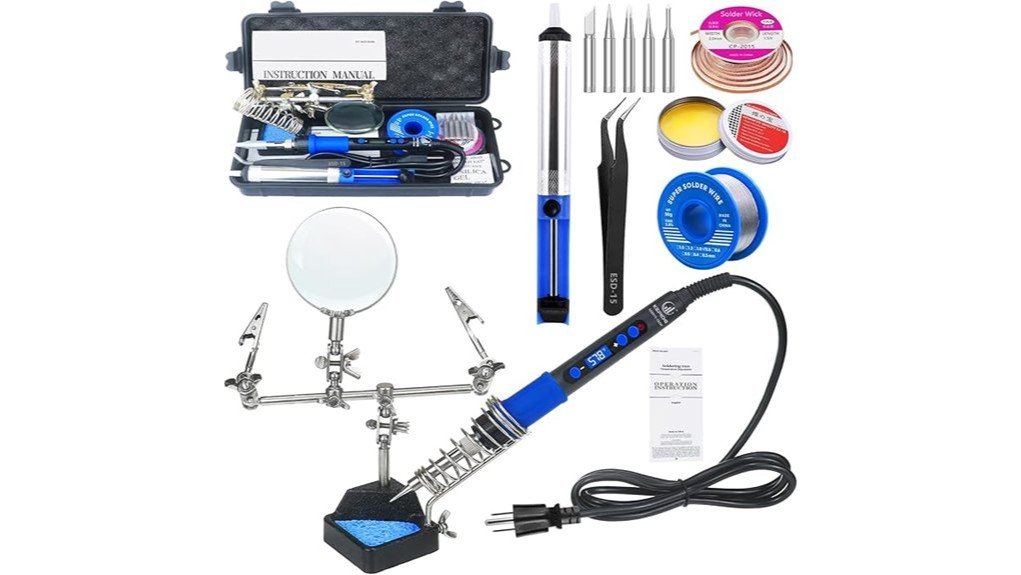
This 100W LCD soldering iron (sold as the 100W High-Power LCD Soldering Iron) is a mains-powered, adjustable-temperature iron with a digital display, aimed at electronics repair, jewelry and general DIY soldering. The listing says it heats to working temperature in about 20 seconds and adjusts from 392 to 932 degrees F (200 to 500 degrees C). It suits hobby work and small repairs; it is not a replacement for a full soldering station with a stand, tip cleaner and verified safety approvals.
Quick take
- Best for: hobby electronics, wire repairs, jewelry and small DIY jobs where adjustable temperature matters.
- Main strength: wide listed temperature range (392 to 932 degrees F) with an LCD readout.
- Main caution: specs, certifications and warranty terms come from the listing and were not independently confirmed here.
100W LCD soldering iron specs (per the listing)
| Item | Detail |
|---|---|
| Power | 100W, mains powered |
| Temperature range | 392 to 932 degrees F (200 to 500 degrees C) |
| Heat-up time | About 20 seconds, as claimed on the listing |
| Display | LCD temperature readout |
| Handle | Heat-resistant silicone, lightweight body |
| Listed uses | Electronics, jewelry, guitars, mobile device repair and general DIY |
| Cord, plug, accessories, warranty | Check the live listing; not confirmed here |
Confirm the plug type and voltage on the listing before ordering, especially if you are outside the US.
Who should buy it
A good fit if you:
- Want adjustable temperature for both small electronics and heavier joints.
- Do occasional repairs and do not need a bench station.
- Like a digital readout to set and repeat a temperature.
Skip it if you:
- Need a calibrated, certified station for professional production work.
- Work mainly on tiny surface-mount parts, where a fine tip and tight temperature control matter most.
- Want a cordless or butane iron for work away from an outlet.
Temperature guide for soldering
Set the temperature for the solder and the joint, not the maximum. As a rule of thumb, tin-lead solder melts at about 183 degrees C (361 degrees F) and common lead-free solders melt at roughly 217 to 227 degrees C (423 to 441 degrees F). Working temperatures are usually set higher than the melting point so the joint heats quickly. Follow the solder maker’s data sheet.
| Job | Starting point |
|---|---|
| Small electronics, tin-lead solder | Low end of the range, raise only if the joint is slow to flow |
| Lead-free solder | Higher setting than tin-lead; keep contact time short |
| Larger wires and connectors | Higher setting, because the joint pulls heat away quickly |
If the solder balls up or the flux burns black, the tip is too hot or dirty. Clean the tip and lower the setting a step.
How to use it
- Set the iron in a heat-safe stand or holder on a non-flammable surface.
- Select a temperature for your solder and let the display settle before you start.
- Clean and lightly tin the tip. A tip cleaner helps; see the soldering iron tip cleaner review.
- Heat the joint and the pad or wire together, then feed solder to the joint, not the tip.
- Hold the parts still until the solder sets, then trim and inspect for a smooth, shiny joint.
- Turn the iron off and let it cool fully before storing it.
Flux makes joints flow more cleanly. See our solder flux review for what to look for.
Safety
- The tip can reach several hundred degrees. Never rest a hot iron on the bench or the cord.
- Solder in a ventilated space or with a small fume extractor. Rosin flux fumes irritate the eyes and lungs.
- Lead solder needs handwashing after use and keeping it away from food and children.
- Wear eye protection; solder can spit and wire ends can snap.
- Unplug the iron when you are done. Do not rely on an unverified safety claim; check the listing for any certification marks.
Pros and limitations
Pros
- Wide listed temperature range with an LCD readout.
- Quick heat-up claimed on the listing.
- Lightweight body with a silicone handle.
Limitations
- Certifications, warranty and cord details are not confirmed here.
- Temperature accuracy is not verified; a cheap iron may drift from the displayed value.
- No stand or cleaner is assumed; check what the listing includes.
Alternatives
If you want a different power level or a kit with accessories, compare it with the 60W soldering iron kit review. Move up to a soldering station if you solder daily or work on fine surface-mount parts.
Frequently Asked Questions
What temperature should a 100W LCD soldering iron be set to?
It depends on the solder. Tin-lead solder melts at about 183 degrees C and lead-free solder at roughly 217 to 227 degrees C, so set the iron above the melting point and keep contact time short. Check the solder maker’s guidance.
How fast does this soldering iron heat up?
The listing claims about 20 seconds to working temperature. Real heat-up time varies with the setting, tip and mains voltage, so treat it as a manufacturer figure.
Is a 100W soldering iron too powerful for electronics?
Not if the temperature is adjustable. Wattage mainly affects how quickly the iron recovers heat, and you set the working temperature separately. Use a lower setting and a fine tip for small parts.
Does it come with a warranty or safety certification?
The listing details checked here do not confirm either. Check the live Amazon listing and the product packaging for certification marks and warranty terms before relying on them.
How do I look after the tip?
Wipe the tip on a damp sponge or brass wool while hot, re-tin it with a little solder before storing, and avoid filing it. A clean tip transfers heat better and lasts longer.
Conclusion
The 100W High-Power LCD Soldering Iron looks like a practical, adjustable iron for hobby electronics, jewelry and light repairs. Treat the listed specs as the seller’s claims, set the temperature for your solder, and use ventilation and a proper stand.