Disclosure: As an Amazon Associate, we earn from qualifying purchases. If you click a link on this page and make a purchase, we may receive a small commission at no extra cost to you.
A basic soldering iron can feel limiting when you move between circuit boards, wire repairs, and small hobby projects. The WORKPRO Soldering Iron Kit, model W125301, combines a 90W corded iron, an LCD screen, adjustable temperature control, and a starter set of tips and soldering supplies. Its strongest appeal is convenience: you get a compact 11-in-1 kit instead of buying each basic accessory separately. The tradeoff is that it is still a handheld iron rather than a full ESD-safe bench station, so careful setup, tip selection, ventilation, and temperature control matter.
Quick Verdict
Rating: 8/10, recommended with caveats
Best For: Beginners, electronics hobbyists, and home DIY users who want adjustable heat and a useful starter accessory set.
Bottom Line: The 90W ceramic heater, LCD controls, five extra tips, and 10-minute sleep mode make this a practical step up from a fixed-temperature iron. Skip it if you need verified ESD protection, a weighted bench base, tightly documented calibration accuracy, or professional daily-duty performance.
Key Takeaways
- The reviewed pink version is a 110V US-plug, 90W corded soldering iron kit with model number W125301.
- The LCD control covers 356°F to 896°F (180°C to 480°C) and can switch between Fahrenheit and Celsius.
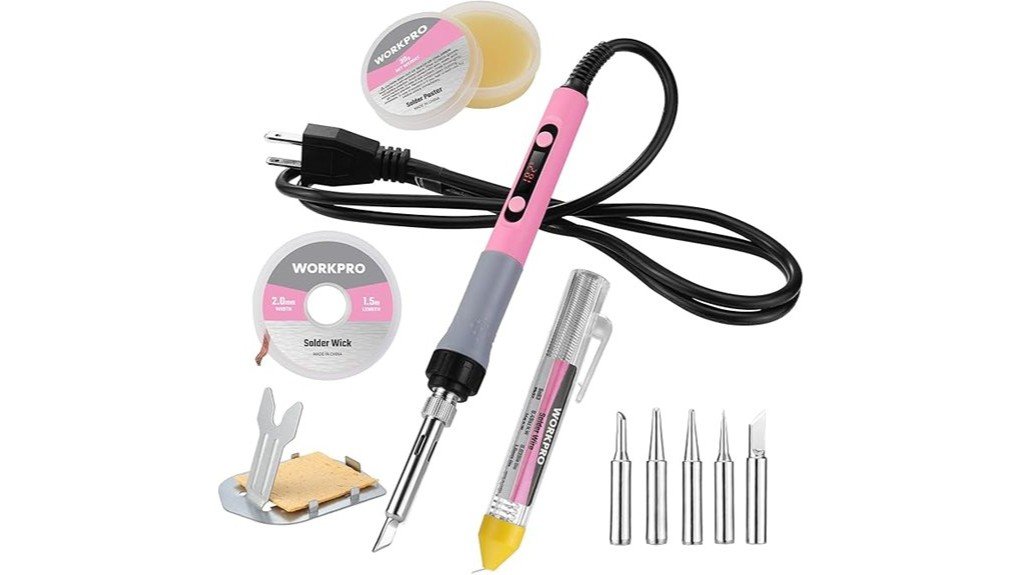
- The 11-in-1 package includes the iron, safety holder, cleaning sponge, five extra tips, solder wire, solder paste, and solder wick.
- The handle enters sleep mode after about 10 minutes of standing and wakes when you pick it up.
- The listing does not identify the solder alloy, replacement-tip series, ESD rating, or exact warranty term, so verify those details before buying for specialized work.
- The Amazon page displays a California Proposition 65 warning, and all soldering should be done with ventilation and careful hot-tool handling.
At a Glance
| Specification | Verified Detail |
|---|---|
| Brand | WORKPRO |
| Model | W125301 |
| ASIN | B0DDPC6426 |
| Product Type | Portable handheld soldering iron kit |
| Power Source | Corded electric, 110V US plug |
| Wattage | 90W |
| Heating Element | Ceramic core |
| Temperature Range | 356°F to 896°F (180°C to 480°C) |
| Controls | LCD display, °F/°C switching, temperature adjustment, calibration function |
| Sleep Mode | Activates after about 10 minutes standing; lift the handle to wake |
| Included Accessories | Safety holder, cleaning sponge, 5 extra tips, solder wire, solder paste, solder wick |
| Reviewed Color | Pink; green is also shown as an option |
| Manufacturer | Hangzhou Great Star Industrial Co., Ltd. |
| Not Verified | Solder alloy, replacement-tip standard, ESD rating, exact warranty length |
| Best Use | Basic electronics repair, wire work, hobby projects, and low-temperature craft soldering |
What Is the WORKPRO Soldering Iron Kit?
The WORKPRO W125301 is a compact 11-in-1 soldering kit built around a 90W handheld iron. It is intended for household electronics, computer-related repairs, hobby circuits, wire connections, and some jewelry or craft tasks that use soft solder. The reviewed listing is the pink 110V US-plug version.
Its main selling point is the balance between portability and control. You get an LCD screen, a wide adjustable range, five extra tip shapes, basic cleaning tools, flux paste, solder wire, and wick in one package. That makes it easier to start practicing without immediately building a full bench setup.
This is not the same as a professional soldering station. It has no separate weighted base, and the listing does not advertise ESD-safe construction or identify a standardized replacement-tip family. Those limits matter if you regularly work on sensitive boards or need repeatable production-level results.
Heating Power and Temperature Control
WORKPRO lists a 90W ceramic heating element with a setting range of 356°F to 896°F. The higher wattage is intended to help the tip heat and recover after contacting a joint, but wattage alone does not guarantee accurate tip temperature. Tip size, joint mass, calibration, surface condition, and solder alloy all affect how the iron behaves.
The listing also describes a temperature calibration function. That is useful when the displayed setting and actual tip temperature do not match, but accurate calibration normally requires a suitable tip thermometer. Do not treat the LCD number as proof that the tip is at the exact displayed temperature.
Before You Buy: The listing does not state that this model is ESD-safe, and it does not identify the replacement-tip standard. Confirm both points before using it on static-sensitive electronics or ordering spare tips.
Design and Build Quality
The iron uses a silicone-covered ergonomic handle and vent openings near the heated section. The grip shape should help with pencil-style control on small joints, while the vents are intended to help the iron cool after shutoff. You should still assume the front of the tool and nearby surfaces remain hot long after power is removed.
The seller describes a peak-heat dry-fire test in which the silicone sheath stayed below 131°C after five minutes at 896°F. That statement should not be read as a safe hand temperature. Avoid running the iron at maximum heat without a workpiece, keep your fingers behind the grip area, and place the tool in the included holder whenever you pause.
The kit is portable, but the light holder is not equivalent to the stable cradle on a full station. Arrange the cord so it cannot pull the hot iron off your bench, and keep the holder on a flat, nonflammable surface.
Controls, Sleep Mode, and Daily Usability
The LCD screen is easier to manage than a simple numbered dial because it shows the selected temperature and lets you switch between Fahrenheit and Celsius. That helps when a component guide, solder label, or repair tutorial uses a different unit.
The handle enters sleep mode after standing for about 10 minutes and wakes when picked up. Sleep mode can reduce unnecessary heat and tip oxidation during a pause, but it is not an unattended-use safety system. Unplug the iron when the job is finished or when you leave the work area.
For beginners, the full accessory set reduces setup friction. You can try different tips, clean the tip on the sponge, use paste when suitable, and remove excess solder with the included wick. The listing does not give the solder wire alloy or flux chemistry, so read the package labels before using those consumables on an important board.
Pro Tip: Choose the largest tip that safely fits the joint. A broader contact area often transfers heat faster, which can let you finish the joint with a shorter contact time than an undersized needle tip.
Who Should Buy It?
Best For
- Beginners who want visible temperature controls and a complete starter accessory set.
- Electronics hobbyists doing occasional through-hole work, connector repairs, and basic wire soldering.
- Home DIY users who value a compact tool more than the stability and expansion options of a full station.
Skip If
- You need verified ESD-safe equipment for sensitive or high-value electronics.
- You solder for hours each day and need a weighted station, known tip ecosystem, and documented service support.
- You need torch-based silver soldering, brazing, plumbing work, or high-mass metal heating.
Using the LCD Temperature Range Correctly
The broad range gives you flexibility, but the correct setting depends on the solder alloy, tip shape, joint size, and component tolerance. Start near the lower end of the range that melts your solder cleanly, then increase in small steps only when heat transfer is too slow.
Very high settings can burn flux, lift circuit-board pads, melt insulation, and shorten tip life. Low settings can also cause trouble if you hold the iron on the joint for too long while waiting for solder to flow. The goal is not the lowest possible number. The goal is fast, controlled heat transfer with a clean, properly tinned tip.
Solder Tips and Included Accessories
The five extra interchangeable tips let you match contact shape to the job. A fine tip can reach small pads, while a chisel-style tip usually provides better heat transfer for wires, terminals, and larger through-hole joints. Keep each tip tinned before storage to limit oxidation.
The safety holder and sponge cover the basic needs of a starter bench. The included solder paste and wick can help with wetting and solder removal, but use them according to their labels. Some flux residues require cleaning, and the listing does not identify whether the included flux is no-clean, rosin-based, or water-soluble.
The included solder wire should not be described as lead-free without checking its packaging. If the alloy is not clearly marked, replace it with a known solder that matches your project requirements.
Setup Tips Before First Use
- Build a safe work area. Use a stable heat-resistant mat, bright lighting, and a holder positioned where the cord cannot drag it.
- Identify the consumables. Check the solder wire and paste labels for alloy, flux type, storage instructions, and warnings.
- Install the right tip while cold. Make sure it is seated according to the product instructions before plugging in the iron.
- Tin the tip promptly. Apply a light solder coating after heat-up so the working surface transfers heat and resists oxidation.
- Practice first. Test on scrap wire or an unused board before touching a valuable device.
- Power down correctly. Return the iron to its holder, unplug it, and allow it to cool fully before changing tips or storing the kit.
Safety and Handling Notes
Soldering creates hot surfaces and flux fumes. Work with local fume extraction or strong ventilation that moves fumes away from your face. NIOSH identifies heated rosin-core flux products as an inhalation concern, so do not hover over the joint or rely only on an open window. See the NIOSH guidance on rosin-core solder fumes for occupational hazard information.
Keep food and drinks away from the bench, wash your hands after handling solder or flux, and follow the consumable labels. Never assume the included solder is lead-free unless the packaging states the alloy. The Amazon listing also displays a California Proposition 65 warning; you can review general warning information at P65Warnings.ca.gov.
Disconnect power from the device you are repairing. Remove batteries when the service instructions allow it, and do not work on mains-powered equipment, large capacitors, lithium battery packs, or safety-critical electronics unless you understand the stored-energy and fire risks. Seek qualified repair help when the circuit or hazard is unclear.
How It Performs in Real Use
For Through-Hole Electronics Repair
The adjustable heat, chisel-tip options, and 90W rating should suit common through-hole joints, loose wires, switches, and connectors. The main limitation is the lack of a stated ESD rating, so sensitive integrated circuits and valuable boards deserve an ESD-safe station and grounded work setup.
For Wire and Connector Repairs
A broader tip can make the kit useful for small-gauge wire splices, terminals, and hobby connectors. Pre-tin both surfaces, support the joint mechanically, and use heat-shrink tubing where suitable. This iron is not designed for battery-tab spot welding or heavy automotive cable.
For Beginners and Practice
The screen and included accessories make the learning process easier because you can see the setting and try several tip shapes. The wide temperature range can also encourage overheating, so begin with scrap materials and focus on short contact time, clean surfaces, and proper tinning.
For Occasional Long-Term Ownership
Tip care will determine much of the long-term experience. Clean gently, keep the working surface tinned, avoid filing plated tips, and do not leave the iron at maximum heat. Before buying replacement tips, confirm the exact compatible series because the current listing does not name it.
Kit Contents and Long-Term Value
The WORKPRO kit sits in the budget starter category. Its value comes from bundling an adjustable 90W iron with a holder, sponge, five extra tips, solder wire, paste, and wick. A buyer starting from zero may spend less time sourcing basic accessories separately.
The value is weaker for experienced users who already own quality consumables and want a known tip ecosystem, ESD-safe construction, or a heavy stand. The listing also does not state a specific warranty length, so warranty coverage should be confirmed with the seller or manufacturer before purchase.
Pros and Cons
Pros
- 90W ceramic heater and wide adjustable range support varied hobby tasks.
- LCD screen shows the selected temperature and switches between °F and °C.
- 11-in-1 package includes five extra tips and core starter accessories.
- Temperature calibration function gives you a way to correct display offset when using a proper thermometer.
- 10-minute sleep mode can reduce idle heat and tip oxidation during pauses.
Cons
- No verified ESD-safe rating or identified replacement-tip standard.
- Solder alloy, flux chemistry, and exact warranty length are not stated on the reviewed listing.
- The lightweight handheld setup is less stable and serviceable than a dedicated bench station.
Is It Worth the Price?
The WORKPRO W125301 is worth considering when you want a budget-focused starter kit with visible temperature controls and enough included tools to begin practicing. Its 90W rating, five extra tips, wick, paste, holder, and sponge provide more flexibility than a bare fixed-temperature iron.
You get the most value if your work is occasional and low risk, such as hobby boards, household wire repairs, and simple connectors. It is not the best fit for professional daily use, static-sensitive electronics, or buyers who want a well-documented tip and service ecosystem.
How It Compares to Alternatives
Compared with a basic fixed-temperature pencil iron, the WORKPRO offers a screen, adjustable heat, calibration, sleep mode, and a broader accessory bundle. That makes it easier to adapt one tool to several beginner and DIY tasks.
If you need a dedicated bench setup, compare it with the Weller WE1010 or Hakko FX-888DX. Those station-style alternatives provide a separate base and stronger professional support, but they take more bench space and target buyers who need a more established system. The WORKPRO makes more sense when compact size and an all-in-one starter package matter most.
Frequently Asked Questions
Is the WORKPRO Soldering Iron Kit good for beginners?
Yes. The LCD display, adjustable range, holder, cleaning sponge, five extra tips, solder wire, paste, and wick give a new user a practical starter setup. Practice on scrap material before repairing an important device.
Is this a full soldering station?
No. It is a handheld corded iron with an inline digital control and a separate lightweight holder. A full station usually provides a weighted base, integrated cradle, and a more established tip and service system.
What voltage and temperature range does it use?
The reviewed version uses a 110V US plug and is rated at 90W. Its adjustable range is 356°F to 896°F, or 180°C to 480°C.
Is the included solder wire lead-free?
The current Amazon listing does not state the solder alloy. Check the spool or package label before use, and do not assume it is lead-free when the composition is not marked.
Which replacement tips fit model W125301?
The reviewed listing includes five extra tips but does not identify a replacement-tip series. Confirm dimensions and compatibility with WORKPRO or the seller before ordering additional tips.
Can it be used for jewelry making?
It may suit small craft projects that use low-temperature soft solder. It is not a substitute for a torch or specialized equipment used for silver soldering, brazing, or high-mass precious-metal work.
Does sleep mode make it safe to leave plugged in?
No. Sleep mode lowers unnecessary heating after about 10 minutes of standing, but the tool can still be hot and connected to mains power. Unplug it when you finish or leave the work area.
What warranty does the kit include?
The reviewed listing links to warranty information but does not state a fixed warranty period in the visible specifications. Confirm the current terms with the seller or manufacturer before purchase.
The Bottom Line
The WORKPRO W125301 is a good choice for beginners and occasional DIY users who want 90W power, an LCD display, five extra tips, and core soldering accessories in one compact kit. Its main limitation is incomplete documentation for ESD protection, replacement-tip compatibility, consumable composition, and warranty length.
Buy it for basic electronics practice, wire work, and hobby repairs. Choose a dedicated station instead when you need professional bench stability, verified ESD safety, or dependable daily-duty support.
Ready to Buy?
Check the latest seller details, included consumables, warranty terms, and current price before you decide.