Disclosure: As an Amazon Associate, we earn from qualifying purchases. If you click a link on this page and make a purchase, we may receive a small commission at no extra cost to you.
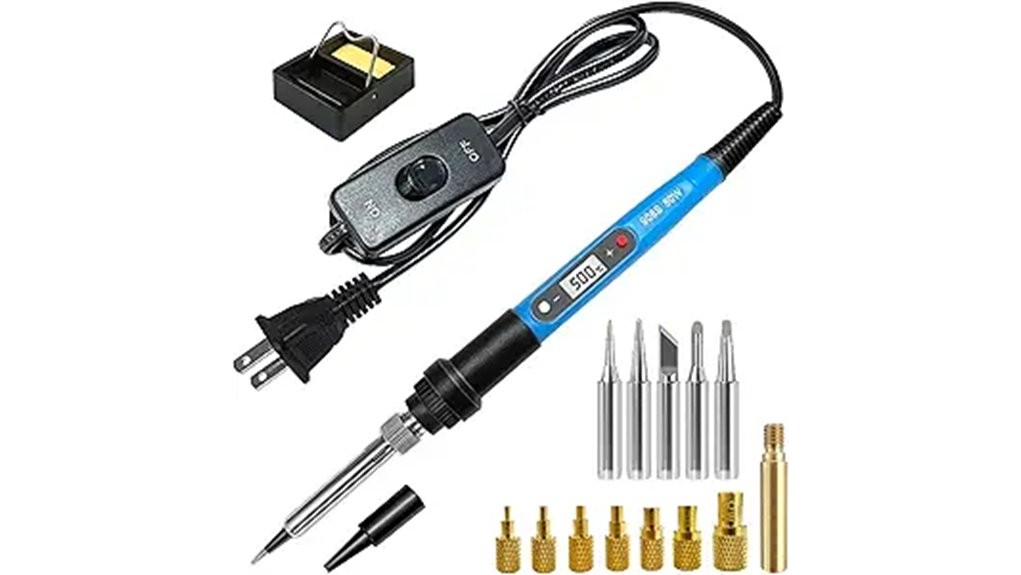
Choosing a soldering iron for electronics, heat-set inserts, and small repair work comes down to control, tip options, and safe handling. The Soldering Iron Heat Set Insert Tool is an 80W, 110V kit with an adjustable 180°C to 500°C temperature range, a digital LCD screen, and multiple tips for soldering and threaded insert installation. This review helps you decide if its fast heat-up time and included accessories make sense for your bench, or if the 110V-only rating and general-purpose design are limiting for your setup.
Quick Verdict
Rating: Recommended with caveats
Best For: Hobby electronics work, DIY repairs, beginner soldering practice, and heat-set inserts in 3D printed parts.
Bottom Line: This kit gives you a wide temperature range, quick heating, and enough included tips to handle several common tasks. The main tradeoff is that it is rated for 110V outlets, so buyers outside that power setup need to verify safe voltage compatibility before use.
| Specification | Detail |
|---|---|
| Product Type | Soldering iron and heat-set insert tool kit |
| Power | 80W |
| Voltage | 110V |
| Temperature Range | 180°C to 500°C, or 356°F to 932°F |
| Heat-Up Time | Approximately 20 seconds to operating temperature |
| Display | LCD screen for temperature monitoring |
| Controls | Adjustable temperature settings and ON/OFF switch |
| Included Tips | Five interchangeable soldering tips and seven heat-set insert tips |
| Insert Tip Range | M2 to M8 heat-set insert tips |
| Safety Features | Anti-scalding handle, heat-resistant sheath, insulated sleeve, and ventilation holes |
| Kit Weight | Approximately 1.5 lb |
| Best Use | Electronics soldering, DIY repairs, heat-set inserts, small craft work, and beginner training |
What Is the Soldering Iron Heat Set Insert Tool?
The Soldering Iron Heat Set Insert Tool is a compact 80W electric soldering kit made for controlled heat work. It combines a standard soldering iron design with heat-set insert tips, so you can switch between soldering wires, working on circuit boards, and embedding threaded inserts into compatible plastic parts.
The key feature is its adjustable 180°C to 500°C heat range. That gives you enough flexibility to use lower temperatures for lighter soldering tasks and higher settings for jobs that need more heat transfer. The LCD screen helps you see the current temperature instead of guessing from a dial alone.
The kit also includes five soldering tips and seven heat-set insert tips from M2 to M8. That makes it more useful than a single-tip iron if you work on different projects, especially small electronics and 3D printed parts that use threaded brass inserts.
Before You Buy: This tool is rated for 110V outlets. Do not plug it into a different mains voltage unless you have verified the correct voltage conversion and safe use requirements for your location.
Who Should Buy It?
Best For
- DIY users who want one kit for soldering and heat-set insert installation.
- 3D printing hobbyists who need M2 to M8 insert tip options.
- Beginners who want a visible LCD temperature readout instead of a basic fixed-temperature iron.
Skip If
- You need a tool made for non-110V outlets without extra voltage equipment.
- You only need a basic iron for rare light-duty soldering and do not need insert tips.
- You need verified industrial certifications, brand-specific replacement parts, or published professional warranty terms before buying.
Product Features and Specifications
The main appeal of this kit is the combination of power, temperature range, and included accessories. The 80W rating gives the iron enough heat capacity for common bench tasks, while the 180°C to 500°C range helps you adjust the tool for different materials and job types.
The LCD screen is a useful upgrade over simple low, medium, and high controls. When you are working around small components or heat-sensitive plastics, seeing the temperature helps you avoid using more heat than needed.
The included tip set also improves flexibility. You get five soldering tips for general soldering tasks and seven heat-set insert tips covering M2 through M8, which is a practical range for many hobby 3D printing projects.
Temperature Control and Efficiency
The Soldering Iron Heat Set Insert Tool offers adjustable temperatures from 180°C to 500°C, or 356°F to 932°F. That range is broad enough for light soldering, heavier heat transfer, and installing threaded inserts into suitable plastic parts.
The tool reaches operating temperature in about 20 seconds. That quick heat-up time is helpful when you need to make a few repairs, install several inserts, or work in short sessions without waiting long for the iron to become usable.
The tool heats up rapidly, reaching its operating temperature in an impressive 20 seconds.
The LCD screen lets you monitor the current temperature as you work. The article-supported design also notes automatic temperature adjustment, which helps the iron maintain steadier heat during use. A separate ON/OFF switch is useful because you do not need to unplug the tool every time you pause your work.
Pro Tip: Start at a lower temperature than you think you need, then increase gradually. Too much heat can lift circuit-board pads, scorch plastic, or make heat-set inserts sink too deep.
Design and Safety Considerations
Heat tools need more than power. The handle, insulation, and heat control matter because your hand stays close to a very hot tip. This kit uses an ergonomic handle, heat-resistant sheath, insulated sleeve, ventilation holes, and anti-scalding design features to make handling safer and more comfortable.
| Feature | How It Helps |
|---|---|
| Ergonomic Handle | Helps reduce hand strain during longer soldering or insert sessions. |
| Heat-Resistant Sheath | Adds protection around hot areas and helps reduce burn risk. |
| Insulated Sleeve | Improves grip and separates your hand from heated sections. |
| Ventilation Holes | Help the tool release heat during operation. |
| Anti-Scalding Design | Helps reduce accidental contact with hot surfaces when used correctly. |
These safety features do not remove the need for careful handling. You should still use a stable stand, keep the hot tip away from cords and flammable items, and let the tool cool fully before changing tips or storing it.
Usability for Various Applications
This kit is most useful when you work across more than one type of project. A basic soldering iron may be enough for wire repairs, but the extra heat-set insert tips make this kit more appealing if you also build or modify 3D printed parts.
- Electronics projects: The adjustable temperature and soldering tips help with wires, small components, and circuit-board practice.
- DIY repairs: The 80W output and quick heat-up time are useful for small household electronics and gadget repairs.
- Jewelry and craft work: The fine tips can help with small heat tasks, though suitability depends on the material and project.
- Education and practice: The LCD display and included tips make it easier for beginners to learn how temperature affects results.
- 3D printing projects: The M2 to M8 insert tips are useful for embedding threaded inserts into compatible printed parts.
How It Performs in Real Use
For Electronics Soldering
The adjustable heat range helps you match the temperature to the soldering task. Lower settings can be useful for lighter work, while higher settings help when you need more heat transfer. The LCD screen is helpful because small electronics can be damaged when you use too much heat for too long.
For Heat-Set Inserts
The included M2 to M8 insert tips are the strongest reason to consider this kit over a basic soldering iron. If you use threaded inserts in 3D printed parts, having several tip sizes lets you match the insert more closely and apply heat more evenly.
For Quick Repairs
The approximately 20-second heat-up time makes the tool convenient for short repair jobs. You can turn it on, make a small connection, and shut it off without a long warm-up period. The ON/OFF switch also makes short pauses easier than unplugging the iron each time.
For Longer Bench Sessions
The ergonomic handle and insulated sleeve matter more during longer sessions. They help with comfort, but heat still builds around any soldering tool. If you are working for a long time, take breaks, keep the tool on a safe stand, and avoid touching the heated shaft or tip area.
Setup Tips Before First Use
Before using the tool, check that you are using a 110V outlet and that the cord, handle, tip, and sheath are clean and undamaged. Select the correct tip for the job before the tool heats up. Changing tips while hot can cause burns and may damage the threads or fittings.
For soldering, use a clean tip and keep a damp sponge or proper tip cleaner nearby. For heat-set inserts, choose the insert tip that fits the insert size, then apply steady downward pressure without forcing the insert too deep into the plastic.
After use, turn the tool off, place it on a safe heat-resistant stand, and let it cool completely before storage. Store the small tips together so you do not lose the M2 to M8 insert sizes.
Compatibility and Safety
This soldering iron is rated for 110V outlets. That is an important compatibility limit. If your workspace uses a different mains voltage, do not assume a simple plug adapter is enough. Use only voltage equipment that is suitable for the tool and your local electrical system.
The tool reaches up to 500°C, so it can burn skin, melt nearby plastic, damage wires, or scorch surfaces. Keep it away from children, pets, loose paper, solvents, and flammable materials. Use eye protection when soldering and work in a well-ventilated area, especially when using solder or flux.
The anti-scalding handle, insulated sleeve, and heat-resistant sheath are helpful design features, but they do not make the tool safe to touch near the heated end. Treat every tip as hot until you have confirmed it has cooled.
Pros and Cons
Pros
- Wide 180°C to 500°C temperature range for different soldering and insert tasks.
- Fast 20-second heat-up time helps with quick repairs and short work sessions.
- LCD screen gives you clearer temperature feedback than a basic dial-only iron.
- Includes five soldering tips and seven M2 to M8 heat-set insert tips.
- Anti-scalding handle, insulated sleeve, and heat-resistant sheath improve handling safety.
Cons
- 110V rating limits easy use in regions or shops with different mains voltage.
- Brand, material, certifications, and full warranty details were not confirmed from a live product page.
- Beginners still need careful technique because high heat can damage electronics or plastic parts.
Is It Worth the Price?
This kit is worth considering if you want one tool for both soldering and heat-set inserts. The included tip range adds value because you do not have to start with a bare iron and immediately buy several extra accessories.
It is a strong value for the price if your work includes electronics practice, small repairs, and 3D printed projects. The LCD screen, ON/OFF switch, quick heating, and broad temperature range make it more useful than many simple fixed-temperature irons.
It is not the best fit if you only need an occasional basic iron or if you require verified professional-grade specifications before buying. The biggest value depends on whether you will actually use the insert tips and adjustable temperature range.
How It Compares to Alternatives
Compared with a basic pencil soldering iron, this kit offers more control because it has an LCD screen, adjustable temperature settings, and multiple tip types. Compared with a full soldering station, it is more compact and portable, but it does not offer the same bench-style base, holder, or advanced station controls.
If you only solder wires, a simple soldering iron may be enough. If you install threaded inserts into 3D printed parts, this kit makes more sense because it already includes M2 to M8 insert tips.
Frequently Asked Questions
Can this tool be used for 3D printing heat-set inserts?
Yes. The kit includes seven heat-set insert tips from M2 to M8, which makes it useful for installing threaded inserts into compatible 3D printed parts. Use the correct tip size and avoid forcing the insert deeper than needed.
What temperature range does it offer?
The tool adjusts from 180°C to 500°C, or 356°F to 932°F. That range lets you use lower heat for lighter soldering and higher heat for tasks that need more thermal transfer.
How fast does the soldering iron heat up?
The article-supported heat-up time is approximately 20 seconds to operating temperature. That makes it convenient for short repair jobs, quick insert work, and bench sessions where you do not want a long warm-up period.
Is it compatible with non-110V outlets?
The tool is listed as a 110V unit. If your outlet uses a different voltage, do not plug it in directly or rely on a plug adapter alone. Verify safe voltage conversion before use.
How many tips are included?
The kit includes five interchangeable soldering tips and seven heat-set insert tips. The insert tips cover M2 to M8, which is a practical range for many small hardware and 3D printing projects.
How do you clean the soldering tips?
Use a damp sponge or proper soldering tip cleaner while the tip is hot enough for cleaning but handled safely. Do not scrape aggressively, because damaged plating can shorten tip life and make soldering harder.
What is the weight of the kit?
The article-supported kit weight is approximately 1.5 pounds. That makes it light enough for storage, travel between work areas, and small home workbenches.
Who should skip this soldering iron kit?
Skip it if you need confirmed industrial specifications, non-110V plug compatibility, or a full soldering station with a dedicated base. It may also be more kit than you need if you only make rare, simple solder joints.
The Bottom Line
The Soldering Iron Heat Set Insert Tool is a practical buy if you want an 80W, 110V iron with adjustable heat, an LCD display, fast warm-up, and tips for both soldering and heat-set inserts. It is best for hobby electronics, 3D printing inserts, and small repair work, but you should skip it if the 110V rating does not match your workspace or if you need fully verified professional specs before purchase.