Disclosure: As an Amazon Associate, we earn from qualifying purchases. If you click a link on this page and make a purchase, we may receive a small commission at no extra cost to you.
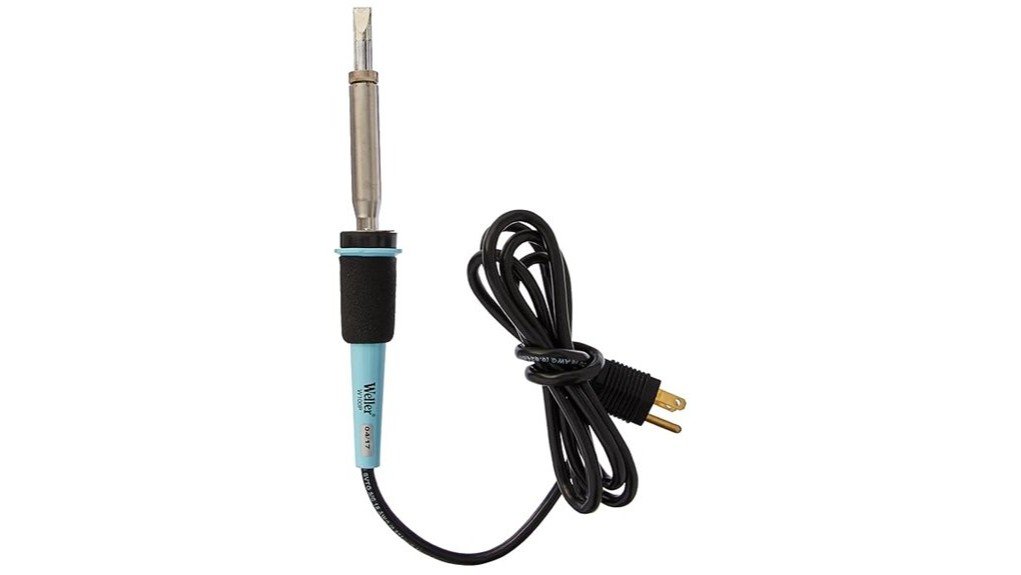
Choosing a soldering iron is not just about wattage. You need enough heat for the job, steady tip control, and a tool that does not feel awkward during longer repairs. The Weller W100PG Soldering Iron is a 100-watt, line-voltage soldering iron with three fixed temperature settings: 600°F, 700°F, and 800°F. It is best for buyers who want a simple, heavy-duty iron without a bulky base, though it may be more tool than you need for very light hobby work.
Quick Verdict
Rating: 8.4/10
Best For: Users who want a portable 100-watt soldering iron with fixed high-temperature options.
Bottom Line: The Weller W100PG makes sense if you want strong heat output, simple controls, and a compact line-voltage design. The tradeoff is that it does not offer a digital display or fine temperature adjustment like a full soldering station.
Key Takeaways
- The Weller W100PG is a 100-watt soldering iron made for heavier soldering tasks.
- It offers three fixed temperature settings: 600°F, 700°F, and 800°F.
- The 700°F setting heats up in about 110 seconds, based on the article-supported specification.
- Its line-voltage design means you do not need a separate base station.
- The closed-loop temperature method helps control tip heat and reduce overheating risk.
- It is not the best choice if you need digital precision, a full station, or very low-temperature work.
Key Specifications
| Specification | Detail |
|---|---|
| Brand | Weller |
| Model | W100PG |
| Product Type | Heavy-duty soldering iron |
| Power | 100 watts |
| Temperature Settings | 600°F, 700°F, and 800°F |
| Heat-Up Speed | About 110 seconds at the 700°F setting |
| Weight | Under 2 pounds |
| Design | Line-voltage design with no bulky base required |
| Temperature Control | Closed-loop method for tip temperature control |
| Best Use | Soldering tasks that need strong heat, portability, and simple fixed settings |
What Is the Weller W100PG?
The Weller W100PG is a heavy-duty soldering iron built around a simple idea: give you strong heat output without a separate soldering station. It uses a 100-watt line-voltage design, so it is easier to move around a bench, job site, or repair area than a station with a base unit.
Instead of a digital control panel, it gives you three fixed temperature choices: 600°F, 700°F, and 800°F. That makes it easier to use if you prefer direct settings over fine manual adjustment. The 700°F setting reaches working temperature in about 110 seconds, which helps when you want to start a repair without a long warm-up.
The main appeal is the mix of portability, heat output, and Weller’s closed-loop tip temperature method. The main limitation is control range. If you need exact temperature selection for delicate electronics, a digital station may fit you better.
Who Should Buy It?
Best For
- Users who need a 100-watt iron for heavier soldering tasks.
- Buyers who want fixed 600°F, 700°F, and 800°F settings instead of digital controls.
- Technicians or hobbyists who want a portable iron without a bulky base station.
Skip If
- You need fine digital temperature adjustment for very sensitive components.
- You only do light-duty hobby soldering and do not need 100 watts.
- You want a full soldering station with a display, base, and more accessory storage.
Before You Buy: This is a high-heat, 100-watt soldering iron. Match the temperature setting to your work, use a proper stand, and avoid using more heat than your component or workpiece can handle.
Design and Portability
The Weller W100PG is designed for users who want a strong iron without extra bench clutter. Because it does not require a separate bulky base, it is easier to carry between work areas and easier to store when space is limited.
At under two pounds, the tool is light enough for normal handling but still built for heavier soldering work. The ergonomic design also matters during longer use because a poorly shaped handle can cause hand fatigue before the job is done.
The compact form helps when you need to work around tight areas. Still, it is not a tiny precision pencil iron. If your work is mostly small circuit-board touch-ups, compare it with lower-wattage or station-style options before you decide.
Temperature Control Features
The strongest feature on the Weller W100PG is its three-setting temperature setup. You can choose 600°F, 700°F, or 800°F, which covers common soldering needs without forcing you to adjust a dial by guesswork.
The 600°F setting is the lower option for tasks where you want less heat. The 700°F setting is the middle choice and reaches temperature in about 110 seconds. The 800°F setting gives you the hottest option when the job needs more heat transfer.
Weller’s closed-loop method is meant to help control the tip temperature and reduce overheating. That can be helpful when you want stable heat, but it does not remove the need for proper technique. You still need the right tip, solder, flux, and contact time for the material you are working on.
Pro Tip: Start with the lowest temperature setting that melts solder cleanly for your task. Move up only when the joint or workpiece needs more heat transfer.
Performance and Heat-Up Speed
For a soldering iron, heat-up speed affects how quickly you can begin work. The Weller W100PG reaches 700°F in about 110 seconds, which is practical for repairs, bench work, and repeated setup throughout the day.
The 100-watt rating gives this iron more heat capacity than many small hobby irons. That can help when you are working on larger joints or materials that pull heat away from the tip. The tradeoff is that extra power requires more care around small parts, insulation, and heat-sensitive components.
This model is best viewed as a strong general-purpose iron for users who already understand basic soldering safety. Beginners can use it, but they should learn tip care, proper stand placement, ventilation, and safe handling before starting a project.
How It Performs in Real Use
For Bench Repairs
On a workbench, the no-base design keeps the setup simple. You can plug in the iron, choose the proper temperature setting, and get started without making room for a separate control unit.
For Heavier Soldering Tasks
The 100-watt output is useful when smaller irons struggle to keep heat in the joint. This can help with larger connections, heavier wire work, or jobs where the workpiece draws heat away quickly.
For Learning and Occasional Use
The fixed temperature settings make the tool easy to understand. A beginner does not have to manage a digital menu, but they still need to handle the iron carefully because all three settings are hot enough to burn skin or damage materials.
For Portable Work
The line-voltage design makes this iron easier to move than a full station. That is useful if you work in different spots, but you should still carry a safe stand and give the tip time to cool before storage.
Setup Tips Before First Use
Before you use the Weller W100PG, place the iron on a stable, heat-safe stand. Keep the cord clear of the hot tip and make sure your work area has enough room for solder, tools, and the item being repaired.
Choose the temperature setting based on the job rather than always using the hottest option. Too much heat can damage components, lift pads, melt insulation, or discolor surrounding material. Too little heat can create weak joints because the solder does not flow properly.
Clean the tip often during use. A damp sponge or brass/wire wool can help remove buildup. After cleaning, tin the tip with fresh solder to protect it and improve heat transfer.
Compatibility and Safety
The Weller W100PG is a high-temperature electrical tool, so safety matters. Always follow the product instructions, use the iron on a stable surface, and keep it away from children, pets, loose paper, and flammable materials.
The article-supported details do not confirm every compatible tip type, accessory, or warranty term. Before buying replacement tips, check that the tip is listed for the W100PG model. A tip that looks similar may not fit or heat correctly.
Use ventilation when soldering, especially when working for long periods. Avoid touching the metal shaft or tip, and allow the iron to cool fully before storage. If you are working on sensitive electronics, disconnect power from the device before soldering.
Pros and Cons
Pros
- 100-watt power gives you strong heat output for heavier soldering tasks.
- Three fixed settings make temperature selection simple.
- About 110-second heat-up at 700°F helps you start work faster.
- Line-voltage design avoids the need for a bulky base station.
- Under-two-pound weight makes it easier to carry and handle.
Cons
- No digital display or fine temperature adjustment is included in the article-supported details.
- 100 watts may be too much for very light or delicate soldering work.
- Replacement tips and warranty details should be checked before purchase.
Is It Worth the Price?
The Weller W100PG is worth considering if you want a higher-power soldering iron with simple fixed heat settings. Its value is strongest for buyers who care about 100-watt output, fast heat-up at the 700°F setting, and a portable design without a base station.
It may not be the best fit if your main concern is fine electronic control. A digital soldering station can give you more precise temperature selection, while this model focuses on strength and simplicity.
For general repair work and heavier soldering jobs, the feature set is practical. For light hobby tasks, you may get better value from a smaller iron or an entry-level station.
How It Compares to Alternatives
Compared with small pencil-style soldering irons, the Weller W100PG offers more power and higher fixed temperature options. That helps when you need stronger heat transfer, but it can be less forgiving on delicate work.
Compared with digital soldering stations from brands such as Hakko, Weller, or X-Tronic, this model is simpler and more portable. A station may be better if you want a display, a stand, and fine control. The W100PG makes the most sense if you want a direct, heavy-duty iron with fewer parts to manage.
Frequently Asked Questions
What types of projects is the Weller W100PG suitable for?
The Weller W100PG is best for soldering tasks that need strong heat and a 100-watt iron. It can suit repair work, heavier joints, and general bench use, but it may be too powerful for very delicate electronics if you do not manage heat carefully.
Does the Weller W100PG have adjustable temperature control?
Yes, it has three fixed temperature settings: 600°F, 700°F, and 800°F. It does not offer fine digital adjustment, so choose the closest setting for your task.
How fast does the Weller W100PG heat up?
The article-supported specification lists about 110 seconds to reach 700°F. Warm-up time can still feel different based on room conditions, tip condition, and how quickly you begin working after the iron reaches temperature.
How do you clean the soldering iron tip?
Use a damp sponge or brass/wire wool to remove residue while the tip is hot. After cleaning, add a small amount of fresh solder to tin the tip and protect the working surface.
Can you replace the soldering tip with other types?
Replacement tips may be possible, but you should confirm compatibility with the W100PG model before buying. Do not assume a tip fits only because it is from the same brand or has a similar shape.
Is the Weller W100PG safe for beginners?
Beginners can use it with care, but they should treat it as a serious high-heat tool. Use a proper stand, keep the cord away from the tip, work in a ventilated area, and start with the lowest setting that works for the joint.
What is the warranty period for the Weller W100PG?
The original article mentions a satisfaction guarantee, but warranty terms can vary by seller and region. Check the current Amazon listing, product packaging, or Weller documentation before you rely on a specific warranty period.
Who should skip this soldering iron?
Skip it if you need precise digital temperature control, a built-in display, or a complete station setup. It is also not ideal if your work is mostly very small, heat-sensitive electronics.
The Bottom Line
The Weller W100PG is a strong choice if you want a 100-watt soldering iron with three simple temperature settings and a portable line-voltage design. It is best for heavier soldering tasks, bench repairs, and users who do not want a bulky base station.
You should skip it if you need a digital station, fine temperature control, or a lower-power tool for delicate work. Overall, it earns its recommended-with-caveats verdict because it offers useful heat output and portability, but its fixed settings will not suit every soldering setup.