Disclosure: As an Amazon Associate, we earn from qualifying purchases. If you click a link on this page and make a purchase, we may receive a small commission at no extra cost to you.
Soldering gets frustrating fast when your iron heats slowly, drifts in temperature, or feels awkward during small repairs. The HANDSKIT 200W soldering iron is designed for buyers who want quick heat-up, digital temperature control, and a starter-friendly kit in one package. It lists a 5-second heat-up time, a 180°C to 480°C temperature range, and an LED display, which makes it more practical than a basic fixed-temperature iron. The main tradeoff is that the article-supported details do not list dimensions, weight, or advanced station-style controls, so you should confirm the current listing details before buying.
Quick Verdict
Rating: 8/10, Recommended with caveats
Best For: hobby electronics repair, small wiring jobs, practice soldering, and general bench use
Bottom Line: The HANDSKIT 200W soldering iron is worth considering if you want fast heat-up, adjustable temperature control, and included accessories without building a full soldering station setup. Skip it if you need verified professional-grade certifications, a full station base, or exact size and weight details before purchase.
| Specification | Detail |
|---|---|
| Brand | HANDSKIT |
| Product Type | Digital soldering iron kit |
| Power | 200W |
| Voltage | 110V |
| Temperature Range | 180°C to 480°C (356°F to 896°F) |
| Heat-Up Time | Listed as 5 seconds |
| Heating Core | Ceramic heating core |
| Display | LED display with real-time temperature reading |
| Controls | Adjustable temperature control with memory function |
| Safety Feature | Automatic sleep function after 15 minutes of inactivity |
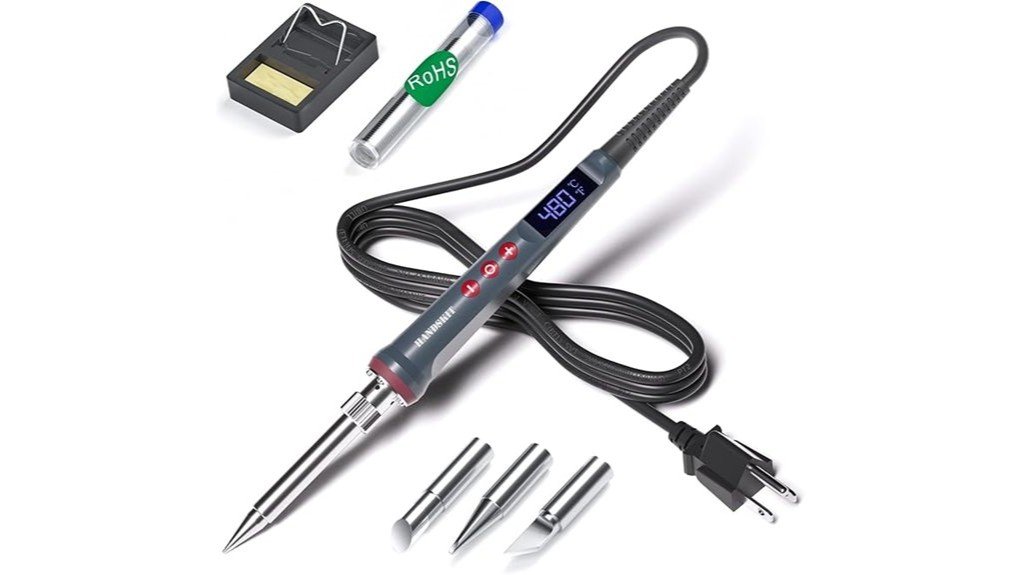
| Included Accessories | Soldering iron, four interchangeable tips, solder wire, soldering stand, and cleaning sponge |
| Best Use | Electronics repair, small wiring, hobby projects, and general soldering practice |
| Support Note | One-time free replacement service within one year of purchase, with customer service response listed within 24 hours |
What Is the HANDSKIT 200W Soldering Iron?
The HANDSKIT 200W digital soldering iron is a handheld soldering tool made for controlled heating during electronics repair, wiring work, and hobby projects. It uses a ceramic heating core and adjustable temperature settings, which gives you more control than a simple plug-in iron with one fixed heat level.
The listed temperature range runs from 180°C to 480°C, or 356°F to 896°F. That wide range helps when you need lower heat for delicate electronics work or higher heat for larger joints that need more thermal energy. The LED display is useful because you can check the set temperature instead of guessing by feel.
The kit format also matters. You get the soldering iron, four interchangeable tips, solder wire, a stand, and a cleaning sponge, so you can start with basic tasks without buying every accessory separately.
Who Should Buy It?
Best For
- Beginners who want adjustable temperature control instead of a fixed-temperature soldering iron.
- DIY users working on electronics repair, small wires, circuit boards, or hobby projects.
- Buyers who want a kit with tips, solder wire, a stand, and a cleaning sponge included.
Skip If
- You need a full soldering station with a separate base, hot air features, or advanced calibration controls.
- You need verified dimensions, weight, certifications, or exact cord length before choosing a tool.
- You regularly solder for production work and need a professional shop-grade station.
Before You Buy: Confirm the current Amazon listing details before purchase, especially if cord length, replacement tip compatibility, certifications, or exact package contents matter for your setup.
Design and Build Quality
The HANDSKIT 200W soldering iron uses an ergonomic handle with heat insulation. That matters during longer jobs because your grip can fatigue quickly when a tool feels too hot or poorly shaped. A comfortable handle also helps when you need steady tip control on small joints.
The ceramic heating core is the key internal feature listed for heat performance. Ceramic cores are commonly used in soldering irons because they can heat quickly and help maintain working temperature. In this model, the article lists a 5-second heat-up time, which is useful when you want to start a quick repair without waiting several minutes.
The main limitation is the lack of listed size and weight details in the source article. If you have small hands, a tight bench area, or a travel tool bag, check the listing photos and product page before deciding.
Temperature Control and Display
Temperature control is the strongest feature of this soldering iron. The 180°C to 480°C range gives you room to adjust for different solder wire, tip sizes, and joint types. Lower settings can help with delicate work, while higher settings may help when you need more heat transfer.
The LED display gives you a real-time temperature reading, so you do not have to rely only on guesswork. This is helpful for beginners because overheating a joint can damage components, lift pads, or melt nearby plastic. It also helps experienced users repeat settings across similar jobs.
The intelligent memory function recalls the last used temperature. That small convenience can save time if you often work on the same type of repair or project.
Included Components
The package is described as a 6-in-1 soldering kit. It includes the soldering iron, four interchangeable soldering tips, solder wire, a soldering stand, and a cleaning sponge. One tip comes pre-installed, so you can begin with the default setup and switch tips when the job calls for a different shape.
The included stand gives you a safer place to rest the hot iron between joints. The cleaning sponge helps remove oxidation and solder residue from the tip, which can improve heat transfer and make your joints cleaner. These accessories are basic, but they are useful for new users who may not already own soldering supplies.
How It Performs in Real Use
For Electronics Repair
For electronics repair, the adjustable temperature range is the main advantage. You can use lower heat for small joints and increase the setting when the joint needs more thermal transfer. The LED display helps you stay consistent while moving between components.
For Small Wiring Jobs
For wire soldering, the higher end of the temperature range may help with thicker wire or larger contact points. The included tips give you some flexibility, but you should still match the tip shape to the joint size. A tip that is too small can slow heat transfer, while a tip that is too large can make precise work harder.
For Beginner Practice
Beginners should benefit from the display, temperature control, stand, and cleaning sponge. These features make it easier to learn the basics of heating, tinning, cleaning, and placing solder. The automatic sleep function also adds a useful safety backup when you pause between practice joints.
For Longer Bench Sessions
The heat-insulated handle and ergonomic design help during longer work sessions. Still, you should take breaks, keep the stand close, and avoid resting the hot iron on the bench. The tip can stay hot after power is removed, so treat it as hot until it has cooled fully.
Setup Tips Before First Use
Place the soldering stand on a stable, heat-resistant surface before plugging in the iron. Keep the cord away from your arms, tools, and the edge of the bench so it does not pull the hot iron out of position.
Choose the right tip for the job before the tool gets hot. A fine tip works better for small electronics, while a broader tip can help transfer heat to larger joints. After the iron heats, tin the tip lightly with solder and wipe it on the sponge as needed.
Pro Tip: Start with a moderate temperature, test on scrap material, and raise the setting only when the solder does not flow properly. This helps reduce overheating on delicate parts.
Compatibility and Safety
The article lists compatibility with common solder wire types, including lead-free and rosin-core options. It also mentions a useful solder wire gauge range of 0.6mm to 1.0mm, which fits many electronics and small repair tasks. Always match the solder type to your project and follow the solder manufacturer’s instructions.
Safety matters with any 200W soldering tool. Keep children and pets away from the workspace, use a heat-resistant surface, and keep flammable materials away from the hot tip. Do not touch the metal tip or heated area, even after unplugging the iron, because it can remain hot for a while.
The automatic sleep function after 15 minutes of inactivity can help reduce energy use and lower risk when you pause. It does not replace careful handling. You should still unplug the iron after work, let it cool in the stand, and store it only when fully cooled.
Pros and Cons
Pros
- 200W power rating with a listed 5-second heat-up time for quick starts.
- Adjustable 180°C to 480°C temperature range supports different soldering tasks.
- LED display makes temperature monitoring easier than a basic dial-only iron.
- Automatic sleep function activates after 15 minutes of inactivity.
- Includes four tips, solder wire, a stand, and a cleaning sponge.
Cons
- Source details do not list exact dimensions, weight, or cord length.
- Not a full soldering station with a separate control base.
- Tip compatibility and package contents should be checked on the current listing before purchase.
Is It Worth the Price?
The HANDSKIT 200W soldering iron looks like a strong value for the price if you want a fast-heating digital iron with common accessories included. You get adjustable heat, a display, a stand, tips, solder wire, and a cleaning sponge in one kit, which is useful if you are starting from scratch.
It is a smart buy for everyday use if your projects include electronics repair, small wiring work, hobby soldering, or practice tasks. The main limitation is that it does not appear to be positioned as a full professional soldering station, so heavy shop users may want a more advanced setup.
How It Compares to Alternatives
Compared with a basic fixed-temperature soldering iron, the HANDSKIT 200W model gives you more control because you can adjust the heat and read the temperature on the LED display. That makes it easier to work across different soldering tasks without guessing at the iron’s temperature.
Compared with a full soldering station, this handheld kit is simpler and more compact. A station-style setup may offer a larger base, more advanced controls, or broader accessory support, but this HANDSKIT model makes more sense if you want an all-in-one starter kit for regular DIY use.
Customer Support and Warranty
The article lists a one-time free replacement service within one year of purchase. That gives buyers a basic support safety net if the tool has an eligible issue after purchase. Customer service response is listed within 24 hours, and the manual includes operating instructions and troubleshooting tips.
As with any Amazon product, check the current seller details, return window, and warranty wording before ordering. Warranty terms can depend on the seller, region, and listing condition.
Frequently Asked Questions
Can you use the HANDSKIT 200W soldering iron for electronics repair?
Yes, it is suitable for many electronics repair tasks when used with the right temperature, tip, and solder wire. The adjustable 180°C to 480°C range helps you match the heat to small joints, wires, and hobby components.
What type of solder wire works with this soldering iron?
The article lists compatibility with lead-free and rosin-core solder wire. It also mentions 0.6mm to 1.0mm solder wire as a useful range for effective results on many small repair jobs.
Is this soldering iron beginner-friendly?
Yes, it has several beginner-friendly features, including adjustable temperature control, an LED display, a stand, and included tips. New users should still practice on scrap material before working on important electronics.
How fast does the HANDSKIT 200W soldering iron heat up?
The article lists a 5-second heat-up time. Actual working readiness can still depend on the selected temperature, tip size, room conditions, and the joint you are heating.
Does it come with extra soldering tips?
Yes, the kit includes four interchangeable soldering tips, with one tip pre-installed. Check the current listing if you need a specific tip shape or plan to buy replacements later.
What safety steps should you follow?
Use the iron on a heat-resistant surface, keep children and pets away, and keep flammable materials clear of the tip. Always rest the hot iron in its stand and let it cool fully before storage.
How long is the power cord?
The source article does not provide an exact power cord length. If bench layout matters to you, confirm the current listing details or plan to use the tool near a properly rated outlet.
Who should skip this soldering iron?
Skip it if you need a full soldering station, verified production-grade specifications, or advanced controls beyond a handheld digital iron. It is better suited for hobby, repair, and general bench use.
The Bottom Line
The HANDSKIT 200W soldering iron is a good fit if you want fast heat-up, adjustable temperature control, a clear LED display, and a useful starter kit for electronics repair or DIY soldering. Its main limitation is the lack of some detailed published specs in the source article, including dimensions, weight, and cord length.
Buy it if you want a practical handheld digital soldering iron for everyday projects. Skip it if you need a full professional soldering station or verified advanced specifications before choosing a tool.