Disclosure: As an Amazon Associate, we earn from qualifying purchases. If you click a link on this page and make a purchase, we may receive a small commission at no extra cost to you.
Soldering work gets frustrating when your iron heats slowly, drifts from the set temperature, or comes with too few accessories to start a repair. The HANDSKIT 90W Digital Soldering Iron Kit aims to solve those everyday problems with fast heating, an LED display, adjustable temperature control, and a starter set of tips and accessories.
This review helps you decide whether it fits electronics repair, DIY wiring, hobby builds, and light workshop use. It also explains where the kit has limits, especially if you need a continuous-duty professional soldering station.
Quick Verdict
Rating: Recommended with caveats
Best For: Beginners, electronics hobbyists, PCB repair, small appliance fixes, and light DIY soldering
Bottom Line: The 90W ceramic heater and 20-second heat-up make this HANDSKIT kit faster than many basic plug-in irons. The tradeoff is that it is still better for controlled, intermittent work than daily industrial soldering.
| Specification | Detail |
|---|---|
| Brand | HANDSKIT |
| Product Type | Digital soldering iron kit |
| Power | 90W |
| Heating Element | Ceramic heater |
| Temperature Range | 180°C to 480°C, or 356°F to 896°F |
| Heating Time | Around 20 seconds |
| Display | LED temperature display |
| Temperature Unit Switching | Supports °C and °F switching |
| Calibration Range | -99°C to 99°C |
| Memory Function | Auto-memory recalls the last used temperature |
| Auto-Sleep | Activates after about 15 minutes of inactivity |
| Included Tips | 5 interchangeable tips, with one tip pre-installed according to the listing |
| Included Accessories | Solder wire, stand, cleaning sponge, and protective cap |
| Compatible Tip Note | Listing suggests searching for M900 soldering tips for replacements |
| Best Use | Electronics repair, PCB work, appliance repair, hobby projects, and light soldering tasks |
| Support | 24-hour response service |
| Warranty | 1-year free exchange |
| Safety Note | Use a heat-resistant stand, keep the cord clear, and let the tip cool before touching or covering it. |
What Is the HANDSKIT Digital Soldering Iron Kit?
The HANDSKIT Digital Soldering Iron Kit is a 90W plug-in soldering tool made for users who want digital temperature control without buying a full benchtop soldering station. It gives you a 180°C to 480°C temperature range, so you can tune heat for thin wires, PCB pads, small components, and stronger solder joints.
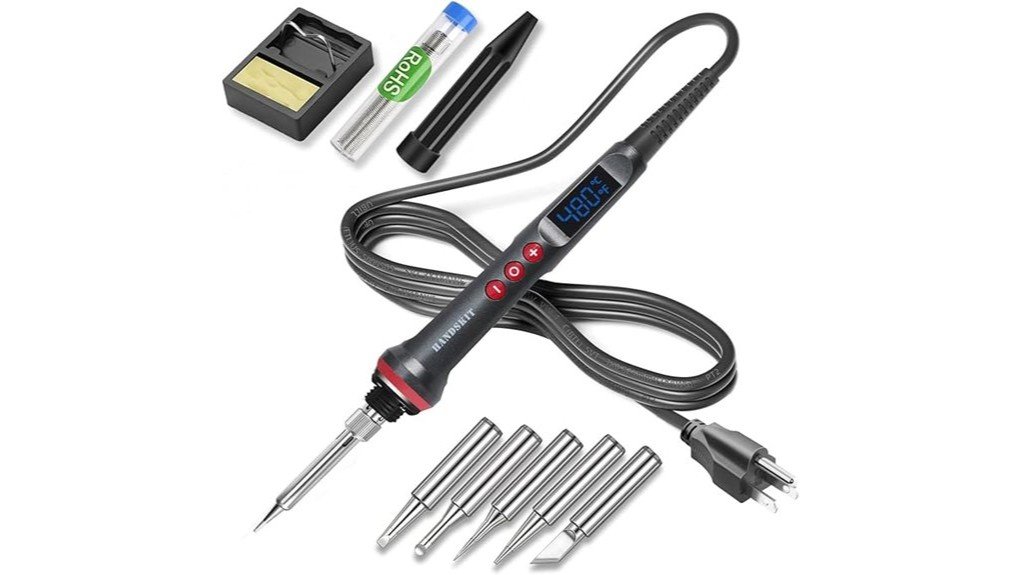
The main appeal is speed and control. The ceramic heater reaches working temperature in about 20 seconds, while the LED screen lets you check your setting at a glance. The kit also includes five interchangeable tips, solder wire, a stand, a cleaning sponge, and a protective cap, so it gives beginners more than a bare iron.
This is still a compact soldering iron kit, not a heavy industrial station. It suits repair benches, hobby spaces, and occasional workshop jobs better than nonstop production use.
Who Should Buy It?
Best For
- Beginners who want a digital display and simple temperature buttons
- Electronics hobbyists working on PCB repairs, LED wiring, and small components
- DIY users who want faster heating than a basic low-wattage soldering iron
Skip If
- You need a full professional station for all-day production work
- You require verified ESD-safe workstation features for sensitive commercial electronics
- You want a cordless soldering iron for field repairs away from an outlet
Temperature Control and Heating Performance
The 90W ceramic heating system is the biggest upgrade over many basic starter irons. A 20-second heat-up means you spend less time waiting before wire repairs, quick PCB work, or small appliance fixes.
The 180°C to 480°C range gives you useful flexibility. Lower settings can help with delicate work, while higher settings help when you need more heat for larger joints or thicker wire. You should still match the temperature to your solder type, component sensitivity, and project instructions.
The LED display also helps you avoid guessing. Instead of relying on a simple dial, you can see the set temperature clearly and make smaller adjustments as your work changes.
Pro Tip: For many electronics jobs, starting around 350°C to 380°C gives you a useful balance of solder flow and tip life. Raise or lower the setting based on your solder, joint size, and component sensitivity.
Controls, Display, and Memory Function
The HANDSKIT kit uses button controls and an LED display, which makes it easier to repeat settings from one project to the next. You can also switch between Celsius and Fahrenheit, a helpful detail if your soldering guide or project notes use a different unit.
The auto-memory function saves the last used temperature. That feature helps when you often do the same type of work, such as LED strip wiring, small PCB repairs, or repeated connector soldering.
The built-in calibration range from -99°C to 99°C gives more adjustment than a basic analog iron. Most casual users may never need that feature, but it adds flexibility if you want to fine-tune the displayed temperature against your own testing setup.
Auto-Sleep and Safety Features
The auto-sleep function activates after about 15 minutes of inactivity. This can reduce unnecessary heat exposure when you pause between joints, sort parts, or check a repair diagram.
You still need safe work habits. Keep the iron in its stand, keep the cord away from your hands and workpiece, and let the tip cool fully before touching it, changing tips, or placing the protective cap over the iron.
The handle has a non-slip design and heat insulation, which helps during longer sessions. The heated tip remains dangerous, so keep children, pets, paper, plastics, and flammable items away from your soldering area.
Before You Buy: This kit is best for light to moderate soldering. It is not the right choice if you need a certified industrial station for continuous production, advanced ESD control, or heavy shop use.
Accessories and Tip Options
The kit includes five interchangeable tips, solder wire, a stand, a cleaning sponge, and a protective cap. That accessory bundle makes it more practical than a single bare soldering iron, especially if you are setting up a small home repair kit.
Different tip shapes help with different jobs. Fine tips work better near small pads and components, while wider tips can move heat into larger joints more efficiently. Match the tip to the joint instead of using one tip for every task.
The listing also points buyers toward M900 soldering tips for replacement options. That matters because soldering tips wear over time, especially if you run the iron too hot, clean it poorly, or leave it heated for long periods.
Setup Tips Before First Use
Before you plug in the iron, place the stand on a stable, heat-resistant surface. Keep the cleaning sponge nearby and route the cord so it does not pull across the work area.
Choose the right tip before the iron gets hot. Tighten and seat the tip only according to the product instructions, then let the iron heat fully before you begin your first joint.
Clean and tin the tip during use. A thin layer of solder on the working surface helps heat transfer and reduces oxidation. When you finish, let the iron cool completely before storing it or using the protective cap.
How It Performs in Real Use
For PCB and Electronics Repair
The adjustable temperature range and quick heat-up make this kit useful for PCB repairs, small components, and connector work. The LED display helps you keep a repeatable setting, which matters when you move between thin pads and larger solder points.
For Wire Joining and LED Projects
The 90W output gives you enough heat for many hobby wiring jobs, including LED strips, low-voltage wiring, and small connectors. You still need proper solder, clean wire, and a secure joint before adding heat shrink or insulation.
For Small Appliance Fixes
This kit can handle occasional small appliance repairs when the job involves wires, switches, or light electronics. It is not a substitute for electrical diagnosis, and you should avoid repairs beyond your skill level or safety knowledge.
For Learning Soldering Basics
Beginners get a helpful learning setup because the display, included tips, stand, and sponge reduce the number of separate items you need to buy. The main learning curve is choosing the correct temperature, keeping the tip clean, and avoiding too much heat on delicate parts.
Maintenance and Care
Tip care has a big effect on how this soldering iron performs. Clean the tip regularly with the included sponge, keep the tip lightly tinned, and avoid scraping it with hard tools that can damage the coating.
Do not leave the iron running hotter than needed. High heat can speed up tip wear and make solder harder to control, especially on small pads.
Inspect tips as they age. If a tip no longer wets with solder, transfers heat poorly, or looks badly oxidized, replacing it may restore performance faster than raising the temperature.
Pros and Cons
Pros
- 90W ceramic heater reaches working temperature in about 20 seconds
- Wide 180°C to 480°C range supports small electronics and stronger joints
- LED display gives clearer control than a basic dial-only iron
- Auto-memory saves your last temperature setting for repeat projects
- Includes tips, solder wire, stand, sponge, and protective cap
Cons
- Not ideal for continuous industrial soldering or production benches
- Tip performance depends on regular cleaning, tinning, and correct temperature use
- Included stand is useful, but it is still a compact kit setup rather than a full workstation
Need a Fast Starter Soldering Kit?
Check the current product details, accessory list, and seller information before you buy.
Is It Worth the Price?
The HANDSKIT 90W Digital Soldering Iron Kit sits in the budget to mid-range category for hobby and home repair tools. It offers strong value for the price if you want faster heating, a digital display, adjustable temperature, and starter accessories in one purchase.
You get the most value from it if you do electronics repair, LED wiring, small appliance fixes, or occasional DIY soldering. The kit saves you from buying every small accessory separately, though serious users may still upgrade tips, solder, flux, or the stand over time.
It is not the best fit if you need a professional station with a heavy base, advanced tip ecosystem, verified ESD controls, and all-day duty-cycle comfort.
How It Compares to Alternatives
Compared to basic 30W or 60W plug-in soldering irons, the HANDSKIT 90W model heats faster and gives you better control through its LED display. That makes it easier to use across different soldering jobs instead of relying on one fixed heat level.
Compared with professional stations from brands such as Hakko or Weller, this kit is more affordable and easier to store, but it does not offer the same workstation feel or long-term shop-grade durability. Choose HANDSKIT if you want speed and practical control for light use, not a full bench station replacement.
Frequently Asked Questions
Is the HANDSKIT 90W soldering iron good for beginners?
Yes, it is beginner-friendly because the LED display shows the set temperature clearly. The included tips, stand, sponge, and solder wire also make it easier to start practicing without building a kit from scratch.
How fast does this soldering iron heat up?
The listing states that the 90W ceramic heater reaches working temperature in about 20 seconds. Actual working speed can still depend on your set temperature, room conditions, tip size, and joint size.
Can you use it for PCB repair?
Yes, it can work for PCB repair, small components, and connector soldering when you use the right temperature and tip. Use extra care around heat-sensitive components and avoid holding heat on small pads too long.
Does it have an auto-sleep function?
Yes, the listing describes an auto-sleep function that activates after about 15 minutes of inactivity. This helps reduce unnecessary heat when you pause, but you should still place the iron in its stand and follow safe handling habits.
What temperature should you use for electronics work?
Many electronics tasks work well around 350°C to 380°C, but the right setting depends on your solder, tip, component, and joint size. Start with the lowest temperature that gives clean solder flow and adjust only when needed.
Do you need to clean the soldering tip regularly?
Yes, regular cleaning helps maintain heat transfer and solder flow. Wipe the tip during use, keep it lightly tinned, and replace it when it becomes badly oxidized or stops wetting properly.
Is it suitable for professional daily use?
It can handle light professional and repair tasks, but it is not the best choice for nonstop production work. A full soldering station is a better fit if you need all-day comfort, advanced controls, and verified bench-grade features.
What comes in the HANDSKIT soldering iron kit?
The listed kit includes the soldering iron, interchangeable tips, solder wire, a stand, a cleaning sponge, and a protective cap. Always check the current Amazon listing before ordering because package details can vary by seller or listing update.
The Bottom Line
The HANDSKIT 90W Digital Soldering Iron Kit is a strong choice if you want a fast-heating, adjustable, easy-to-read soldering iron for electronics repair, hobby work, and light DIY jobs. Its best strengths are the 20-second heat-up, LED display, wide temperature range, and starter accessory set.
You should skip it if you need a heavy-duty professional soldering station for continuous shop use. For beginners and home repair users, it earns a recommended-with-caveats verdict because it gives you useful control without making the setup complicated.