Disclosure: As an Amazon Associate, we earn from qualifying purchases. If you click a link on this page and make a purchase, we may receive a small commission at no extra cost to you.
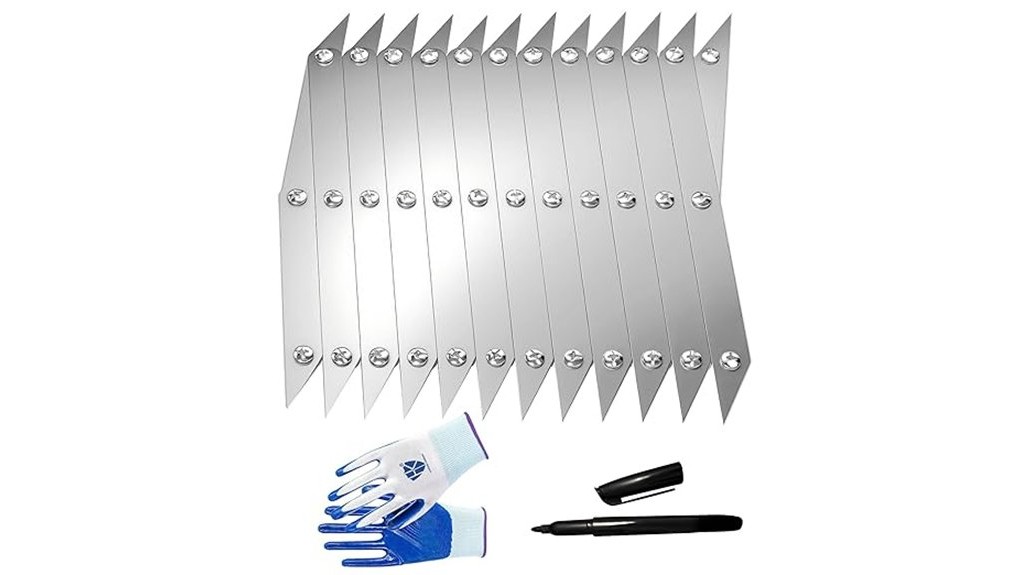
A center mark that is only slightly off can leave a drill hole, fastener, or welded part visibly misaligned. The Dolcety 12 Point Center Finder Pro is a manual stainless-steel layout tool designed to help you find the center of workpieces from 1 inch to 13 inches. Its 12-point format can make repeated shop layout faster than drawing diagonals or checking both sides with a tape measure. The tradeoff is that it remains a marking aid, so the result depends on flat contact, steady placement, and a fine pencil, knife, or scribe.
Quick Verdict
Rating: 8.2/10, Recommended with caveats
Best For: Woodworkers, welders, metal fabricators, and DIY users who regularly mark centers on 1-inch to 13-inch workpieces.
Bottom Line: This is a practical, battery-free layout tool with a stainless-steel body and a useful size range. It is not a digital measuring device or a machinist inspection gauge, and the exact package contents and warranty were not confirmed.
| Specification | Detail |
|---|---|
| Brand | Dolcety |
| Product name | 12 Point Center Finder Pro |
| Product type | Manual center-finding and layout-marking tool |
| Design | 12-point layout format |
| Supported workpiece range | 1 inch to 13 inches |
| Material | Laser-cut stainless steel |
| Color | Silver |
| Best uses | Drilling layout, woodworking, metalworking, welding setup, fastening, and general DIY marking |
| Surface requirement | Works best when the tool and workpiece can remain flat and stable |
| Power required | None |
| Care | Wipe clean, dry before storage, inspect the edges, and use light oil when needed |
| Unconfirmed details | Exact dimensions, weight, package quantity, included accessories, and warranty terms |
What Is the Dolcety 12 Point Center Finder Pro?
The Dolcety 12 Point Center Finder Pro is a manual layout guide for locating and marking the center of a workpiece. You align the tool with the outside reference points of the part, keep the setup stable, and make a center mark before drilling, cutting, fastening, or assembling.
Its stated working range covers objects from 1 inch to 13 inches. That makes it most relevant to small and medium shop parts, including board ends, turning blanks, brackets, plates, and other pieces that fit securely within the guide.
The product is described as laser-cut stainless steel. That material is a sensible fit for a shop layout tool because it does not need batteries, is easy to wipe clean, and is less vulnerable to surface corrosion than unfinished mild steel. It still needs careful storage because a bent edge or damaged reference point can affect your mark.
Who Should Buy It?
Best For
- Woodworkers marking centers on board ends, blanks, panels, and dowel locations.
- Welders and fabricators placing reference marks before punching, drilling, clamping, or tack welding.
- DIY users who want a repeatable manual method for parts within the 1-inch to 13-inch range.
Skip If
- You need certified measurements, digital readouts, or machinist-grade inspection accuracy.
- Your workpieces are usually larger than 13 inches or cannot be held still during marking.
- You mainly work on curved, tapered, or uneven surfaces that prevent consistent contact.
Before You Buy: Confirm the current Amazon variant and package details before ordering. The product identity, stainless-steel material, silver color, and 12-point design are supported, but the exact weight, dimensions, number of pieces, included accessories, and warranty were not confirmed for this ASIN.
Design and Build Quality
The stainless-steel body is the main construction advantage. A layout tool can be exposed to sawdust, grinding debris, fingerprints, oil, and moisture, so a smooth metal surface is easier to clean than wood, plastic, or unfinished steel.
Laser-cut construction can also support clean reference edges, but the tool is only useful while those edges stay straight. Do not toss it beneath clamps, hammers, or other heavy tools. Store it flat or hang it where the contact points cannot be bent or nicked.
The design has no electronics, adjustment knobs, or battery compartment. That keeps setup simple and reduces maintenance, but it also means you provide all of the alignment and marking control.
Measurement Range and Accuracy
The stated 1-inch to 13-inch range covers many common hobby, repair, and fabrication parts. A dedicated center finder is especially useful when the workpiece is awkward to divide with a ruler or when you need the same marking method across several similar pieces.
Accuracy depends on four factors: the workpiece must remain still, the tool must sit squarely, the same contact points must touch the edges, and the marking tip must be fine. A wide carpenter pencil line can hide the true center, while a sharp pencil, marking knife, or fine scribe gives you a more precise reference.
For high-tolerance machining, use the mark only as a starting point. Confirm critical dimensions with the measuring and inspection tools required by your project before removing material.
Ease of Use
The basic workflow is direct: place the workpiece on a stable surface, align the center finder with its outside edges, and mark the indicated center. This can be quicker than measuring from multiple sides, especially when you are preparing several matching parts.
New users still need a short practice session. Start on scrap material so you can learn how much hand pressure keeps the tool steady without shifting the workpiece. Experienced users can use the same process as a fast layout step before drilling, punching, welding, or assembly.
Pro Tip: Make a light first mark, rotate or reposition the workpiece, and check the center again. When the second mark lands on the first, you have a stronger reason to trust the location before drilling or punching.
Applications in Woodworking and Metalworking
In woodworking, the tool can help you mark board ends, turning blanks, small panels, dowel positions, and centered fastener locations. A consistent center reference is useful before you drill pilot holes, start a Forstner bit, mount hardware, or prepare a part for a lathe.
For metalworking and welding setup, it can help place reference marks on brackets, plates, and small fabricated parts. Use the center finder before heat, sparks, and spatter are present, then remove it and secure the work with the correct clamps, magnets, squares, or fixtures.
| Use Case | How It Helps | Limitation to Know |
|---|---|---|
| Woodworking | Creates a repeatable starting mark for holes, dowels, turning, and hardware. | Soft wood can dent or show a wide mark if you press too hard. |
| Metal drilling | Identifies a location you can verify before using a center punch. | The layout mark is not a substitute for dimensional inspection. |
| Welding setup | Adds a visual reference before parts are clamped and tacked. | It does not hold parts square or protect against movement. |
| Repeated DIY parts | Uses the same alignment method across a small batch of similar pieces. | A jig may be faster when production volume is high. |
How It Performs in Real Use
For Drilling Layout
The center finder gives you a clear location to inspect before a bit touches the material. On wood, you can mark lightly and confirm the position with a square or ruler. On metal, verify the location before making a small center-punch dimple that keeps the drill bit from wandering.
For Welding Alignment
The tool is most useful during the cool layout stage. Mark the intended center, remove the tool, and then use proper workholding to position the parts. The center mark can help with visual alignment, but clamps and fixtures must control the actual joint.
For Repeated Shop Tasks
When you mark several similar boards, plates, or blanks, a consistent process can reduce small differences caused by switching between tape-measure methods. Check the first few pieces carefully, because repeating a poor alignment will repeat the same error.
For Occasional Home Projects
The battery-free design is convenient for a garage drawer or portable toolbox. It is ready when you need it, but a buyer who makes only one or two center marks each year may get enough utility from a ruler, square, and diagonal lines.
How to Use It Correctly
Clean the workpiece and place it on a stable bench. Position the center finder so its reference points contact the workpiece consistently, then check that the tool is not tilted or rocking.
Make a light center mark first. For wood, use a sharp pencil, marking knife, or awl that suits the finish and grain. For metal, use a fine scribe, then confirm the location before using a center punch.
Recheck the mark from another orientation when accuracy matters. Avoid forcing the tool onto curved, tapered, or uneven surfaces because inconsistent contact can move the apparent center.
Common Mistakes to Avoid
- Using a thick marking tip: A broad line creates uncertainty about the true drilling point.
- Letting the part move: Clamp or brace the workpiece when it cannot remain steady by hand.
- Trusting one rushed placement: Reposition the tool and verify the mark before making a permanent hole.
- Treating it as an inspection gauge: Confirm tolerance-critical work with the proper square, caliper, gauge, or measuring system.
- Leaving it near welding spatter: Use it for layout, remove it, and then begin hot work.
Shop Safety and Material Care
Inspect the stainless-steel edges before use and stop using the tool if it is bent, badly nicked, or has a sharp burr. Keep your fingers clear when you follow a layout mark with a center punch, drill, saw, or cutting tool.
Wear the eye, hearing, hand, and respiratory protection required for the task that follows the layout step. The center finder helps place a mark, but it does not replace safe drilling, cutting, grinding, or welding procedures.
After use, wipe away dust, metal filings, oil, and moisture. Dry the tool before storage, and apply a light protective oil when it will sit for a long period in a damp garage or shop.
Pros and Cons
Pros
- Supports center marking on workpieces from 1 inch to 13 inches.
- Stainless-steel construction is durable, wipeable, and suitable for shop storage.
- 12-point manual design needs no batteries, charging, app, or calibration menu.
- Useful for woodworking, metal drilling layout, welding setup, and general DIY work.
- Can make repeated center-marking tasks more consistent than visual guessing.
Cons
- Accuracy depends on stable contact, careful alignment, and a fine marking tip.
- Curved, tapered, uneven, or larger-than-13-inch workpieces may not suit the design.
- Exact dimensions, weight, package quantity, accessories, and warranty remain unconfirmed.
Is It Worth the Price?
The Dolcety 12 Point Center Finder Pro is worth considering when center marking is a regular part of your woodworking, fabrication, or repair workflow. Its value comes from convenience and repeatability, not from replacing a full set of measuring tools.
You are more likely to get strong value from it when you work with many small and medium parts and want a dedicated guide that is ready without batteries or setup menus. The stainless-steel body also suits repeated shop use when you clean and store it carefully.
It is not the best fit when you need certified accuracy, digital readings, or compatibility with workpieces outside the stated range. For rare center-marking jobs, a ruler and diagonal layout may be enough.
How It Compares to Alternatives
A ruler and two diagonal lines cost nothing if you already own the tools, but they take more steps and can be slower on repeated work. A combination square offers broader edge-layout and 90-degree functions, while a caliper or machinist layout setup is better for measured offsets and tolerance-critical inspection.
The Dolcety center finder makes the most sense when you want a focused manual guide for fast center marks within its supported range. It complements squares, rulers, punches, and clamps rather than replacing them.
Frequently Asked Questions
What size objects can the 12 Point Center Finder Pro measure?
The supported range is 1 inch to 13 inches. Check the current Amazon variant before ordering, and do not assume the tool will fit larger workpieces.
Can you use it for welding projects?
Yes, it can help place reference marks before welding setup. Remove it before hot work, then use proper clamps, squares, magnets, or fixtures to hold the parts in position.
Is it suitable for woodworking?
Yes. You can use it to mark board ends, turning blanks, drill points, dowel locations, and centered hardware positions when the workpiece remains stable.
Can it be used on curved surfaces?
Curved, tapered, or uneven surfaces can prevent consistent contact and reduce confidence in the mark. Test the placement and verify the center by a second method before drilling or cutting.
How do you clean and maintain it?
Wipe away dust, filings, oil, and moisture after use, then dry the tool before storage. Inspect the reference edges for bends or nicks and use light oil for long storage in a damp shop.
Is it comfortable for left-handed users?
The manual layout design does not depend on electronic controls or a fixed hand grip. Practical comfort will depend on how you steady the workpiece and which pencil, knife, awl, or scribe you use.
Does it come with a warranty?
Warranty terms were not confirmed for the linked ASIN. Review the current seller information and Amazon return terms before ordering if coverage is important to you.
Who should skip this center finder?
Skip it when your parts are usually larger than 13 inches, cannot sit securely, or require certified machining accuracy. It is a practical layout aid, not a digital measuring device or final inspection gauge.
The Bottom Line
The Dolcety 12 Point Center Finder Pro is a good fit for woodworkers, welders, fabricators, and DIY users who want a reusable manual guide for center marks on 1-inch to 13-inch workpieces. Its stainless-steel, battery-free design is the main strength, while technique-dependent accuracy and unconfirmed package and warranty details are the main limitations. It earns an 8.2/10 recommended-with-caveats verdict, but buyers who need digital or machinist-grade measurement should choose a more specialized tool.
Ready to Buy?
Check the latest price, selected variant, package details, and seller terms before you decide.