Disclosure: As an Amazon Associate, we earn from qualifying purchases. If you click a link on this page and make a purchase, we may receive a small commission at no extra cost to you.
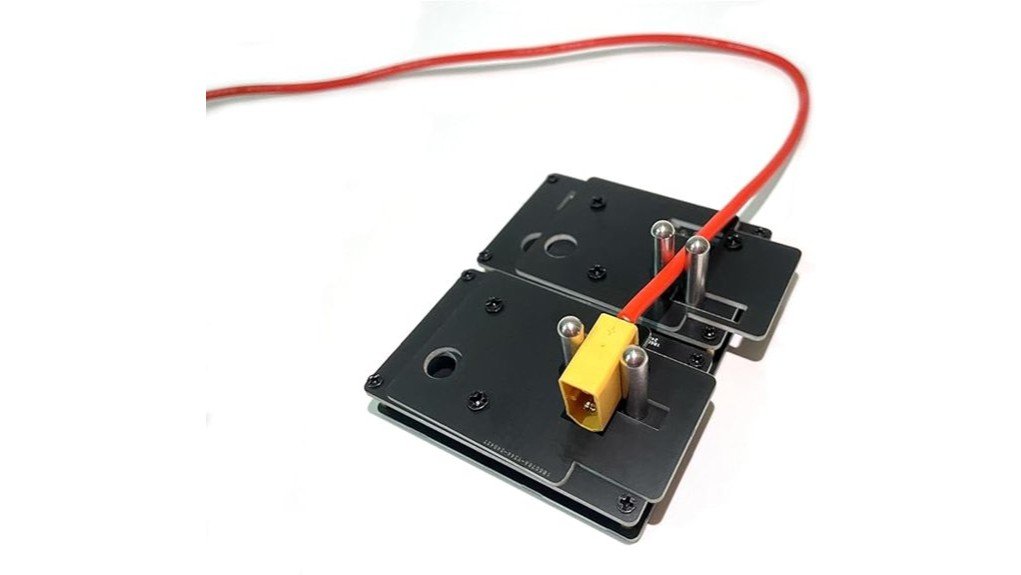
RC power connectors are difficult to solder cleanly when the plug rolls, the wire pulls sideways, or you need a third hand to feed solder. The Hobbymall RC Soldering Insulate Station Jig holds common RC connectors and silicone wire so you can control the iron and solder with both hands. This review helps you decide whether its connector range, 65-gram weight, and simple clamping design fit your bench work. Its main advantage is steadier alignment, while its main limitation is that it supplies no heat, temperature control, magnification, or soldering accessories.
Quick Verdict
Rating: 8.2/10, recommended with caveats
Best For: RC hobbyists, drone builders, RC car owners, and electronics users who solder XT90, XT60, XT30, EC5, EC3, or Deans T plugs.
Bottom Line: The Hobbymall RC Soldering Jig is a useful bench aid when you need cleaner alignment and steadier connector positioning. It is not a full soldering station, so skip it if you need a powered iron holder, temperature control, magnification, or a complete electronics repair setup.
| Specification | Detail |
|---|---|
| Brand | Hobbymall |
| Model / Part Number | XHT01 |
| ASIN | B0D2HYMWFW |
| Product Type | RC connector and silicone wire soldering jig |
| Compatible Wire Range | 0 AWG to 24 AWG silicone wires |
| Connector Compatibility | XT90, XT60, XT30, EC5, EC3, Deans T plug, and similar RC connector work |
| Listed Materials | Marketplace data varies between nylon and stainless steel, and alloy steel |
| Catalog Temperature Field | 480°C listed, not a direct iron-tip contact limit |
| Item Weight | 65 grams / 2.29 ounces |
| Included Components | 1 RC soldering jig, no iron or soldering supplies |
| Power Requirement | No batteries required |
| Best Use | Holding RC connectors and silicone wires steady during soldering |
Before You Buy: This is a holding jig, not a powered soldering station. You still need a soldering iron, solder, flux when needed, heat shrink, ventilation, eye protection, and safe soldering habits.
What Is the Hobbymall RC Soldering Insulate Station Jig?
The Hobbymall RC Soldering Insulate Station Jig is a small workbench tool that helps hold RC connectors and silicone wires in place while you solder. Instead of trying to grip a hot connector with pliers or balance it against the edge of a bench, you can use the jig to keep the parts aligned while you make the joint.
It is designed for common RC power connectors, including XT90, XT60, XT30, EC5, EC3, and Deans T plugs. That makes it useful for RC cars, drones, planes, boats, battery packs, ESC leads, and charger adapters. The listed wire range from 0 AWG to 24 AWG gives it broad use across small and large silicone wire projects, though very large or unusually shaped connectors may still need test fitting.
The XHT01 is a passive holder rather than a powered station. Its purpose is to reduce slipping and crooked wire exits while you control the soldering iron and solder. Material descriptions vary across marketplace fields, so the safest buying assumption is that this is a compact mixed-material jig that still needs careful heat control.
Who Should Buy It?
Best For
- RC hobbyists who regularly solder XT90, XT60, XT30, EC5, EC3, or Deans T plugs.
- Drone, RC car, RC boat, and RC plane users who make or repair battery leads.
- Beginners who want a steadier setup while learning clean connector soldering.
Skip If
- You need a full soldering station with temperature control and an iron holder.
- You mostly solder circuit boards, microelectronics, or surface-mount components.
- You use connector types outside the listed RC plug range and cannot confirm fit.
Clamping Design and Wire Support
The jig is shaped around common RC power plugs, including XT90, XT60, XT30, EC5, EC3, and Deans T connectors. That range covers many battery leads, ESC wires, charger cables, and adapter projects without forcing you to balance the connector against a bench edge.
Its listed 0 AWG to 24 AWG silicone-wire range is broad, but the number alone does not guarantee every wire and connector combination will sit securely. Thin leads may need careful positioning, while thick cable may need a separate support block so its weight does not twist the plug.
The holding action gives you a stable point for tinning connector cups or tabs and joining the prepared wire. This improves repeatability, but it does not correct poor heat transfer, contaminated surfaces, weak tinning, reversed polarity, or movement before the solder solidifies.
Design and Build Quality
Marketplace specification fields describe the jig as nylon and stainless steel in some places and alloy steel in another product-description field. The same catalog also lists 480°C as an upper temperature value. Because those fields are inconsistent, treat them as seller-supplied catalog data rather than proof that every surface can tolerate direct contact with a hot iron tip.
At 65 grams, the jig is light enough to carry in a tool bag or RC field box. The low weight is helpful for portability, but it also means you should place it on a flat, steady bench before soldering. For heavy wires, use gentle cable support so the wire does not pull the connector out of position.
Connector Compatibility
This jig makes the most sense for the connector families named in the listing. XT60 and XT90 plugs are widely used on battery packs and ESC leads, while XT30 plugs suit many smaller RC builds. EC5, EC3, and Deans T connectors are also listed, giving the holder useful coverage across battery, charger, and adapter work.
Compatibility still depends on the exact shell and contact shape. Custom housings, oversized tabs, anti-spark variants, bullet connectors, or plugs with attached covers may not sit like the standard versions shown in the listing. Dry-fit the male and female connector types you use before heating either one.
Pro Tip: Before soldering, dry-fit the connector and wire in the jig, then slide heat shrink onto the wire first. Many RC soldering mistakes happen because the heat shrink is forgotten until after the connector is already soldered.
Ease of Use
The jig addresses one specific problem: keeping a connector still while you heat the cup or tab and feed solder. Once the plug and wire are aligned, you can focus on heat transfer, solder flow, and polarity instead of stopping the part from rolling across the bench.
Beginners may find it helpful because it removes one source of frustration. Experienced users may like it because it speeds up repeat soldering jobs, especially when making several adapters or replacing multiple battery connectors.
It does not make soldering automatic. You still need to tin the wire, heat the connector properly, avoid overheating the plug body, and let the joint cool without movement. The jig helps with positioning, but the final joint quality still depends on your technique.
How It Performs in Real Use
For RC Battery Connector Repairs
When replacing a worn XT60, XT90, or Deans plug, the jig helps hold the new connector steady while you tin the cup and join the wire. This can reduce hand fatigue and make it easier to keep polarity and wire direction organized.
For Building Charging Adapters
If you make adapters between battery plugs and charger leads, the jig can help you repeat the same alignment across multiple connectors. This is useful when you want neat wire exits and consistent heat shrink placement.
For Drone and RC Car Work
Drones and RC cars often use compact, high-current wiring. The jig helps when you need both hands free to control the soldering iron and solder while keeping the connector from rolling or tipping.
For Storage and Field Kits
The light 65-gram weight makes the jig easy to keep in a small repair kit. It is not a full bench station, but it can be useful when you need a simple holder for repairs away from your main workspace.
Setup Tips Before First Use
Place the jig on a flat, stable, heat-safe surface. Remove loose paper, foam, fuel, and other flammable items from the work area. Whenever possible, work on disconnected leads rather than an energized battery pack. If you must replace a battery connector, isolate one conductor at a time and never cut or expose both leads together.
Dry-fit the connector before heating it. The wire should enter the connector straight, without pulling sideways against the holder. If the wire is heavy, support it with a small block, tape, or a separate helping hand so the connector does not twist as the solder cools.
Use local ventilation and eye protection, and follow the instructions for your iron, solder, flux, and battery. Let the joint cool without movement before removing it from the jig. Then check for poor wetting, gaps, stray strands, reversed polarity, or exposed conductor before shrinking the insulation.
Compatibility and Safety
The jig holds parts during hot work, so heat control matters more than the catalog temperature field. Do not rest the iron tip on the holder, and do not assume the listed 480°C value means every surface or connector housing is safe at that temperature. Apply heat only where the joint requires it.
Many RC connectors can soften or deform if too much heat is applied for too long. Use the right iron temperature, pre-tin the wire and connector when appropriate, and work efficiently. If the connector housing starts to discolor, shift, or smell overheated, stop and let it cool.
Battery connector work needs extra care because a short can damage the pack, melt insulation, or start a fire. Keep the unused lead fully insulated, work on one conductor at a time, confirm polarity before soldering, and stop if the battery is swollen, damaged, hot, or otherwise unsafe to handle.
Pros and Cons
Pros
- Supports common RC connector types, including XT90, XT60, XT30, EC5, EC3, and Deans T plugs.
- Works with a broad listed silicone wire range from 0 AWG to 24 AWG.
- Purpose-built connector slots are more controlled than balancing a plug in pliers, tape, or an improvised holder.
- Light 65-gram weight makes it easy to store in a bench drawer, RC tool box, or field repair kit.
- Helps keep both hands free for cleaner soldering control and better connector alignment.
Cons
- Not a powered soldering station and does not include a soldering iron.
- May not fit every custom connector shell, oversized plug, or unusual battery lead layout.
- Its light weight improves portability, but heavy wire can pull or rotate the jig unless you support the cable.
Is It Worth the Price?
The Hobbymall RC Soldering Jig is best viewed as a practical bench helper, not a major tool investment. It offers strong value for the price if you regularly solder RC connectors and want a cleaner, steadier setup than pliers, tape, or a basic helping hand.
You get the most value from it if you work with several connector types across batteries, chargers, ESCs, and adapters. It is less compelling if you only solder one connector once or twice a year, or if your main work is fine circuit board repair instead of RC power wiring.
The main limitation is scope. It solves the holding and alignment problem, but it does not solve poor soldering technique, weak wire prep, incorrect heat, or unsafe battery handling.
How It Compares to Alternatives
Compared with a magnetic helping hands soldering station, this Hobbymall jig is more focused on RC connector work. A helping hands tool may be better for circuit boards, small components, or odd-shaped parts, while this jig makes more sense when your main job is holding RC plugs and silicone wire.
Generic aluminum RC connector jigs may feel heavier and may include dedicated holes for additional bullet-plug sizes, while magnetic helping-hands stations offer more freedom for circuit boards and odd-shaped parts. The Hobbymall XHT01 makes the most sense when you prefer a light, simple holder and its listed connector range matches most of your battery and ESC work.
Frequently Asked Questions
What connectors work with the Hobbymall RC Soldering Jig?
It is listed for XT90, XT60, XT30, EC5, EC3, and Deans T plugs. These are common RC battery, charger, and ESC connectors, but unusual shells or custom plug styles should be checked before soldering.
Can it handle different wire gauges?
The listed range is 0 AWG to 24 AWG silicone wire. Very thick wire may need extra support so the wire weight does not pull the connector out of alignment.
Is this a full soldering station?
No. It is a soldering jig that holds connectors and wires. You still need a soldering iron, solder, flux when needed, heat shrink, ventilation, and safe soldering equipment.
Is it suitable for beginners?
Yes, it can help beginners because it keeps the connector still while they learn heat control and solder flow. Beginners should still practice on spare wire and connectors before working on important battery leads.
What material is the jig made from?
Marketplace data is inconsistent. Some fields identify nylon and stainless steel, while another product-description field says alloy steel. Treat the listed 480°C value as catalog data, and avoid direct or prolonged iron-tip contact with the jig.
Can you use it for non-RC soldering?
You may be able to use it for similar wire and connector tasks, but it is mainly designed around RC connector shapes. For circuit boards, sensors, or tiny components, a helping hands tool or PCB vise may be a better fit.
What common mistake should you avoid?
Do not rely on the jig alone to prevent a poor joint. Pre-fit the connector, tin the wire properly, avoid moving the joint while it cools, and remember to slide heat shrink onto the wire before soldering.
The Bottom Line
The Hobbymall RC Soldering Insulate Station Jig is recommended for RC users who regularly solder the listed XT, EC, and Deans T connector families and want steadier alignment than pliers or tape can provide. Its strongest points are broad listed connector coverage, low weight, and hands-free positioning. Skip it if you need a powered station, a PCB vise, or guaranteed fit for unusual connector shells.