Disclosure: As an Amazon Associate, we earn from qualifying purchases. If you click a link on this page and make a purchase, we may receive a small commission at no extra cost to you.
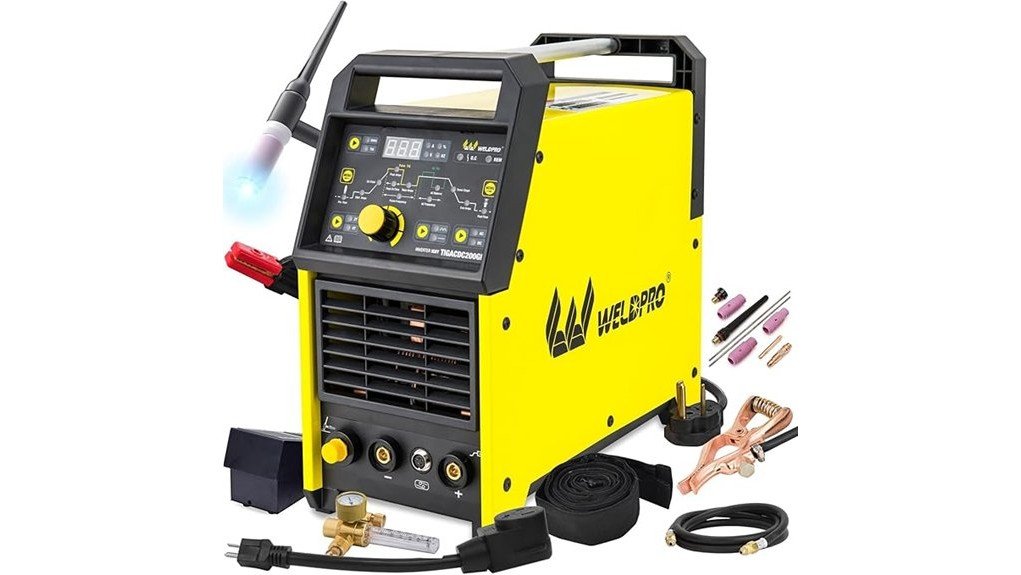
Choosing an AC/DC TIG welder can get confusing fast, especially when you want one machine for aluminum, stainless steel, mild steel, and occasional stick work. The Weldpro TIG Welder AC/DC 200A gives you TIG, pulse TIG, and stick capability in a compact IGBT inverter design. It also includes a CK17 TIG torch and foot pedal, which matters if you want better heat control on thin or detailed welds. This review helps you decide whether its control range, accessory package, and duty cycle fit your garage, small shop, or fabrication projects.
Quick Verdict
Rating: 8/10
Best For: Hobbyists, fabrication learners, and intermediate welders who want AC/DC TIG control with stick backup
Bottom Line: This Weldpro gives you strong control for aluminum and steel TIG work, plus enough accessories to get your setup started. The tradeoff is that beginners need time to learn the digital settings, and heavy production welding may push past its duty-cycle comfort zone.
Key Specifications
| Specification | Detail |
|---|---|
| Brand | Weldpro |
| Product Name | Weldpro 200A AC/DC TIG Welder with CK17 Torch |
| Model Family | TIGACDC200GD |
| Product Type | AC/DC TIG and stick welding machine |
| Welding Modes | AC TIG, DC TIG, AC pulse TIG, DC pulse TIG, stick/MMA |
| TIG Output Range | 5–200A DC TIG, 10–200A AC TIG |
| Stick Output Range | 10–180A AC/DC stick |
| Power Input | Dual voltage, listed as 110V/220V on Amazon and described by Weldpro as 120V/240V auto-sensing |
| Inverter Technology | IGBT inverter design |
| Duty Cycle | 40% at 200A |
| Arc Start | High-frequency TIG start |
| Control Settings | Pre-flow, post-flow, start amps, end amps, upslope, downslope, peak current, AC balance, AC frequency, pulse frequency, peak time, and background current |
| Power Source Weight | About 31 lb |
| Included Accessories | CK17 TIG torch, trigger button, torch cover, Weldpro foot pedal, electrode holder, ground clamp, flow meter, gas hose, power adapter, and consumables kit |
| Safety Features | Automatic overheat and overcurrent protection, with voltage fluctuation protection listed on Amazon |
| Warranty Note | Weldpro lists a 3-year power source warranty |
| Best Use | Garage TIG work, small-shop fabrication, aluminum practice, stainless steel projects, and stick welding backup |
What Is the Weldpro TIG Welder AC/DC 200A?
The Weldpro TIG Welder AC/DC 200A is a dual-voltage inverter welder built around AC/DC TIG and stick welding. Its AC TIG mode helps with aluminum and magnesium alloy work, while DC TIG fits stainless steel, mild steel, and other common fabrication metals.
The main appeal is control. You can adjust settings such as AC balance, AC frequency, pulse frequency, pre-flow, post-flow, upslope, downslope, start amps, and end amps. Those settings help you manage arc behavior, shielding gas timing, and heat input instead of relying on a basic amperage-only machine.
This is not a simple one-knob beginner welder. You get more flexibility, but you also need to understand TIG setup, tungsten preparation, shielding gas, material cleaning, and amperage control to get consistent results.
Who Should Buy It?
Best For
- Welders who want one machine for aluminum AC TIG and steel DC TIG projects
- DIY builders and small-shop users who need pulse control and a foot pedal
- Intermediate welders who want more tuning options than entry-level TIG machines offer
Skip If
- You want a simple plug-and-weld machine with very few settings
- You need high-volume industrial welding with long runs near maximum output
- You need MIG welding, flux-core welding, or spool-gun aluminum welding from the same machine
Design and Control Interface
The Weldpro uses a digital menu system instead of a basic analog panel. That gives you precise adjustment over TIG settings, but it also means you should spend time learning what each setting does before starting real project work.
The LED display helps you confirm amperage and mode selection before striking an arc. This matters when you switch between AC TIG, DC TIG, pulse TIG, and stick welding, because the wrong mode can create poor arc behavior or damage thin material.
The included foot pedal is a major benefit for TIG work. It lets you adjust amperage during the weld, which helps when you start cold, move into a hotter section, or taper off at the end of a bead.
Welding Performance in Real Use
Aluminum Welding
AC TIG mode makes this machine useful for aluminum because alternating current supports cleaning action on the oxide layer. The adjustable AC balance and AC frequency settings help you tune the arc for cleaner puddle control, especially on brackets, frames, and small fabrication parts.
Stainless Steel Work
DC TIG mode gives you smoother control for stainless steel and mild steel. Pulse settings can help reduce heat input on thinner sections, which matters when you want to limit warping, discoloration, or burn-through.
Thin Metal and Detail Work
The 5A minimum DC TIG output gives you more control for lower-amperage work than many basic machines. The foot pedal also helps when you need to ease into a puddle or taper heat at the end of a weld.
Stick Welding Backup
The stick mode gives you a useful backup for repair work, outdoor jobs, and thicker material where TIG is not the fastest option. It will not replace a dedicated heavy-duty industrial stick welder, but it adds flexibility for a small shop.
Pulse Control and Heat Management
Pulse control is one of the strongest reasons to consider this welder. It lets the machine cycle between higher and lower current, which can help you control puddle size and reduce heat buildup on thin metal.
This is useful for stainless steel, sheet metal, edge joints, and visible work where bead appearance matters. Pulse settings still require practice, so you should test on scrap before welding a finished part.
Pro Tip: Save a few scrap pieces from the same material and thickness as your project. Use them to dial in amperage, pulse frequency, AC balance, and gas flow before you weld the final part.
Setup Tips Before First Use
Check the input power, torch connections, ground clamp, gas hose, flow meter, and foot pedal before you weld. Dual-voltage machines are convenient, but 120V household power will not give the same high-output headroom as a properly supported 240V setup.
You still need the correct shielding gas for TIG welding, and you should follow the product manual for gas flow, tungsten type, polarity, and startup settings. Clean aluminum carefully before welding because oil, oxidation, and dirt can make the arc unstable.
For stick welding, match the electrode size and type to the material and amperage range. Do not assume one setting works across all rods, joint designs, or metal thicknesses.
Compatibility and Safety
This welder supports common TIG and stick applications, but safe welding depends on your setup as much as the machine. Use proper PPE, eye protection, gloves, ventilation, and fire-safe work practices every time you weld.
The machine includes overheat and overcurrent protection, which helps protect the power source during demanding use. You should still respect the 40% duty cycle at 200A and give the welder cooling time during high-amperage work.
Amazon lists the item as non-returnable, with refund or replacement options if it arrives damaged or defective. Check the current seller policy before buying, especially if you are ordering for a shop or business.
Before You Buy: This is a feature-rich TIG welder, not a no-learning-curve starter tool. You will get better results if you already understand tungsten prep, shielding gas, AC balance, pulse settings, and duty cycle limits.
Pros and Cons
Pros
- AC/DC TIG support lets you weld aluminum, stainless steel, mild steel, and other compatible metals
- Pulse control helps manage heat on thinner material and detailed TIG work
- Included CK17 torch and foot pedal improve control compared with bare-bones packages
- Dual-voltage design works for garage and shop power setups when properly configured
- Stick mode adds flexibility for repair work and thicker material
Cons
- Digital settings can feel overwhelming if this is your first TIG machine
- Long high-amperage welds are limited by the 40% duty cycle at 200A
- It does not include MIG or flux-core welding modes
Is It Worth the Price?
The Weldpro TIG Welder AC/DC 200A sits in the mid-range category for AC/DC TIG welders. It gives you features that usually matter most for serious TIG practice, including pulse control, AC balance, high-frequency start, dual voltage, and a foot pedal.
It offers strong value if you want to learn aluminum TIG or improve your control on stainless and mild steel projects. The accessory package also helps reduce the number of items you need to source separately.
It is not the best fit if you only need basic stick welding or occasional simple repairs. In that case, a simpler and cheaper stick or DC-only TIG machine may make more sense.
How It Compares to Alternatives
Compared with basic DC-only TIG welders, this Weldpro is more versatile because it supports AC TIG for aluminum. Compared with higher-amperage AC/DC TIG welders, it gives you less headroom above 200A but keeps the package more manageable for a garage or small shop.
Compared with MIG-focused multiprocess machines, this model is better for TIG-specific control but does not cover MIG or flux-core welding. It makes the most sense if TIG quality, aluminum capability, and stick backup matter more than one-machine coverage for every welding process.
Frequently Asked Questions
Is the Weldpro TIG Welder AC/DC 200A good for beginners?
It can work for beginners who want to learn TIG properly, but it is not the easiest first welder. You need to learn amperage control, tungsten prep, shielding gas setup, pulse settings, and AC balance before expecting clean welds.
Can it weld aluminum?
Yes. It supports AC TIG, which is the mode used for aluminum because it helps manage oxide cleaning during welding. Clean material and correct AC balance settings still matter a lot.
What metals can this welder handle?
It is designed for aluminum, stainless steel, mild steel, magnesium alloys, alloy steel, and other compatible TIG or stick welding applications. Always match your settings, filler metal, tungsten, and shielding gas to the material.
Does it come with a foot pedal?
Yes, the package includes a Weldpro foot pedal. That helps you adjust amperage during the weld, which is useful for aluminum, thin metal, and detailed TIG work.
Can it run on household power?
It is a dual-voltage machine and is commonly listed for 110V/220V use, while Weldpro describes the unit as 120V/240V auto-sensing. Higher-output welding usually works better on the higher-voltage setup, assuming your electrical circuit supports it.
What does the 40% duty cycle mean?
A 40% duty cycle at 200A means the welder is not meant to run nonstop at full output. In practical terms, you should give it cooling time during demanding high-amperage work.
Does it include everything needed to start TIG welding?
It includes major accessories such as the CK17 torch, foot pedal, flow meter, gas hose, ground clamp, electrode holder, power adapter, and consumables kit. You still need the correct shielding gas and any project-specific filler rod or safety gear not already in your shop.
Who should skip this welder?
Skip it if you only need simple stick welding, want MIG or flux-core capability, or do not want to learn TIG settings. You should also compare heavier-duty machines if your work requires long production welds near maximum amperage.
The Bottom Line
The Weldpro TIG Welder AC/DC 200A is a strong choice if you want AC/DC TIG control, pulse adjustment, a CK17 torch, and stick welding backup in one compact machine. It fits hobbyists and small-shop users best, especially if aluminum and stainless steel work are part of your projects.
Skip it if you want a very simple beginner welder, MIG capability, or long industrial duty cycles at high output. Its main strength is control and versatility, while its main limitation is the learning curve that comes with those settings.