Disclosure: As an Amazon Associate, we earn from qualifying purchases. If you click a link on this page and make a purchase, we may receive a small commission at no extra cost to you.
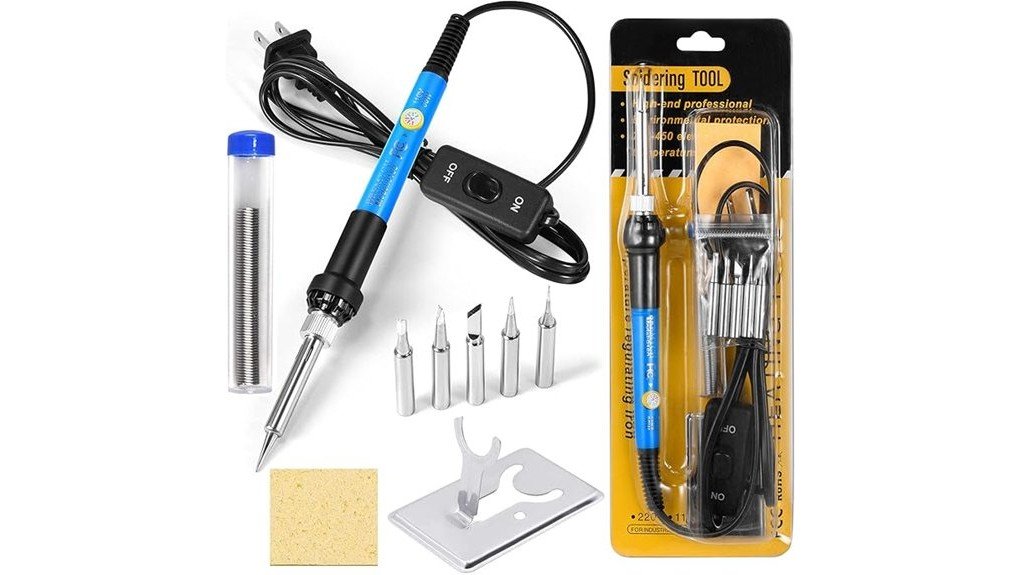
A basic soldering iron can handle small repairs, but poor heat control and the wrong tip can make clean joints harder than they need to be. The 9-in-1 60W Adjustable Soldering Iron Kit aims to give you more control with a 200 to 450°C dial, five interchangeable tips, and a simple plug-in design. This review helps you decide whether that setup is enough for electronics, guitar wiring, jewelry work, and household repairs. Its main strength is flexibility at an entry-level price point, while its biggest limitation is that the current brand, model details, and full package contents could not be independently verified.
Quick Verdict
Rating: 8/10, recommended with caveats
Best For: Beginners, occasional DIY repairs, hobby electronics, guitar wiring, and light craft work
Bottom Line: The 60W output, adjustable heat, and five tip shapes give you useful flexibility for common bench tasks. You should skip it if you need verified ESD protection, digital temperature feedback, professional-duty heat recovery, or confirmed warranty support.
Key Specifications
| Specification | Detail |
|---|---|
| Product type | Corded adjustable soldering iron kit |
| Advertised kit format | 9-in-1 |
| Power | 60W |
| Temperature range | 200 to 450°C |
| Claimed warm-up time | About 1 to 3 minutes |
| Included tip shapes | Five interchangeable tips |
| Heating design | Inner-heated ceramic element |
| Controls | Temperature dial and power switch |
| Cooling features | Four ventilation openings in the handle housing |
| Best use | Hobby electronics, wire repairs, guitar wiring, jewelry work, and light DIY tasks |
| Verification note | Confirm brand, voltage, plug type, full accessories, and warranty on the current Amazon listing |
What Is the 9-in-1 Soldering Kit?
This is a corded pencil-style soldering iron built around a 60W ceramic heating element. You adjust the heat with a dial between 200 and 450°C, then choose from five tip shapes to match the joint size and access angle. The design is simpler than a full soldering station because the controls are built into the handle instead of a separate base.
The kit is aimed at buyers who want one inexpensive tool for occasional repairs rather than a calibrated bench station for daily production work. Its features suit through-hole electronics, wire splices, connector repairs, guitar controls, and some light craft tasks. The product name says 9-in-1, but the available source material only identifies the iron and five tips, so you should verify every included accessory before ordering.
Who Should Buy It?
Best For
- Beginners learning basic through-hole soldering and wire repair
- Hobbyists who need several tip shapes without buying a full station
- Musicians and DIY users handling occasional guitar, cable, and household fixes
Skip If
- You need confirmed ESD-safe construction for sensitive components
- You want digital temperature readout, closed-loop control, or fast professional heat recovery
- You need a verified brand warranty or a fully documented accessory list
Before You Buy: The current brand, model name, voltage, plug type, ESD status, warranty, and complete 9-piece package could not be independently confirmed. Check those details on the live Amazon page, especially if you plan to use the iron on sensitive electronics.
Design and Build
The pencil-style body keeps the kit compact and easy to store in a drawer or small toolbox. A built-in power switch lets you stop heating without pulling the plug, and four ventilation openings help release heat from the handle area. Those features improve basic convenience, but they do not replace a proper heat-resistant stand.
The five-tip setup is more useful than a single general-purpose tip. A fine tip can reach small pads and terminals, while a wider tip transfers more heat to wires and larger joints. Tip quality and plating life were not verified, so expect wear to depend on temperature, solder type, cleaning habits, and how often you keep the tip tinned.
Temperature Range and Heating Performance
The 200 to 450°C range covers many common electronics and craft jobs. Lower settings can reduce the chance of overheating small pads, while higher settings may help with lead-free solder or joints that pull heat away quickly. The source claims a 1 to 3 minute warm-up, which is reasonable for casual bench work but slower than modern cartridge irons that can become ready in seconds.
The dial gives you useful adjustment, but it should not be confused with a digital station that displays and regulates actual tip temperature. Heat can fall when you touch a large connector, thick wire, or broad ground plane. For better results, choose a wider tip before turning the temperature to the maximum.
Interchangeable Tips and Versatility
Five tips let you match the contact area to the task. Use a fine conical or narrow tip for small terminals, a chisel-style tip for through-hole joints, and a broader face for wires that need more heat transfer. The exact tip shapes are not listed in the source, so confirm the current assortment if one shape is essential to your work.
This flexibility makes the kit useful for circuit boards, guitar pots and jacks, broken cable connections, small metal craft pieces, and simple appliance wiring. It is less suitable for heavy sheet metal, large battery lugs, high-current cable work, or long production sessions. Those jobs usually need more thermal capacity, stronger temperature recovery, or specialized equipment.
Ease of Use and Setup
The kit has a direct plug-in workflow: install a cool tip, place the iron in a stable stand, connect power, switch it on, and set the dial for the solder and joint. That simple control layout is friendly for a beginner, but you still need good technique. Clean surfaces, suitable flux, correct tip size, and short contact time matter as much as the number on the dial.
A beginner may need trial and error because there is no verified digital display. Start near the middle of the range, test on scrap material, and adjust only enough to make solder flow cleanly. A dull, grainy joint often points to poor heat transfer, dirty surfaces, movement during cooling, or insufficient flux rather than a need for maximum temperature.
Safety and Materials
A soldering iron in this range can cause serious burns and can ignite nearby material. Use a stable heat-resistant stand, keep the hot tip away from cords and clutter, wear eye protection, and work where fumes move away from your face. Unplug the iron and let it cool fully before changing tips or storing it.
The source identifies an inner ceramic heater but does not verify the handle material, electrical certification, grounding, or ESD-safe construction. Do not assume the tip is grounded. For sensitive integrated circuits, static-prone components, or professional electronics, use equipment with documented ESD protection and follow the component maker’s handling guidance.
Follow the solder and flux safety labels. Wash your hands after handling lead-containing solder, keep food and drinks off the bench, and use local fume extraction or effective ventilation. Children should not use this tool without close, qualified adult supervision.
How It Performs in Real Use
For Basic Electronics Repairs
The adjustable range and multiple tips should handle common through-hole components, loose wires, switches, and connectors. A narrow tip improves access, but a small tip can struggle on large ground areas because it transfers less heat. You will get better joints by matching tip width to the pad instead of relying on extra temperature.
For Guitar and Audio Wiring
Guitar pots, output jacks, and cable plugs often need more heat than tiny circuit-board pads. The 60W rating and a broader tip can help you work quickly enough to avoid holding heat on a component for too long. Protect nearby finishes and insulation, and practice on spare wire before working inside an instrument.
For Jewelry and Light Craft Work
The kit may suit small decorative repairs and light metal craft tasks that use soft solder. It is not a substitute for a torch, high-power iron, or metalworking station when the workpiece has high thermal mass. Check that your solder, flux, and base metal are compatible before heating the piece.
For Occasional Home and Travel Use
The compact handle and swappable tips are easier to store than a full bench station. However, this is still a corded hot tool, and the source does not confirm a carrying case or protective cap. Let it cool completely before packing it, and keep the tips where they cannot damage other tools or cables.
Setup Tips for Better Results
- Choose the tip before adding heat. A tip with a contact face close to the joint size transfers heat faster and reduces dwell time.
- Tin a new or clean tip. Apply a thin coat of solder to protect the surface and improve heat transfer.
- Heat the joint, not only the solder. Touch the tip to both surfaces, then feed solder into the heated joint.
- Use the lowest setting that works well. Excess heat can shorten tip life, damage insulation, and lift circuit-board pads.
- Clean without scraping the plating. Use a damp sponge or brass tip cleaner, then re-tin the tip.
- Test on scrap first. This helps you estimate dial position because actual tip temperature is not displayed.
Pro Tip: When a joint will not heat quickly, switch to a wider tip before raising the dial. Better contact usually improves heat transfer more safely than running the iron at maximum temperature.
Pros and Cons
Pros
- 60W output suits many light electronics and wire repairs
- 200 to 450°C dial gives more control than a fixed-temperature iron
- Five interchangeable tips cover different joint sizes and access needs
- Built-in power switch improves basic bench convenience
- Compact design stores more easily than a full soldering station
Cons
- Brand, model, warranty, voltage, and complete package contents are not independently verified
- No confirmed digital display, closed-loop temperature control, or ESD-safe rating
- May struggle with large joints, heavy cable, and professional all-day use
Is It Worth the Price?
This kit is best treated as a budget or entry-level option. It offers strong value for the price when you need adjustable heat and several tips for occasional repairs, especially if you do not want the size or cost of a separate station. The simple controls also reduce setup time for small jobs.
It is not the best fit if your work depends on repeatable temperature accuracy, fast recovery on large joints, documented ESD protection, or dependable access to replacement parts. Before buying, compare the current package contents and seller support with the cost of a recognized entry-level station.
How It Compares to Alternatives
A basic fixed-temperature iron is simpler, but it gives you less control across different solder types and joint sizes. A bench station such as the Weller WLC100 or Hakko FX-888DX is a better comparison if you want a separate stand, clearer controls, and a setup intended for frequent bench use. Those options usually take more space and may cost more.
The Pinecil V2 is worth comparing when portability, USB-C power, a display, and faster warm-up matter more than an all-in-one mains-powered handle. The 9-in-1 kit makes the most sense when your priority is a straightforward corded tool with several included tip shapes and a lower entry barrier.
Frequently Asked Questions
Is this soldering kit suitable for beginners?
Yes, the power switch, adjustable dial, and multiple tips make it approachable for basic practice. Start on scrap wire or an inexpensive practice board, use a stand, and learn safe tip cleaning before working on valuable electronics.
Can it be used with lead-free solder?
The upper temperature range may be adequate for many lead-free alloys, but performance depends on the alloy, flux, tip size, and joint mass. Use the solder maker’s recommended range and avoid running hotter than needed.
Is the iron ESD-safe?
ESD-safe construction and tip grounding were not verified. Use a documented ESD-safe station when you work on static-sensitive integrated circuits, microcontrollers, or professional repair jobs.
What temperature should you use?
Use the solder and component guidance as your starting point, then choose the lowest setting that produces a clean joint quickly. Tip size, oxidation, and the amount of metal in the joint can change how much heat you need.
Does the 9-in-1 name guarantee nine specific accessories?
No complete nine-piece list was available in the source material. Confirm the live product images and package list before ordering because sellers can change bundles and accessory counts.
How should you clean and store the tips?
Wipe the hot tip on a damp sponge or brass cleaner, add a light coat of solder, then switch off the iron. Let it cool fully before storage, and avoid filing or sanding plated tips because that can expose the copper core.
Who should skip this kit?
Skip it if you repair sensitive electronics daily, need calibrated temperatures, or work on large high-current joints. A documented ESD-safe digital station or a higher-capacity tool will be a safer long-term choice.
The Bottom Line
The 9-in-1 60W Adjustable Soldering Iron Kit is a practical choice for beginners and occasional DIY users who want adjustable heat and several tip shapes in a compact tool. Its main tradeoff is incomplete verification of the brand, package, electrical details, ESD status, and warranty, so professional users and buyers working on sensitive components should choose a better-documented station.
Ready to Buy?
Check the latest price, voltage, included accessories, and seller details before you decide.