Disclosure: As an Amazon Associate, we earn from qualifying purchases. If you click a link on this page and make a purchase, we may receive a small commission at no extra cost to you.
Small electronics repairs, wire fixes, and craft projects are easier when your soldering kit has the right heat range, tips, and support tools in one place. The Plusivo Soldering Iron Kit is a 60W, AC-powered kit built for hobby soldering, home repairs, simple circuit board work, and learning projects. Its biggest strengths are the 200°C to 450°C adjustable temperature range, five replaceable tips, and broad accessory bundle. Its main tradeoff is that it is a handheld kit, not a full soldering station with a digital display or advanced temperature readout.
Quick Verdict
Rating: 8.6/10, Recommended with caveats
Best For: DIY users, electronics hobbyists, students, and home repair buyers who want a complete starter kit.
Bottom Line: The Plusivo Soldering Iron Kit gives you a useful 60W iron, 5 tips, and more than 15 accessories in a portable PU bag. Skip it if you need a professional soldering station with a digital display, stronger temperature feedback, or heavy-duty shop performance.
| Specification | Detail |
|---|---|
| Brand | Plusivo |
| Product type | Soldering iron kit |
| Power | 60 watts |
| Power source | AC power |
| Plug type | 110V US plug |
| Temperature range | 200°C to 450°C, or 392°F to 842°F |
| Temperature control | Adjustable knob |
| Soldering tips | 5 replaceable 900M tips listed as I, 2.4D, K, 3C, and B |
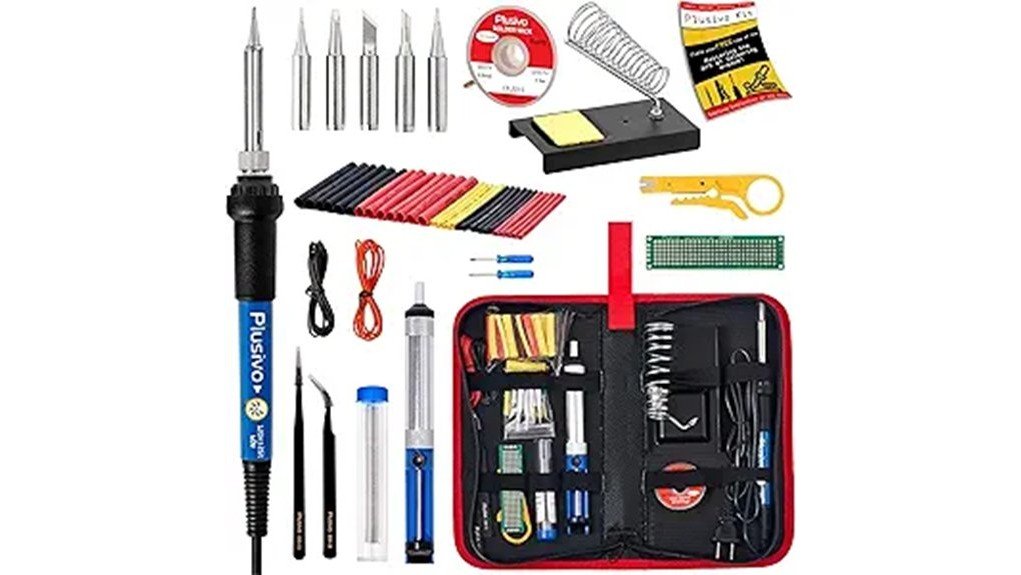
| Included accessories | Desoldering pump, solder wire tube, tweezers, mini wire stripper, mini screwdrivers, mini PCB, heat shrink tubes, solder wick, cleaning sponge, stand, and downloadable ebook |
| Storage | Durable PU carrying bag |
| Best use | Electronics repair, circuit board practice, household fixes, wiring, crafts, and jewelry making |
| Safety features | Heat-resistant handle, heat-resistant cap and grip, ventilation holes, and soldering stand |
| Support | 30-day money-back/replacement guarantee and lifetime customer support stated by the manufacturer |
What Is the Plusivo Soldering Iron Kit?
The Plusivo Soldering Iron Kit is a 21-in-1 adjustable temperature soldering kit centered around a 60W soldering iron. It is made for users who want a ready-to-use bundle instead of buying the iron, tips, stand, solder wire, desoldering tools, and small repair accessories one by one.
The iron uses a temperature knob with a range of 200°C to 450°C. That gives you enough flexibility for many basic tasks, including electronics hobby work, wire joining, circuit board practice, small appliance repairs, and craft use. The five 900M-style tips also make the kit more flexible than a single-tip budget iron.
The included PU carry bag is a real advantage if you move between a workbench, garage, classroom, or repair drawer. It keeps the small parts together, which matters because soldering tips, tweezers, wick, and heat shrink tubes are easy to misplace.
Before You Buy: This kit uses a 110V US plug and a knob-style temperature control. It is not the best match if you need a different plug standard, a digital display, or a full soldering station for frequent professional bench work.
Who Should Buy It?
Best For
- Beginners who want a complete soldering starter kit with the iron, tips, solder wire, stand, and desoldering tools.
- DIY users who repair wires, small electronics, toys, appliances, earphones, computer parts, or simple circuit boards.
- Hobbyists who need a portable kit for crafts, educational practice, and light jewelry-making tasks.
Skip If
- You need a digital temperature readout or tighter heat control for repeat professional work.
- You need a soldering station with a heavier base, separate iron holder, and advanced bench features.
- You do not use a 110V US plug setup without a safe, compatible power solution.
Design and Build Quality
The kit focuses on portability and basic workshop function. The soldering iron has a heat-resistant handle and grip, while the body includes ventilation holes to help with heat dissipation during use. The cord strain relief is also useful because many budget irons fail early when the cord is bent or pulled often.
The included stand gives you a safer place to rest the hot iron between joints. It is not as stable as a full soldering station base, but it is much better than laying the iron on a table. The cleaning sponge helps remove residue from the tip, which can improve tip life and cleaner solder flow when used correctly.
The PU carry bag is one of the more buyer-friendly parts of the package. A soldering kit has many small items, and storage matters. Keeping tips, wick, tweezers, wire, and the desoldering pump in one bag reduces clutter and makes the kit easier to bring to a garage, classroom, or friend’s house.
Temperature Control and Heating Performance
The adjustable range of 200°C to 450°C is the key performance feature. Lower settings can help when you are working on smaller components or lighter tasks. Higher settings are useful for jobs that need more heat, such as thicker wire or larger joints.
Because this kit uses a temperature knob, you do not get a digital readout. That means you may need a little trial and error to find the right setting for your solder, wire size, and workpiece. For most DIY repairs, that is acceptable. For precise production work, a digital station may be easier to repeat from job to job.
The 60W rating gives the iron enough power for common hobby and repair work. It is still a small handheld tool, so you should not expect it to act like a high-end station for constant daily shop use.
Tips and Accessory Set
The five replaceable soldering tips give you more control over different jobs. A fine tip can help with smaller circuit board points, while wider or shaped tips can help transfer heat across larger contact areas. The listed 900M tips include I, 2.4D, K, 3C, and B shapes, which covers a useful range for learning and general repair.
The accessory bundle is one of the strongest reasons to consider this kit. It includes more than 15 extra items, such as a desoldering pump, solder wire tube, tweezers, mini wire stripper, mini screwdrivers, mini PCB, heat shrink tubes, solder wick, and a downloadable ebook. These extras are helpful if you are starting from scratch and do not already own basic soldering tools.
The desoldering pump and solder wick matter because mistakes happen. If you bridge two contacts or need to remove old solder, those tools give you a way to clean up the joint instead of abandoning the project.
Ease of Use for Beginners
This kit is beginner-friendly because it gives you the core tools needed to practice. You can start with the mini PCB or simple wire joints before moving on to repairs that matter. The adjustable knob is simple to understand, and the accessory bag helps keep the setup less confusing.
New users should still take soldering seriously. The tip gets hot enough to burn skin and damage surfaces. You also need a stable work area, good ventilation, and the right soldering technique. This kit gives you tools, but your results still depend on patience, clean contact points, and the correct amount of heat.
Pro Tip: Start with a low-to-middle temperature setting, test on scrap wire or the practice PCB, then increase heat only if the solder does not flow smoothly. Too much heat can lift pads, melt insulation, or damage small parts.
Safety and Materials Notes
Soldering involves high heat, hot metal, and possible fumes from solder and flux. Use the iron on a heat-safe surface, keep the stand nearby, and never leave the hot iron where a child, pet, or distracted adult can touch it. Always unplug the iron after use and let it cool fully before returning it to the PU bag.
The heat-resistant grip, cap, ventilation holes, and stand are helpful features, but they do not replace careful handling. Wear eye protection when cutting wire or working near solder splatter. Work in a ventilated space, especially when using flux or solder that creates smoke.
If you are soldering electronics, disconnect power before working. If you are repairing appliances, battery packs, mains wiring, or anything safety-critical, get help from a qualified professional. This kit is useful for DIY tasks, but it should not be used to guess your way through dangerous electrical repairs.
How It Performs in Real Use
For Electronics Hobby Projects
For small electronics practice, the Plusivo kit gives you the main tools you need: a 60W iron, several tips, solder wire, tweezers, a mini PCB, and cleanup tools. The fine and shaped tips help with different contact points, but you will need steady hands and practice to avoid overheating small pads.
For Household Repairs
For light household fixes, such as loose wires, small appliance leads, simple connectors, and basic electrical hobby work, the adjustable temperature range is useful. The mini wire stripper and heat shrink tubes can help you prepare and finish simple wire repairs more neatly.
For Crafts and Jewelry Making
The kit can support craft and some jewelry-making tasks because it includes multiple tips and a broad heat range. Results depend on the material, solder type, and joint size. For delicate jewelry work or specialized metals, a dedicated jewelry soldering setup may be a better fit.
For Travel, Classes, and Shared Workspaces
The PU bag makes this kit easier to carry than loose tools. It is a practical choice for students, makerspaces, or anyone who does not have a permanent workbench. Just remember that you still need a safe outlet, stable surface, ventilation, and cooling time before storage.
Setup Tips Before First Use
Before your first project, unpack the kit and make sure the tip is installed securely while the iron is cool and unplugged. Place the stand on a stable, heat-resistant surface. Keep the cleaning sponge nearby and dampen it if the instructions call for it.
Use the right tip for the job. A small pointed tip can help with tight electronic contacts. A wider tip can transfer heat better to larger joints. Do not force one tip to do every task, because poor tip choice often leads to slow heating, messy joints, or damaged parts.
Give the iron time to heat, then tin the tip with a small amount of solder. A tinned tip transfers heat better and can make your first joint cleaner. After use, clean the tip, unplug the iron, let it cool, and store the accessories back in the PU bag.
Common Mistakes to Avoid
Do not use the highest temperature just because the iron allows it. Too much heat can burn flux, damage insulation, lift circuit board pads, and shorten tip life. Start lower, then adjust as needed.
Do not press the iron hard against a joint. Soldering depends on heat transfer and clean surfaces, not pressure. If solder will not flow, the joint may be dirty, the tip may be oxidized, or the temperature may be too low for the material.
Do not store the iron while it is still warm. The PU bag is useful for organization, but the hot tool needs full cooling time before storage. This protects the bag, the accessories, and your workspace.
Pros and Cons
Pros
- 60W soldering iron provides enough power for many common DIY and electronics repair tasks.
- 200°C to 450°C adjustable range gives you flexibility for different soldering needs.
- Five replaceable tips make the kit more useful than a one-tip starter iron.
- More than 15 accessories help beginners start without buying every small tool separately.
- PU carrying bag keeps tips, solder, tools, and cleanup accessories organized.
Cons
- No digital display, so temperature setting is less exact than on a digital soldering station.
- The small stand is useful, but not as stable or convenient as a full station base.
- 110V US plug limits out-of-box compatibility for buyers outside that electrical setup.
Is It Worth the Price?
The Plusivo Soldering Iron Kit is best viewed as a value-focused starter and DIY bundle. You are not just buying a 60W iron. You are also getting tips, a stand, solder wire, desoldering tools, small hand tools, cleaning accessories, heat shrink tubes, a practice PCB, and storage.
That makes it a smart buy for everyday use if you need a complete kit for basic repairs, learning, and occasional projects. It is especially useful if you do not already own soldering accessories.
It is not the best fit if you care most about exact temperature feedback, long daily sessions, or professional bench control. In that case, a dedicated soldering station will usually be more comfortable and consistent.
How It Compares to Alternatives
Compared with many basic 9-in-1 or 10-in-1 soldering kits, the Plusivo kit gives you a broader accessory set and a more organized storage bag. Compared with 80W LCD kits, it lacks a digital display but may still be easier for a beginner who wants a simple knob-controlled setup.
Compared with a soldering station such as the Weller WE1010NA, this kit is more portable and more complete out of the box for general DIY use. The Weller-style station is a better comparison if you want a heavier bench setup, stronger temperature control, and a more professional work area.
Customer Experiences and Satisfaction
Buyers tend to value this kit because it feels complete. The 60W iron, five tips, desoldering pump, solder wick, wire, tweezers, mini tools, and PU bag make it easier to start a project without searching for missing pieces.
The most useful feedback pattern is practical rather than flashy: the kit gives beginners a workable setup, and it gives casual DIY users a convenient backup kit. The main limitation is the same one found in many compact soldering kits, you trade advanced controls for lower cost, portability, and simplicity.
Frequently Asked Questions
Is the Plusivo Soldering Iron Kit good for beginners?
Yes, it is a good beginner kit because it includes the iron, five tips, solder wire, stand, desoldering pump, wick, tweezers, and other small tools. Beginners should still practice on scrap wire or the included mini PCB before repairing important electronics.
Can you use this kit for circuit board repair?
Yes, it can be used for basic circuit board welding and hobby electronics work. For delicate boards, use the right tip, avoid excessive heat, and do not hold the iron on one pad too long.
Does it have adjustable temperature control?
Yes, the iron has an adjustable temperature knob with a range of 200°C to 450°C. It does not have a digital display, so you adjust by knob position rather than a visible screen reading.
What accessories come with the kit?
The kit includes more than 15 accessories, including five soldering tips, desoldering pump, solder wire tube, tweezers, mini wire stripper, mini screwdrivers, mini PCB, heat shrink tubes, solder wick, cleaning sponge, stand, and a downloadable ebook. The PU bag helps store the parts together.
Can you use it for jewelry making?
Yes, it may work for some craft and jewelry-making tasks because it includes multiple tips and adjustable heat. For specialized jewelry work, precious metals, or high-precision soldering, a dedicated jewelry soldering setup may be better.
Is this kit suitable for professional use?
It can handle light professional tasks, field backups, and occasional repair work. For daily professional bench soldering, a digital soldering station with stronger temperature control and a heavier stand is usually a better choice.
What should you check before buying?
Check that a 110V US plug works for your setup and that you are comfortable with knob-style temperature control. Also decide whether a compact kit is enough, or whether you need a full soldering station with a digital display.
How should you store the kit after use?
Unplug the iron and let it cool fully before placing it in the PU carry bag. Clean the tip, return the small parts to their slots or pouch areas, and keep the kit away from children and pets.
The Bottom Line
The Plusivo Soldering Iron Kit is a strong choice if you want a portable, complete starter kit for electronics hobby work, simple repairs, crafts, and learning. Its main strengths are the 60W iron, 200°C to 450°C heat range, five tips, and large accessory set, while its main limitation is the lack of a digital display or full station-style control. Buy it if you want a practical DIY bundle, but skip it if you need a professional soldering station for frequent precision work.