Disclosure: As an Amazon Associate, we earn from qualifying purchases. If you click a link on this page and make a purchase, we may receive a small commission at no extra cost to you.
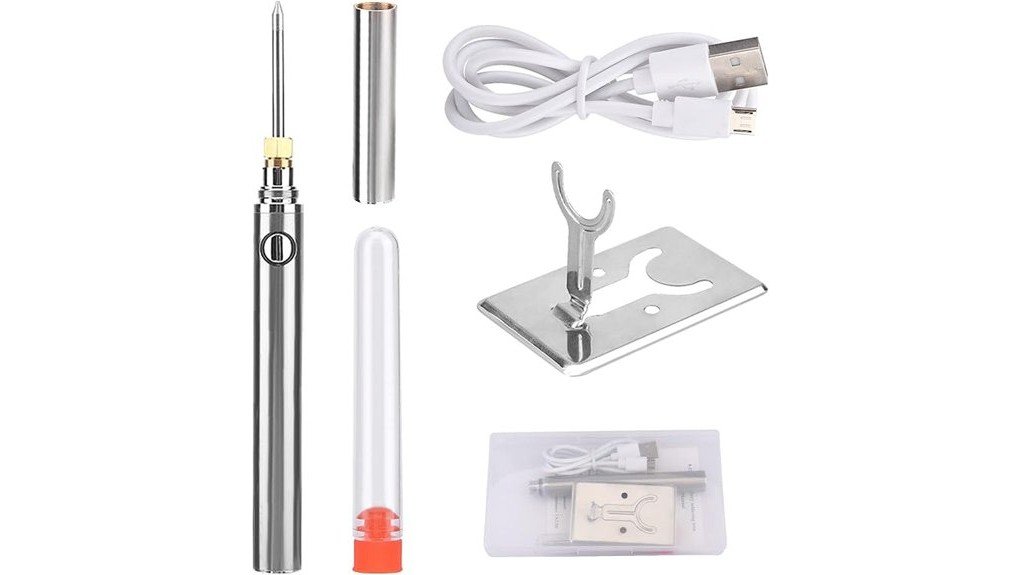
A corded soldering iron can be awkward when you only need to repair one loose wire or reach a tight spot away from your bench. The CALIDAKA 5V 15W cordless portable USB soldering iron is designed for those short, light-duty jobs, with a built-in 1100mAh battery, press-to-heat control, and USB charging. This review explains what the verified specifications mean in real use, which tasks suit the tool, and which missing details you should check before buying. Its main strength is portable convenience, while its main limitation is the lack of a stated temperature range and verified runtime.
Quick Verdict
Rating: 8.2/10
Best For: Electronics hobbyists, DIY users, mobile repair kits, small wire repairs, and quick circuit-board touch-ups.
Bottom Line: The CALIDAKA cordless soldering iron offers fast seller-claimed heat-up, flexible USB charging, and easy handling for a few small joints. It is not a substitute for a temperature-controlled station when you need long runtime, repeatable heat, or strong recovery on larger parts.
| Specification | Detail |
|---|---|
| Brand | CALIDAKA |
| Product type | Cordless portable USB soldering iron |
| Amazon ASIN | B0BPCJMJMC |
| Electrical rating | 5V, 15W |
| Battery | Built-in 1100mAh rechargeable battery |
| Charging connections | Type-C and Micro USB |
| Supported charging sources | Power bank, computer USB port, or suitable USB power adapter |
| Use while charging | Supported according to the current Amazon listing |
| Heat-up claim | Melts solder in about 12 seconds at room temperature, according to the listing |
| Heat control | Press and hold to heat, release to cool |
| Standby | Automatic standby after about 25 seconds without operation |
| Charge indicators | Red while charging and green when fully charged |
| Exterior details | Stainless-steel surface and thermal-insulation layer are stated by the seller |
| Best use | Small circuit boards, wire and connector repairs, DIY electronics, light appliance work, and small jewelry tasks |
| Main limitation | No stated temperature range, verified runtime, exact dimensions, weight, or warranty details |
What Is the CALIDAKA 5V 15W Cordless Soldering Iron?
The CALIDAKA 5V 15W cordless soldering iron is a compact, battery-powered tool for small soldering jobs where a corded iron or full station would be inconvenient. Its 1100mAh battery and dual Type-C and Micro USB charging options make it easy to keep in an electronics kit, garage drawer, vehicle tool bag, or hobby workspace.
The tool uses a non-continuous heating system. You press and hold the button to heat the tip, then release it to let the tip cool. The seller states that it can melt solder in about 12 seconds at room temperature and enters standby after roughly 25 seconds without operation.
This design is best viewed as a portable add-on rather than a primary bench iron. The listing does not state a temperature range, full-charge time, continuous runtime, tip specification, exact weight, or dimensions, so buyers who depend on those details should confirm them before ordering.
Before You Buy: Choose this model for short, light-duty soldering. For heat-sensitive electronics, repeated joints, thick wires, connectors with large metal shells, or long repair sessions, a temperature-controlled soldering station is the safer and more predictable choice.
Who Should Buy It?
Best For
- DIY users who need a compact iron for occasional wire, connector, or circuit-board repairs.
- Electronics hobbyists who want a cordless backup tool for a few small joints away from the bench.
- Buyers who value USB charging and easy storage more than precise temperature adjustment.
Skip If
- You need a verified temperature range for delicate components or repeatable production work.
- You regularly solder heavy-gauge wire, large terminals, metal chassis parts, or other heat-sinking joints.
- You need a known runtime, replaceable battery system, broad tip selection, or stated warranty coverage.
Design and Portability
The cordless body is the main reason to consider this iron. Without a power cord pulling across the work area, you can position the tip more easily around a small connector, a loose appliance wire, or a board mounted in an awkward location. The compact format also takes less storage space than a station with a base, holder, and power cable.
The seller describes the exterior as having a stainless-steel surface and thermal-insulation layer. Those details may improve durability and hand comfort, but they do not make the tip safe to touch. You still need a heat-resistant rest and a clear cooling area because the working end can burn skin and damage nearby plastic.
Exact dimensions and weight are not stated on the current listing. Check the listing photos and package details if the iron must fit a specific pouch, drawer, or portable tool case.
Heating Performance and Control
CALIDAKA claims that the tip can melt solder in about 12 seconds at room temperature. That speed is useful when you need to tin a small wire, reconnect a light lead, or complete a few joints without waiting for a larger station to warm up.
The press-to-heat system gives you direct control over when power reaches the heater. Press and hold while bringing the joint to soldering temperature, then release after the solder flows. This can conserve battery power between joints, but it requires more timing and hand coordination than an iron that maintains a set temperature automatically.
The listing does not provide a temperature range or closed-loop temperature control. As a result, you cannot select a known temperature for different solder alloys, connector sizes, or heat-sensitive components. The 15W rating also means you should expect slower recovery when a joint pulls heat away from the tip.
Battery and USB Charging
The built-in battery is rated at 1100mAh. The listing supports charging through either Type-C or Micro USB and names power banks, computers, and USB power adapters as possible sources. A red light indicates charging, while a green light indicates a full charge.
The seller also states that the iron can operate while charging. Use that feature only with an intact cable and a suitable 5V USB power source, and keep the cable away from the hot tip. Do not assume that every charger, fast-charging mode, or damaged cable is appropriate for the tool.
The current listing does not state full-charge time or expected runtime. Battery capacity alone cannot tell you how many joints the iron will complete because runtime changes with heating time, joint size, ambient temperature, and how often standby activates.
Automatic Standby and Daily Handling
The iron enters standby after about 25 seconds without operation, according to the listing. This feature can reduce wasted battery power and unnecessary heating during a pause. It may also help protect the tip from being left powered for long periods.
Standby is not a substitute for switching off the tool, placing it on a heat-safe rest, and allowing it to cool before storage. The tip may remain hot after the indicator changes, so treat it as hot until you have confirmed that it has cooled.
Compatibility and Best Use Cases
This iron is best matched with small joints that do not absorb much heat. Examples include thin hookup wire, small connectors, light circuit-board touch-ups, simple hobby projects, and minor appliance wiring repairs. The listing also mentions jewelry soldering, although suitability depends on the metal, solder, flux, and joint size.
It is a weaker match for large terminal lugs, braided grounds, thick wire, metal housings, or components attached to broad copper planes. Those parts can draw heat away faster than a compact 15W iron can replace it, which may lead to slow wetting or a dull, unreliable joint.
Tip compatibility and included accessories are not clearly stated in the current listing details. Confirm the installed tip, replacement-tip availability, charging cable, cover, stand, and any included solder before you buy.
How It Performs in Real Use
For Quick Electronics Repairs
For a loose wire, broken lead, or small connector repair, the cordless body and fast heat-up claim are practical. You can bring the iron to the device and complete one or two joints without setting up a full station. Practice the heat timing first because the tool does not display or regulate a selected temperature.
For Circuit-Board Touch-Ups
The iron may handle simple through-hole touch-ups and light wire-to-pad work when the pad and component are small. Use extra care around fine traces, surface-mount parts, and heat-sensitive components. A temperature-controlled station is better when pad damage or overheating would be costly.
For Light Appliance and Vehicle-Kit Repairs
Portability helps when the repair cannot be moved easily to a bench. The tool can be useful for low-voltage wiring and small accessible connections, but it should not be used on energized circuits. Mains-powered appliances, vehicle safety systems, and high-current wiring require correct isolation, testing, and repair procedures.
For Travel, Storage, and Backup Use
The compact design and USB charging make this iron easy to keep as a backup tool. Store it only after the tip has cooled completely, and protect the power button from accidental activation. Because runtime is not stated, charge it before travel rather than relying on an unknown remaining battery level.
How to Use It Correctly
Start by charging the iron with a suitable USB power source and inspect the cable, housing, button, and tip for damage. Secure the workpiece, disconnect power from the circuit, and place the iron on a heat-resistant surface. Keep solder, cleaning material, and a safe tip rest within reach so you do not have to move the hot tool across the workspace.
Practice the press-and-hold action on scrap wire before working on an important board. Heat the joint, not just the solder, then feed a small amount of solder where the heated parts meet. Release the button once the solder flows, hold the joint still while it cools, and inspect the result for full wetting rather than a rounded blob.
Keep the tip clean and lightly tinned. A dirty or oxidized tip transfers heat poorly, which can tempt you to hold it on the joint too long. Use solder and flux that match your material and follow the product instructions for charging, operation, shutdown, and storage.
Pro Tip: Test the iron on scrap material that is similar to your real joint. This lets you learn the heat-up timing and confirms whether the 15W tool has enough recovery before you risk a circuit-board pad or connector.
Common Mistakes to Avoid
- Using it on a joint that is too large: If solder will not flow promptly, move to a higher-power or temperature-controlled iron instead of holding the tip in place for an extended time.
- Melting solder directly on the tip: Heat both parts of the joint so the solder flows onto the connection rather than forming a weak surface blob.
- Relying on standby as an off switch: Turn the tool off and allow it to cool fully before setting it aside or packing it away.
- Working on a powered circuit: Disconnect and verify power before soldering. Some appliances and power supplies can retain dangerous stored energy after unplugging.
- Ignoring tip condition: Clean and tin the tip regularly because oxidation reduces heat transfer and can shorten useful tip life.
Safety Considerations and Materials
The seller lists a thermal-insulation layer and automatic standby, but neither feature removes normal soldering hazards. The tip can cause severe burns, melt wire insulation, damage a workbench, or ignite nearby paper and cloth. Keep the tool in a stable heat-resistant holder whenever it is not in your hand.
Work with good ventilation and avoid breathing smoke from flux. Wash your hands after handling solder and residues, and keep food and drinks away from the work area. Wear eye protection when trimming leads or working near small parts that can spring free.
Disconnect electronics before soldering and verify that stored energy has been discharged safely. Do not attempt mains-voltage appliance repairs, battery-pack repairs, airbag or restraint-system wiring, or other safety-critical work unless you have the correct training and procedures.
Pros and Cons
Pros
- Seller-claimed 12-second heat-up supports quick, small repair jobs.
- Built-in 1100mAh battery allows cordless operation away from a bench outlet.
- Type-C and Micro USB charging offer more cable and power-source flexibility.
- Press-to-heat control can reduce unnecessary heating between joints.
- Automatic standby after about 25 seconds helps conserve battery power during pauses.
Cons
- No stated temperature range or adjustable temperature control.
- Runtime, charge time, exact dimensions, weight, tip compatibility, and warranty are not clearly stated.
- The 15W rating is a poor match for large, heat-sinking joints and long continuous sessions.
Is It Worth the Price?
The CALIDAKA cordless soldering iron is worth considering as a budget-style convenience tool for occasional repairs. Its value comes from quick access, cordless movement, and flexible USB charging rather than precise control or high output.
You are most likely to get good value if you already have basic soldering supplies and need a compact backup for a few small joints. The tool is less compelling as your only soldering iron because the listing does not provide a temperature range, runtime, or clear tip-replacement information.
Compare the current price with an entry-level corded iron or temperature-controlled station before deciding. A slightly larger tool may offer better long-term value if you solder often or need repeatable results.
How It Compares to Alternatives
A basic corded pencil iron usually provides continuous heat without battery limits, but it ties you to an outlet and may still lack temperature control. A temperature-controlled station is larger and less portable, yet it is the better choice for delicate boards, repeated joints, and work that needs predictable heat.
A butane soldering iron can deliver more portable heat for some field jobs, but it requires fuel and adds open-flame and exhaust concerns. The CALIDAKA model makes the most sense when you want a small electric iron for brief, low-demand tasks and prefer USB charging over cords or fuel.
Frequently Asked Questions
How fast does the CALIDAKA soldering iron heat up?
The Amazon listing says it can melt solder in about 12 seconds at room temperature. Actual time can vary with battery charge, tip condition, solder type, ambient temperature, and the size of the joint.
Can you use it while it is charging?
Yes, the seller states that the iron can operate while charging. Use an appropriate 5V USB source, inspect the cable first, and keep the cable away from the hot tip and workpiece.
Does it have adjustable temperature control?
The current listing does not state an adjustable temperature range or digital temperature control. You control heating by pressing and holding the button, then releasing it to cool.
Is this cordless soldering iron suitable for beginners?
It can suit beginners doing small practice joints because the controls are simple and the body is cordless. A beginner should first practice on scrap wire, use a stable tip rest, and avoid valuable circuit boards until the heat timing feels predictable.
Can it solder thick wires or large terminals?
It is not the best choice for thick wire, large terminals, broad copper areas, or metal parts that absorb substantial heat. A higher-power, temperature-controlled iron will usually heat those joints faster and reduce the temptation to overheat nearby insulation or pads.
How long does the battery last?
The listing confirms a built-in 1100mAh battery but does not state a verified runtime. Runtime will depend on how long you hold the heat button, the size of each joint, battery condition, and how often the tool enters standby.
Does automatic standby make it safe to store immediately?
No. Standby can stop active heating, but the tip may remain hot enough to burn skin or melt a case. Switch the tool off, place it on a heat-safe rest, and wait until it is fully cool before storage.
What should you verify before ordering?
Check the current package contents, installed tip, replacement-tip availability, charging cable, dimensions, weight, warranty, seller, and return terms. These details are not all clearly stated in the listing information reviewed for this article.
The Bottom Line
The CALIDAKA 5V 15W cordless soldering iron is a practical 8.2/10 choice for hobbyists and DIY users who need a compact USB-chargeable tool for brief, light-duty repairs. Its strongest benefits are portability, quick seller-claimed heat-up, and simple press-to-heat control, while its biggest drawbacks are the missing temperature range, unknown runtime, and limited suitability for larger joints.
Buy it as a portable backup for small wires, connectors, and basic touch-ups. Skip it as your main iron if you need adjustable temperature, long sessions, high heat recovery, or clearly specified professional features.
Ready to Buy?
Check the current seller, package details, price, and return terms before you decide.