Disclosure: As an Amazon Associate, we earn from qualifying purchases. If you click a link on this page and make a purchase, we may receive a small commission at no extra cost to you.
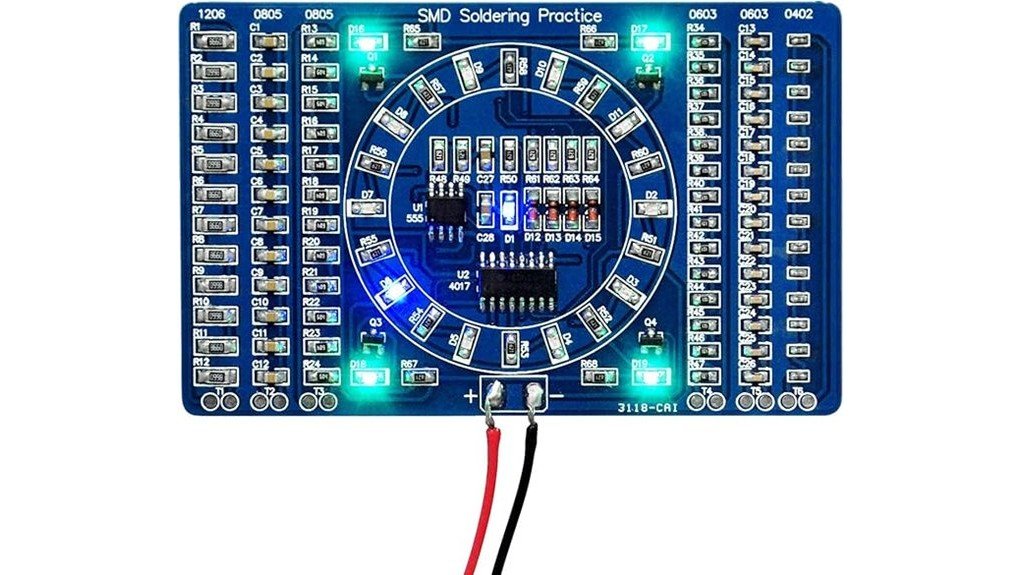
Learning SMD and SMT soldering is harder when you only practice on scrap parts or oversized through-hole boards. The Gikfun DIY SMD SMT Welding Practice Soldering Skill Training Board EK7028 gives you a compact practice board with real components, a water-flowing LED circuit, and clearly marked placement points so you can build skill with smaller parts. It is best for beginners and hobbyists who already have a soldering iron, solder, tweezers, and the patience to inspect their work before adding power. The main tradeoff is simple: this is a hands-on practice kit, not a finished plug-and-play electronics module.
Quick Verdict
Rating: 8/10
Best For: Beginners, electronics students, and hobbyists who want low-cost SMD/SMT soldering practice.
Bottom Line: The Gikfun board is a useful training kit because it lets you solder real small components instead of only practicing on blank pads. Skip it if you need a fully documented beginner course, a finished circuit, or a kit that includes every tool needed for soldering.
Key Specifications
| Specification | Detail |
|---|---|
| Brand | Gikfun |
| Model | EK7028, as listed in the source article |
| Product Type | DIY SMD/SMT soldering practice training board |
| Circuit Type | NE555 and CD4017 water-flowing LED circuit |
| PCB Blank Board Size | 80 mm x 60 mm, according to Gikfun’s product page |
| Article-Listed Dimensions | 5 x 3.2 x 0.1 inches, likely marketplace or package listing dimensions |
| Article-Listed Weight | 0.32 ounces |
| Voltage Range | 3-12V after assembly, as listed in the source article |
| Layout | Double-sided component layout for extra soldering practice |
| Included Practice Elements | SMD/SMT components, LEDs, NE555, CD4017, and 2 QFP44 chips |
| Best Use | Electronics soldering practice, student projects, hobby bench training, and small-part handling practice |
| Safety Note | Check component direction, solder bridges, pseudo solder joints, and floating solder joints before applying power. |
What Is the Gikfun DIY SMD SMT Board?
The Gikfun DIY SMD SMT board is a small electronics practice kit made to help you improve soldering control on surface-mount and small electronic components. Some listings use the word “welding,” but in practical electronics use, this is a soldering practice board, not an arc welding tool.
The board is built around a simple water-flowing LED circuit using CD4017, NE555, and LEDs. After you solder the components correctly, you can connect power within the listed range and see the circuit operate, which gives you a practical way to test your solder joints instead of only practicing on dead pads.
Gikfun lists the PCB blank board size as 80 mm x 60 mm, while the source article lists 5 x 3.2 x 0.1 inches. That difference may reflect marketplace or package dimensions, so check the seller page before buying if exact physical size matters for a class kit, storage box, or project case.
Before You Buy: This is not a complete beginner tool bundle. You still need a soldering iron, solder, tweezers or pointed clips, safe work surface, eye protection, and a suitable power source for testing.
Who Should Buy It?
Best For
- Beginners who already understand basic soldering safety and want to practice smaller SMD/SMT parts.
- Electronics students who need a low-cost board for hands-on solder joint practice.
- Hobbyists who want to move beyond through-hole soldering and practice with compact components.
Skip If
- You want a finished electronic module that works out of the box.
- You need detailed step-by-step teaching materials included with the board.
- You do not have basic tools such as a soldering iron, solder, tweezers, and a safe power source.
Design and Build Quality
The main appeal of this Gikfun board is its practice-focused PCB layout. The product page describes a high-quality PCB with clearly marked electronic components, which helps you match each part to the correct pad instead of guessing placement.
The double-sided layout gives you more practice than a simple one-sided board. You can work on part orientation, solder amount, heat control, and inspection habits across different pad styles and component positions.
The board also includes small components such as QFP44 chips, which are useful when you want to practice fine control. These parts can be challenging if your soldering tip is too large or your hands are not steady, so the board rewards careful preparation more than speed.
Soldering Practice and Circuit Learning
Unlike a blank practice PCB, this kit gives you a circuit that can run after assembly. The circular circuit uses the NE555 timer, CD4017 counter, and LEDs to create a water-flowing light effect once the board is soldered and powered correctly.
That working circuit matters because it gives you feedback. If the LEDs do not behave as expected, you can inspect part direction, solder bridges, cold joints, and missed joints. This turns the board into both a soldering exercise and a basic troubleshooting lesson.
The article lists a 3-12V range for post-assembly testing. Use the correct power source, start cautiously, and do not apply power until you have checked orientation and solder quality. Applying power too early can make a small assembly mistake harder to diagnose.
Ease of Use
The clearly marked board helps reduce the learning curve, but it does not remove the need for careful handling. Small SMD and SMT parts can slide, lift, or rotate if you use too much solder, too much heat, or the wrong tool angle.
A pointed clip or fine tweezers is especially useful because it lets you hold small parts in place while touching the pad with the soldering iron. A magnifier, good lighting, and a clean tip can also make the practice session much easier.
This board is beginner-friendly for learners who already know how a soldering iron works. It is less suitable as a first-ever electronics project for someone who has never handled hot tools, solder, or powered circuits.
Setup Tips Before First Use
Before soldering, sort the components and compare each part with the printed markings on the board. Keep small pieces in a tray or parts organizer so they do not roll away while you work.
Use a stable, heat-safe surface and work in a ventilated area. Soldering involves heat and fumes, so avoid working near flammable items, loose paper, or soft plastic surfaces.
After assembly, inspect the board before adding power. Look for solder bridges between nearby pads, dull or cracked joints, reversed parts, and joints that look lifted or incomplete.
Pro Tip: Solder the lowest-profile parts first, then move to taller components. This helps the board sit flatter on your work surface and makes small parts easier to control.
Compatibility and Safety
This board is compatible with basic electronics bench practice, not heavy-duty electrical work. It is meant for low-voltage circuit training and soldering skill development.
Follow the seller instructions, use the listed voltage range only, and do not connect the board to mains power. If you are using it in a classroom, makerspace, or youth activity, supervision is important because soldering irons get hot and small parts can be easy to lose.
Gikfun specifically warns that component direction and placement matter. Before testing, check for pseudo soldering and floating solder joints because poor joints can stop the circuit from working or make troubleshooting frustrating.
How It Performs in Real Use
For First SMD Practice
The Gikfun board gives you a manageable way to start practicing with smaller electronics parts. The marked component positions help you focus on solder control rather than spending all your time decoding the layout.
For Student Projects
For electronics classes or lab practice, the board works best as a hands-on exercise after students already understand basic soldering safety. The working LED circuit gives students a clear result to test at the end.
For Hobby Bench Training
If you already solder through-hole kits, this board helps you practice smaller parts before repairing or building more compact electronics. It is a useful step between basic kits and more delicate repair work.
For Long-Term Skill Building
The board is not something you need to use every day forever, but it can be helpful for repeating core habits: correct part placement, light solder use, tip cleaning, and careful inspection. Those habits carry over to real electronics projects.
Pros and Cons
Pros
- Real working LED circuit gives you a way to test your soldering after assembly.
- Clearly marked PCB helps beginners place components more confidently.
- Double-sided component layout adds more practice value than a very basic one-sided board.
- Includes small parts such as QFP44 chips for fine-control soldering practice.
- Compact board size makes it easy to store on a hobby bench or use in class kits.
Cons
- Does not include all soldering tools needed for a complete beginner setup.
- Small SMD/SMT parts may frustrate users with no soldering experience.
- Documentation and exact listing dimensions may vary by seller, so check the current product page before buying.
Is It Worth the Price?
The Gikfun DIY SMD SMT board is best viewed as a budget-friendly practice tool rather than a full electronics learning course. You get the most value if you already own the basic tools and want a low-cost board that lets you practice component placement, solder control, and circuit testing.
It is worth considering if your goal is hands-on skill building with a small working circuit. The NE555 and CD4017 LED circuit makes the board more useful than a plain practice plate because you can see whether the finished assembly works.
It is not the best fit if you need a guided lesson kit with detailed instructions, a soldering iron, power supply, solder, and safety gear included. For that type of buyer, a larger beginner soldering bundle may be easier to start with.
How It Compares to Alternatives
Compared with a through-hole-only soldering kit, the Gikfun board is better for practicing small SMD/SMT control. Through-hole kits may be easier for your first project, but they do not prepare you as well for compact electronics work.
Compared with a blank SMD practice board, this Gikfun kit is more rewarding because the LED circuit can run after assembly. Compared with a full Arduino starter kit, it is narrower in scope but more focused on soldering technique.
Frequently Asked Questions
Is the Gikfun DIY SMD SMT board good for beginners?
Yes, it can work well for beginners who already know basic soldering safety and want to practice smaller parts. If you have never used a soldering iron before, start with safety training and a simpler through-hole kit first.
What tools do you need to assemble it?
You need a soldering iron, solder, fine tweezers or pointed clips, good lighting, and a safe work surface. A magnifier, flux, and tip cleaner can also help with small SMD and SMT parts.
Can you power the board after soldering?
The source article lists a 3-12V range for post-assembly testing. Before adding power, inspect the board for reversed components, solder bridges, pseudo soldering, and floating joints.
What circuit does the board use?
The board uses a water-flowing LED circuit built around NE555 and CD4017 components. This gives you a working visual result after soldering when the circuit is assembled and powered correctly.
Is this a replacement for an electronics starter kit?
No. This board is mainly for soldering practice, not broad electronics instruction. If you want lessons, sensors, breadboards, and coding practice, a full starter kit will be more complete.
What common mistakes should you avoid?
Do not rush component placement, use too much solder, or power the board before inspection. Also avoid using an oversized soldering tip because it can make small pads harder to control.
Who should skip this board?
Skip it if you want a finished electronic device, a full tool bundle, or a beginner course with detailed teaching materials. It is also not ideal for young users without adult supervision because soldering involves heat, fumes, and small parts.
The Bottom Line
The Gikfun DIY SMD SMT Welding Practice Soldering Skill Training Board EK7028 is a smart buy for hobbyists, students, and beginners who want practical soldering experience with a working LED circuit. Its biggest strength is the hands-on SMD/SMT practice layout, while its main limitation is that you need your own tools, safe setup, and careful inspection habits. Skip it if you want a finished module or a complete guided learning bundle.