Disclosure: As an Amazon Associate, we earn from qualifying purchases. If you click a link on this page and make a purchase, we may receive a small commission at no extra cost to you.
Learning to solder can feel intimidating when you only have loose parts and no clear way to check your work. The Gikfun Soldering Practice DIY Kit gives beginners a structured PCB project with marked components and a simple water lamp circuit. This review helps you decide whether it is a useful first practice kit, what tools and supervision you may still need, and where its beginner-focused design has limits.
Quick Verdict
Rating: 8.1/10
Best For: Beginners who want a low-pressure soldering practice board with visual feedback after assembly.
Bottom Line: The Gikfun kit makes sense if you want to practice component placement, basic solder joints, and circuit testing on a clearly marked PCB. Skip it if you need a full tool bundle, advanced electronics training, or verified replacement-part support.
| Specification | Detail |
|---|---|
| Brand | Gikfun |
| Product type | Soldering practice DIY electronics kit |
| Project design | Water lamp circuit practice project |
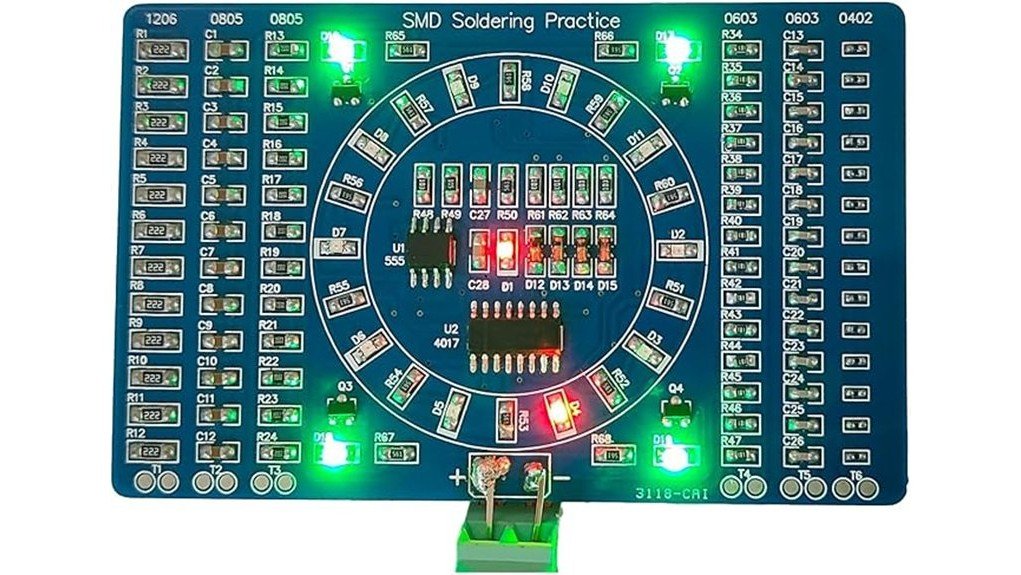
| PCB layout | Marked PCB layout for easier component identification |
| Power range | 3-12V power supply range, based on the source article |
| Learning focus | Basic soldering practice, component placement, and circuit testing |
| Helpful extras noted | mm/Inch ruler and user guide availability noted in the source article |
| Safety note | Requires safe soldering habits, heat awareness, and adult supervision for younger learners |
Key Takeaways
- The Gikfun Soldering Practice DIY Kit is best for beginners who want a guided first soldering project.
- The marked PCB helps you match components to the board more easily than loose practice parts.
- The water lamp circuit gives you a simple way to test whether your soldering work functions after assembly.
- The article-supported 3-12V power range gives you flexibility, but you still need a suitable power source and safe handling.
- This kit is not a full soldering station and is not the best choice if you want advanced circuit design practice.
What Is the Gikfun Soldering Practice DIY Kit?
The Gikfun Soldering Practice DIY Kit is a beginner-focused electronics project made to help you practice through-hole soldering on a prepared PCB. Instead of starting with random components, you get a board layout with clear markings that guide component placement.
The main project is a water lamp circuit. After assembly, you can connect the circuit to a 3-12V power supply and look for visual feedback. That makes the kit more useful than a board that only lets you practice solder joints without showing whether the finished circuit works.
It works best as a skill-building project for new hobbyists, students, and makers who already have, or plan to buy, the basic soldering tools. It should not be treated as a complete beginner kit unless the listing you buy clearly includes the tools you need.
Before You Buy: Check the current product listing carefully for what is included. The source article supports the PCB project, water lamp circuit, 3-12V range, ruler, and user guide, but it does not verify that a soldering iron, solder wire, power adapter, or replacement parts are included.
Who Should Buy It?
Best For
- Beginners who want a guided soldering practice board with marked component positions.
- Students or hobbyists who learn better when a finished circuit gives visible feedback.
- Parents or instructors who need a compact practice project for supervised electronics learning.
Skip If
- You need a complete kit with soldering iron, solder, safety gear, and power supply clearly included.
- You already know through-hole soldering and want advanced microcontroller or surface-mount practice.
- You need verified warranty, replacement parts, or classroom bulk-pack details before ordering.
Design and Build Quality
The strongest part of this kit is the prepared PCB layout. Clear board markings can reduce confusion when you are learning where each part goes, especially if you have not built many electronics projects before.
The project format also helps you connect the skill to a working result. You are not only melting solder onto pads. You are building a small circuit that should respond when powered correctly, which gives the practice more purpose.
The article does not verify PCB thickness, copper weight, board dimensions, or component materials. Because of that, judge the kit as a beginner learning project, not as a rugged electronics module for permanent installation.
Learning Value and Soldering Practice
This kit focuses on the core habits that matter when you start soldering: identifying components, placing parts in the right location, heating pads correctly, and checking the finished work. Those basics transfer well to small electronics repairs and hobby projects.
The water lamp circuit adds motivation because your work has a visible result. If the circuit does not respond after assembly, you can inspect your joints, polarity, component placement, and power connection to find the issue.
That troubleshooting step is useful, but it may frustrate complete beginners without help. If you are buying this for a younger learner, plan on supervision from someone who can explain solder bridges, cold joints, and safe tool handling.
Power Compatibility and Testing
The source article notes a 3-12V power supply range. That range gives you some flexibility, but it also means you need to use a suitable power source and follow the kit instructions closely.
Do not guess at power polarity, voltage, or connection points. A wrong connection can keep the circuit from working and may damage components. Start by reading the guide, checking the board labels, and using the lowest suitable setup recommended by the instructions.
For testing, work on a stable nonflammable surface with good lighting. Inspect the underside of the board for solder bridges before you connect power, especially around closely spaced pads.
Setup Tips Before First Use
Sort the components before heating your soldering iron. Match each part to the PCB markings, then place small parts in a tray or shallow container so they do not roll away.
Use a pointed clip, tweezers, or a small helping-hand tool when you need more control over small accessories. The original article specifically recommends a pointed clip for better precision, and that advice makes sense for beginners.
Give yourself enough time for a careful first build. The soldering process may take 30 minutes for someone with practice, but a first-time user may need longer because checking part placement matters more than speed.
Pro Tip: Before soldering each component, dry-fit it on the board and compare it with the printed markings. This simple check helps prevent the most common beginner mistake: soldering a part in the wrong spot and having to remove it later.
Safety and Supervision
Soldering tools get hot enough to burn skin and damage surfaces. Use the kit with a stable iron stand, good ventilation, eye protection, and a clean workspace away from loose paper or fabric.
The original FAQ positioned the kit for ages 12 and up, but age alone is not enough. Younger users should work only with close adult supervision, and any beginner should learn how to handle hot tools before starting the project.
Wash your hands after handling soldering materials, and follow the instructions that come with your solder, flux, and soldering iron. If you are teaching a group, review safety rules before handing out parts.
How It Performs in Real Use
For First-Time Soldering Practice
The marked PCB makes the project less intimidating because you have a clear place to start. Beginners can focus on clean joints and component placement instead of designing a circuit from scratch.
For Students and Supervised Learning
The water lamp circuit gives instructors and parents a simple way to talk about cause and effect. When the circuit works, the learner sees the result of careful assembly. When it does not, the board creates a practical troubleshooting lesson.
For Hobby Workbench Practice
If you already own a soldering iron, this kit can serve as a low-cost practice project before you attempt a repair or a more expensive electronics build. It gives you a contained project that does not require planning a custom circuit.
For Long-Term Skill Building
The kit is most useful as an early step, not a long-term training system. After you finish it, you may want a second practice board, a multimeter exercise, or a more complex kit to keep improving.
Pros and Cons
Pros
- Marked PCB layout helps beginners identify where components should go.
- Water lamp circuit provides visual feedback after assembly.
- 3-12V power range gives flexibility for testing when used correctly.
- Hands-on format teaches practical soldering habits better than reading alone.
- Compact project size makes it useful for hobby desks, classrooms, and supervised practice.
Cons
- Not confirmed as a complete tool bundle, so you may need a soldering iron, solder, and power source separately.
- Replacement parts and warranty details are not verified in the source article.
- Too basic for users who already want advanced circuit design or surface-mount soldering practice.
Is It Worth the Price?
The Gikfun Soldering Practice DIY Kit looks like a strong value for the price if you need a simple beginner project and already have the tools to complete it. The value comes from the structured PCB layout, water lamp circuit, and practical testing step.
It is not the best fit if you expect a complete electronics course or a full soldering starter station. You get the most value when you treat it as one focused practice project, then move to more challenging kits after you build confidence.
How It Compares to Alternatives
Compared with loose practice boards and random components, the Gikfun kit gives you a clearer path because the PCB is marked and the finished circuit has a visible purpose. That makes it better for first-time learners who want structure.
Compared with larger electronics starter kits, this one is more focused and less broad. Choose it for soldering practice. Choose a bigger electronics kit if you want breadboard work, sensors, controllers, and multiple lessons in one package.
Frequently Asked Questions
Is the Gikfun Soldering Practice DIY Kit good for beginners?
Yes, it is best for beginners who want a guided PCB project instead of loose soldering practice. The marked board and water lamp circuit make it easier to see how careful assembly affects the final result.
What age group is this kit suitable for?
The source article describes it as suitable for ages 12 and up. Because soldering involves heat, younger learners should use it only with close adult supervision and proper safety habits.
Does it include everything needed to solder?
The source article does not verify that a soldering iron, solder wire, safety gear, or power adapter is included. Check the current Amazon listing before buying so you know which tools you still need.
What power supply does the finished circuit use?
The article notes a 3-12V power supply range. Follow the kit guide for correct voltage, polarity, and connection points before testing the finished board.
How long does the soldering process take?
Plan on about 30 minutes to several hours, depending on your experience and how carefully you check the parts. Beginners should prioritize correct placement and clean solder joints over speed.
Can this kit be used for advanced projects?
It is mainly a beginner practice kit. Advanced users may find it useful as a quick warm-up, but it is not meant for complex circuit design, coding practice, or advanced repair training.
Are replacement parts available?
Replacement parts are not verified in the source article. If you lose or damage a component, you may need to identify the part and source a compatible replacement from an electronics supplier.
Who should skip this kit?
Skip it if you want a full soldering tool bundle, a verified classroom pack, or a more advanced electronics platform. It is better for focused beginner soldering practice than for broad electronics training.
The Bottom Line
The Gikfun Soldering Practice DIY Kit is a recommended beginner practice project if you want a marked PCB, a simple water lamp circuit, and a visible way to test your work. Skip it if you need a full soldering setup, verified replacement parts, or advanced electronics lessons.
Its main strength is the guided hands-on format. Its main limitation is that the source article does not verify all package contents, warranty details, or included tools.