Disclosure: As an Amazon Associate, we earn from qualifying purchases. If you click a link on this page and make a purchase, we may receive a small commission at no extra cost to you.
Learning to solder can feel risky when your first mistakes happen on a real repair or a costly electronics board. The Gikfun Soldering Practice Kit GK1023 gives you a small, structured PCB project where you can practice component placement, solder flow, polarity, and basic troubleshooting on a beginner-friendly LED circuit. It offers clear learning value for first-time builders, students, and hobbyists, but it stays limited to simple low-voltage practice rather than advanced electronics design.
Quick Verdict
Rating: Recommended with caveats (7.8/10)
Best For: Beginners, vocational students, electronics classes, and hobbyists learning basic PCB soldering
Bottom Line: The Gikfun GK1023 is a focused practice board that helps you build real soldering confidence through labeled placement and LED feedback. Its main tradeoff is narrow scope, since it teaches basic assembly skills rather than deeper circuit design or programming.
Key Specifications
| Specification | Detail |
|---|---|
| Brand | Gikfun |
| Model | GK1023 |
| Product Type | Soldering practice PCB kit |
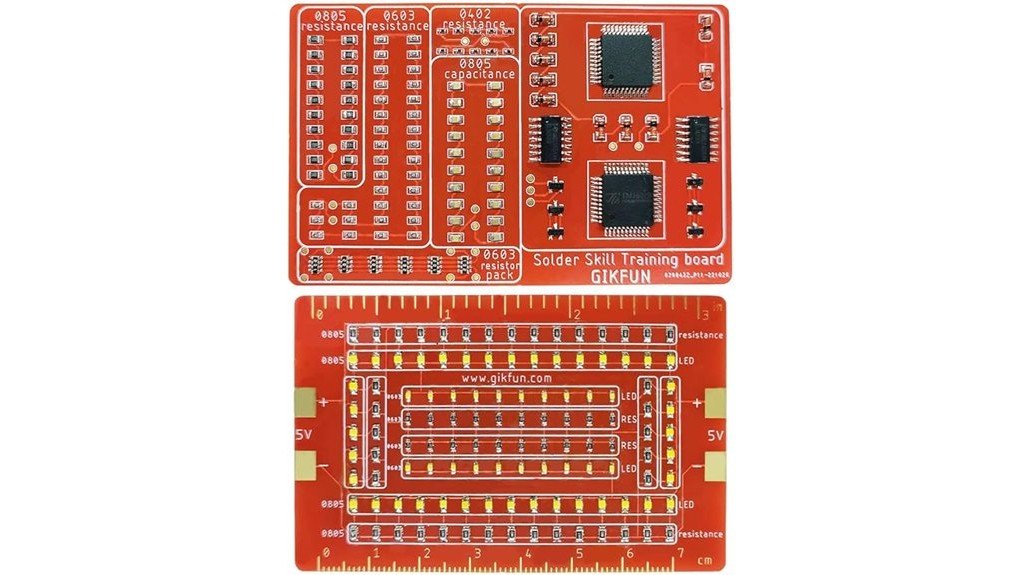
| Board Design | Dual-sided PCB with clearly marked component positions |
| PCB Size | 3.5 x 2.5 inches |
| Operating Voltage | 3–5V |
| Main Output | LED illumination circuit |
| Measurement Tool | Integrated mm/inch ruler on the PCB |
| Learning Focus | Basic soldering, polarity awareness, PCB component placement, and joint formation |
| Instruction Support | Article-supported manual and online PDF guidance |
| Tools Needed | Soldering iron, solder wire, and basic cutting tools are needed separately |
| Best Use | Beginner practice, classroom exercises, and low-risk soldering repetition |
| Safety Note | Requires normal soldering safety, including heat awareness, supervision for teens, and proper tool handling |
What Is the Gikfun Soldering Practice Kit GK1023?
The Gikfun GK1023 is a soldering training PCB made to help you practice placing and soldering electronic components on a real board. Instead of working on a repair board with unknown risks, you follow a marked layout and complete a simple LED circuit.
The board is dual-sided, so you get more practice area in a compact 3.5 x 2.5-inch format. The kit runs at 3–5V, which keeps the project focused on low-voltage learning rather than high-power electronics.
Its main value is immediate feedback. Once you place components correctly, respect polarity, and form solid joints, the LED circuit can light up and show that the basic assembly is working.
Core Features and What They Mean for You
Dual-Sided PCB Layout
The dual-sided board gives you more component placement practice without making the kit too large. This helps you understand how real PCB work feels, including spacing, alignment, and careful solder control.
For beginners, the marked layout reduces guesswork. You can focus on heating the pad, feeding solder correctly, and checking each joint instead of trying to decode a blank board.
3–5V Low-Voltage Operation
The 3–5V operating range keeps the project in a beginner-friendly low-voltage category. That makes it better for practice sessions, classrooms, and hobby benches than boards that require higher-power supplies.
This does not make soldering risk-free. The soldering iron still gets hot, and you still need safe handling, ventilation, and supervision for younger users.
LED Feedback System
The LED output gives you a clear pass-or-fix signal after assembly. If the LEDs do not light, you can inspect polarity, cold joints, bridges, or missed connections.
This feedback is useful because it turns mistakes into visible troubleshooting lessons. It also keeps the kit simple enough for a first or second practice project.
Integrated Measurement Ruler
The built-in mm/inch ruler helps you practice neat alignment and spacing. That detail matters when you move from practice boards to tighter electronics projects where uneven placement can create fit or clearance problems.
Before You Buy: This kit is for soldering practice only. It is not an Arduino starter kit, a repair kit, or a complex electronics project with multiple outputs.
Who Should Buy It?
Best For
- Beginners learning how solder flows on PCB pads
- Students in electronics, STEM, or vocational training
- Hobbyists who want practice before working on real devices
Skip If
- You already have intermediate soldering confidence
- You want coding, sensors, motors, or multi-function outputs
- You need a complete tool bundle with soldering iron and solder included
Build Quality and Learning Experience
The GK1023 feels most useful as a structured training board rather than a finished gadget. The labeled component positions help reduce beginner confusion, especially when you are still learning orientation, polarity, and joint inspection.
The dual-sided design adds useful repetition, but the circuit remains simple. That is a strength when you want focused practice, and a limitation when you want broader electronics theory.
The article-supported manual and online PDF guidance can help you follow the build sequence. Still, the real learning comes from handling the iron, watching solder flow, and correcting mistakes when the LED circuit does not work on the first try.
Compatibility and Safety
This kit is best treated as a low-voltage electronics practice project. The 3–5V circuit design fits beginner bench practice, but you should still follow the product instructions and use a suitable power source for the circuit.
Soldering adds heat, fumes, and sharp trimmed leads. Work in a ventilated area, keep the iron in a safe stand, wear basic eye protection when trimming leads, and supervise teens or first-time users closely.
Because the kit does not include soldering tools or wire, check your bench setup before buying. You will need a soldering iron, solder wire, cutters, and a safe work surface to complete the project.
Pro Tip: Sort the parts before heating the iron, then solder a few easy joints first. This helps you check your heat setting and reduces the risk of lifted pads from repeated reheating.
Setup Tips Before First Use
Read the Layout Before Soldering
Study the printed markings before placing parts. A few minutes of checking the layout can prevent reversed LEDs, misplaced components, and extra desoldering work.
Work in Small Stages
Place and solder a small group of components, then inspect those joints before moving on. This makes mistakes easier to find than checking the whole board after it is fully assembled.
Inspect for Bridges and Cold Joints
After each section, look for solder bridges between pads and dull, lumpy joints that may not conduct well. The LED feedback helps, but visual inspection teaches habits you will use on real boards.
How It Performs in Real Use
For Daily Practice
Repeated soldering on labeled pads helps you build muscle memory for iron control, solder amount, and joint shape. The board is compact enough for short practice sessions when you want repetition without a large project.
For Classroom or Training Use
Teachers and instructors can use the GK1023 as a controlled exercise because the parts, layout, and goal are easy to explain. The LED output also gives a quick way to see which boards need troubleshooting.
For First-Time Builders
First-time builders get a safer learning path than practicing on valuable electronics. Mistakes still matter, but they happen on a training board designed for skill-building.
For Moving Toward Real Projects
The kit helps with basic soldering habits that carry over to real electronics work, such as pad heating, polarity checks, and tidy placement. It will not teach coding, sensor wiring, or circuit design, so you may want a more advanced kit after this one.
Pros and Cons
Pros
- Labeled PCB layout helps beginners avoid placement confusion
- Dual-sided board gives more practice in a compact 3.5 x 2.5-inch size
- LED feedback helps confirm correct soldering and polarity
- Integrated mm/inch ruler supports cleaner alignment practice
- Low-voltage 3–5V circuit keeps the project focused on beginner learning
Cons
- Limited to basic LED circuit learning
- Does not include soldering iron, solder wire, or cutting tools
- Practice value drops after full assembly unless you desolder and rebuild
Is It Worth the Price?
The Gikfun GK1023 sits in the budget learning category, so it makes the most sense when you want focused soldering practice without paying for a larger electronics starter kit. It is a smart buy for everyday practice if your goal is better hand control, cleaner joints, and more confidence with PCB assembly.
You get the most value if you are new to soldering or teaching someone the basics. The marked board, LED output, and small size keep the learning path clear.
It is not the best fit if you already want advanced functions, reusable experiments, or a complete tool bundle. In that case, a broader electronics kit may offer more long-term learning.
How It Compares to Alternatives
Compared with a blank perfboard, the GK1023 gives you a clearer path because the component positions and LED result are already defined. A blank board offers more freedom, but it also gives beginners more chances to make layout mistakes.
Compared with Arduino starter kits, this Gikfun board is narrower and simpler. Arduino kits are better for programming and sensors, while the GK1023 makes more sense when your main goal is soldering repetition and basic PCB confidence.
Frequently Asked Questions
Do I need prior soldering experience?
No prior soldering experience is required, but you should understand basic tool safety before starting. The labeled board and simple LED output make the kit suitable for patient beginners.
What tools do I need to complete it?
You need a soldering iron, solder wire, and basic cutting tools. These are not listed as included in the article, so check your tool setup before ordering.
What voltage does the Gikfun GK1023 use?
The article-supported operating voltage is 3–5V. Use the product instructions and a suitable low-voltage power source for the circuit.
Does the LED light up automatically?
No. The LEDs only light after correct assembly, proper polarity, and solid circuit completion. If they do not light, inspect for reversed parts, weak joints, or solder bridges.
Is the PCB reusable?
The PCB is a permanent assembly project. After you complete it, the practice value is lower unless you desolder components and rebuild, which may be difficult for some beginners.
Is this good for teens?
It can work for supervised teens who are learning electronics and soldering basics. Adult supervision is recommended because soldering irons are hot and trimmed component leads can be sharp.
Who should skip this kit?
Skip it if you want coding, sensors, motors, wireless modules, or a finished device with multiple functions. The GK1023 is best for soldering practice, not broad electronics experimentation.
The Bottom Line
The Gikfun Soldering Practice Kit GK1023 is a solid pick for beginners who want structured, low-risk soldering practice with labeled placement and LED feedback. It earns a recommended-with-caveats verdict because it teaches useful PCB assembly habits, but it is limited to basic LED circuit learning.
Buy it if you need a simple practice board before real repairs or larger electronics projects. Skip it if you need advanced circuit design, programming, or a complete soldering tool bundle.