Disclosure: As an Amazon Associate, we earn from qualifying purchases. If you click a link on this page and make a purchase, we may receive a small commission at no extra cost to you.
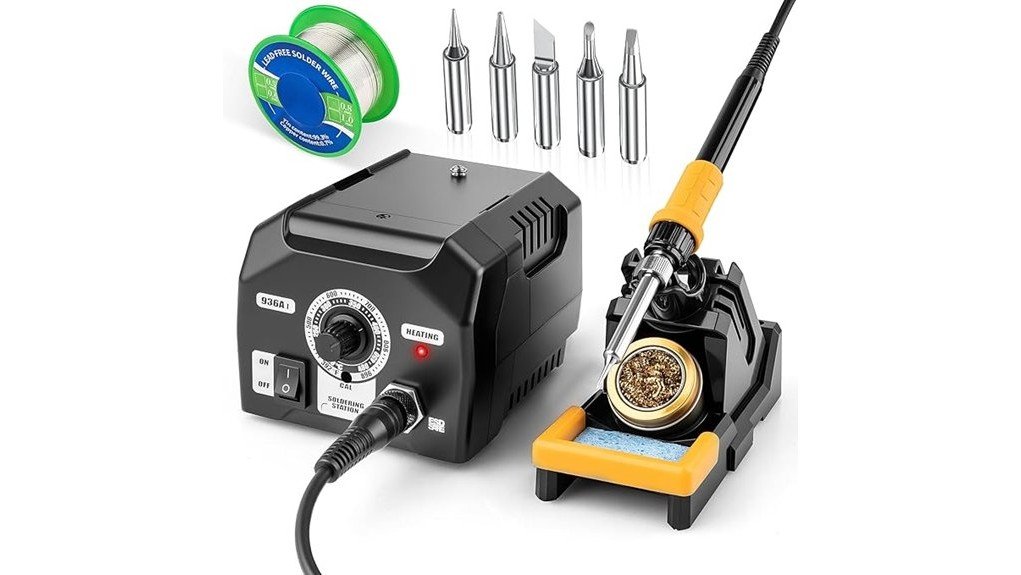
A basic soldering iron may be enough for occasional wire repairs, but electronics work gets easier when you can control heat and keep the iron stable on your bench. The Siziviki 936A I Soldering Station combines a 45W ceramic heater, adjustable 302°F to 572°F temperature range, ESD-safe iron, and five replaceable tips in a beginner-friendly station. Its simple physical controls and heavy base are useful for hobby work, although the 45W output and 572°F ceiling make it less suitable for demanding high-thermal-mass jobs. This review explains where the station makes sense and when a higher-powered model would be the better purchase.
Quick Verdict
Rating: 8/10, Recommended with caveats
Best For: Electronics learners, hobbyists, PCB repair, small appliance work, and light DIY soldering.
Bottom Line: The Siziviki 936A I offers simple temperature control, quick warm-up, ESD protection, and useful 900M-series tips without complicated menus. Its main tradeoff is the modest 45W power level, which gives you less thermal headroom than higher-output stations for large wires, terminals, and heat-hungry joints.
Key Specifications
| Specification | Detail |
|---|---|
| Brand | Siziviki |
| Model | 936A I / 936A |
| Product Type | Temperature-controlled soldering station |
| Power | 45W |
| Temperature Range | 302°F to 572°F (150°C to 300°C) |
| Heating Core | Ceramic |
| Warm-Up Claim | Reaches approximately 392°F in 30 seconds |
| Temperature Stability | Stated ±9°F during continuous use |
| Control | Physical dual-scale °C/°F knob |
| Tips | Five interchangeable 900M-series nickel-plated copper tips |
| Base | 63.5 oz heavy-duty station base |
| ESD Protection | ESD-safe soldering iron |
| Safety Features | Dual thermal fuses and overload protection |
| Included Accessories | 936 soldering stand, soldering iron, five tips, metal cleaning ball, and user manual |
| Best Use | Electronics practice, PCB repair, appliance maintenance, small DIY projects, and light craft soldering |
Key Takeaways
- The 45W ceramic heating system reaches about 392°F in 30 seconds, so you do not need a long warm-up for routine bench work.
- The 302°F to 572°F adjustment range gives you control for common electronics and hobby soldering tasks.
- A physical dual-scale °C/°F knob keeps operation simple if you prefer manual controls instead of digital menus.
- Five 900M-series soldering tips give you several tip shapes for different joint sizes and component layouts.
- The ESD-safe design, dual thermal fuses, overload protection, heavy base, and iron holder add useful safeguards for bench use.
- The main limitation is 45W output. Larger terminals, thick wires, large ground planes, and other heat-hungry jobs can benefit from a higher-powered station.
What Is the Siziviki 936A I Soldering Station?
The Siziviki 936A I is a 45W temperature-controlled soldering station designed primarily for electronics learning, circuit-board repair, household electrical maintenance, hobby projects, and other small soldering jobs. Instead of plugging a basic fixed-temperature iron directly into the wall, you work from a weighted station with a physical temperature knob and dedicated iron holder.
The ceramic heater is rated to reach roughly 392°F in about 30 seconds. You can then adjust the station from 302°F to 572°F using the °C/°F scale printed around the control knob. The manufacturer also states temperature fluctuation of approximately ±9°F during continuous use.
The kit includes five replaceable 900M-series tips, an ESD-safe iron, a 936-style stand, and a metal cleaning ball for tip maintenance. This makes it more complete than a bare soldering pencil while remaining simpler than digital stations with menus, preset channels, sleep modes, and high-output heating systems.
Who Should Buy It?
Best For
- Beginners learning through-hole soldering and basic PCB repair.
- Hobbyists who want temperature control without complicated digital settings.
- Home users repairing small electronics, light wiring, appliances, or craft projects.
Skip If
- You regularly solder large terminals, thick cables, or components attached to large heat-sinking metal areas.
- You want a digital temperature display, programmable presets, or advanced automatic power-management features.
- You need temperatures above the station’s 572°F maximum.
Before You Buy: Do not rely on temperature recommendations above 572°F for this station. Its stated adjustment range ends at 572°F, so buyers who need substantially higher tip temperatures or more thermal reserve should choose a higher-output station.
Temperature Control and Performance
The strongest practical feature is the straightforward 302°F to 572°F temperature range. You adjust it with a physical knob marked in Celsius and Fahrenheit, which removes the need to move through digital menus or save settings before you start working.
The ceramic heating core is stated to reach 392°F in approximately 30 seconds. That is useful when you are making a few repairs and do not want to leave the station warming for several minutes before touching the first joint.
The manufacturer also states approximately ±9°F temperature stability during continuous soldering. Stable heat matters because a tip that cools significantly as soon as it touches a joint can make solder flow poorly and encourage you to keep the iron on a component longer than necessary.
Power remains the bigger limitation. At 45W, the 936A I is aimed more at light and moderate soldering than sustained heavy work. A thick copper cable, oversized connector, large ground plane, or substantial metal terminal can pull heat away from the tip faster than a lower-powered station can replace it.
Design and Usability
The 936A I uses a 63.5 oz heavy-duty base intended to keep the station stable while you handle the iron. A heavier base is helpful because pulling the cord should be less likely to drag the entire station across your bench.
The station can be positioned vertically or horizontally to make better use of limited workspace. The dedicated holder also gives you a predictable place to return the hot iron between joints instead of laying it on the workbench.
The control layout favors simplicity. You get a physical dial rather than a digital control panel, so changing temperature takes only a turn of the knob. The tradeoff is that you do not get the same precise visual feedback or preset-based workflow offered by more advanced digital stations.
The simple knob, weighted base, and dedicated iron holder make the 936A I particularly easy to understand as a first temperature-controlled bench station.
Tips and Included Accessories
The kit comes with five interchangeable 900M-series soldering tips. Having several tip shapes matters because the smallest tip is not automatically the best choice for every joint. A tip with more contact area can often transfer heat more efficiently to a larger pad or wire, while a finer tip gives you better access around closely spaced components.
The verified package information also lists a 936 soldering stand, ESD-safe soldering iron, metal cleaning ball, and user manual. The tips are described as nickel-plated copper 900M-series parts, a common format that gives you a clearer replacement path than an obscure proprietary tip system.
Pro Tip: Match the tip size to the joint instead of using the finest tip for everything. Better contact between the tip and the workpiece can transfer heat faster and reduce the time you need to hold the iron on a pad or terminal.
How It Performs in Real Use
PCB and Electronics Practice
This is the station’s most natural use. The ESD-safe iron, adjustable temperature, moderate 45W output, and interchangeable tips fit beginner electronics projects, through-hole components, small circuit-board repairs, and general practice work. The simple knob also makes it easier to concentrate on technique rather than station settings.
Small Appliance and Household Repairs
For small switches, wires, connectors, and similar electrical repairs, the adjustable heat and steady stand can be more convenient than a basic fixed-temperature iron. You should still judge each joint by its physical size because heavier connectors can require more thermal power than the station comfortably supplies.
Fine Craft and Small Jewelry Work
The product is also marketed for small jewelry and craft soldering. The five tips give you flexibility for detailed work, but you should confirm that the solder, metal, and joining method you plan to use fall within the station’s temperature and power capabilities.
Large Wires and High-Thermal-Mass Joints
This is where the 45W rating becomes more noticeable. Thick copper wire and large metal terminals absorb substantial heat. The 936A I may still handle some jobs with the correct tip and technique, but frequent heavy work is a stronger reason to consider a 70W to 110W class station.
Setup and Usage Tips
- Choose the correct tip first. Use enough tip surface area to transfer heat efficiently without touching neighboring components.
- Start within the product’s stated range. Do not follow instructions that require temperatures above the 572°F maximum.
- Keep the tip tinned. A clean, properly tinned tip generally transfers heat better than an oxidized, dry surface.
- Return the iron to its holder. Do not place a hot iron directly on your bench or near cables and flammable materials.
- Let the joint determine suitability. If a large joint repeatedly drains heat from the tip, increasing contact time is not always the best solution. A more powerful station may be more appropriate.
- Follow your solder and component instructions. Different alloys and components can call for different working temperatures and handling practices.
Maintenance Tips for Longevity
Tip care directly affects how well a soldering station transfers heat. The 936A I includes a metal cleaning ball specifically for removing oxidation and residue from the tip.
The product instructions describe setting the station to 572°F, rubbing a darkened tip on the cleaning ball for about five seconds, and then re-tinning the tip with fresh solder. Re-tinning leaves a protective solder layer and helps restore useful heat transfer.
Avoid aggressive grinding or filing of plated soldering tips because damaging the outer plating can shorten tip life. When you finish working, clean and tin the tip, return the iron to its holder, switch the station off, and allow it to cool before storage.
Safety Features and ESD Protection
The Siziviki station includes several built-in safeguards. The iron is described as ESD-safe for work around sensitive electronics, while dual thermal fuses and overload protection are designed to reduce the risk of overheating and electrical faults inside the station.
| Safety Feature | Purpose | Buyer Benefit |
|---|---|---|
| ESD-Safe Iron | Helps control electrostatic-discharge risk | Better suited to sensitive electronics work |
| Dual Thermal Fuses | Provides thermal protection | Adds protection against overheating faults |
| Overload Protection | Protects the electrical system during abnormal load conditions | Adds another layer of equipment protection |
| Heavy Base and Holder | Keeps the station and hot iron in a defined working position | Reduces accidental movement on the bench |
Built-in protection does not replace normal soldering safety. Work in a ventilated area, protect your eyes, keep combustible materials away from the hot tip, avoid touching heated metal parts, and disconnect the station before maintenance. Always follow the supplied manual and the safety instructions for your solder and project.
Pros and Cons
Pros
- 45W ceramic heater reaches about 392°F in roughly 30 seconds.
- Adjustable 302°F to 572°F range with easy-to-read °C/°F knob.
- Five interchangeable 900M-series tips cover several common soldering tasks.
- ESD-safe iron, dual thermal fuses, and overload protection improve bench suitability.
- 63.5 oz base and dedicated holder provide a stable working setup.
Cons
- 45W output provides less heat reserve than 70W to 110W stations on large joints.
- 572°F maximum limits jobs that call for a substantially higher operating temperature.
- The simple knob does not provide the precise digital readout and preset-based workflow found on more advanced stations.
Is It Worth the Price?
The Siziviki 936A I makes the most sense as a value-focused entry-level soldering station. You get adjustable temperature, ESD-safe construction, a weighted station, five replaceable tips, and basic safety protection in one kit instead of assembling those pieces separately.
It offers stronger value for learners and occasional electronics users than for someone running a repair bench all day. A frequent technician may benefit more from higher wattage, tighter temperature control, a digital display, preset channels, sleep functions, or faster recovery under heavy thermal loads.
For routine PCB projects, small repairs, and hobby use, it is worth considering if simplicity matters more to you than advanced controls. It is not the best fit if your projects regularly involve large copper conductors or demanding professional production work.
How It Compares to Alternatives
The Weller WE1010 moves into a more advanced class with a 70W iron, digital controls, broader temperature capability, and tighter temperature management. It is a stronger option if you expect more frequent electronics work and want a recognized professional-style platform, although it is positioned above basic entry-level stations.
The WEP 927-IV goes further with 110W output, digital temperature control, preset channels, and sleep functionality. That extra power is useful for heat-hungry joints and repeated bench work. The Siziviki 936A I remains the simpler choice when you mainly want an affordable physical knob, ESD-safe iron, common 900M-style tips, and enough power for lighter soldering.
Frequently Asked Questions
Is the Siziviki 936A I good for beginners?
Yes. Its physical temperature knob, iron holder, five tips, and moderate 45W output make it approachable for learning common soldering techniques. You still need to learn correct tip selection, temperature control, ventilation, and safe handling.
What temperature range does the station provide?
The stated adjustment range is 302°F to 572°F, or 150°C to 300°C. Instructions or projects requiring temperatures above 572°F fall outside the station’s verified operating range.
Can you use it for automotive wiring?
It can be considered for smaller electrical joints that fall within the station’s power and temperature capabilities. Thick automotive cables and large terminals can absorb considerable heat, so a higher-powered iron may be more appropriate for those jobs.
What replacement tips does the Siziviki 936A I use?
The included tips are identified as nickel-plated copper 900M-series soldering tips. When ordering replacements, confirm the exact dimensions and compatibility shown by the replacement-tip seller before purchasing.
Is the station ESD-safe?
The soldering iron is advertised as ESD-safe for use around sensitive electronics. ESD-safe equipment is still only one part of a proper electronics workstation, so use suitable handling and grounding practices for sensitive components.
How should you clean a blackened soldering tip?
The supplied instructions recommend using the metal cleaning ball, followed by fresh solder to re-tin the tip. Avoid filing through the plated surface because physical damage to the coating can shorten tip life.
Does the Siziviki 936A I include a one-year warranty?
A specific one-year manufacturer warranty could not be confirmed from the product information reviewed for this update. Check the current Amazon listing and seller warranty or return terms before ordering if warranty coverage is important to you.
The Bottom Line
The Siziviki 936A I is a sensible choice for beginners, electronics hobbyists, and home users who want adjustable heat, an ESD-safe iron, five common-style tips, and a stable station without complex digital controls. Buyers working regularly on thick cables, large terminals, or other high-thermal-mass jobs should consider a higher-powered station because the 45W output and 572°F maximum are its clearest limitations.
For light to moderate bench soldering, its combination of quick warm-up, simple control, replaceable tips, and practical safety features earns it a Recommended with caveats verdict.
Ready to Buy?
Check the latest price, seller details, warranty information, and product specifications before you decide.