Disclosure: As an Amazon Associate, we earn from qualifying purchases. If you click a link on this page and make a purchase, we may receive a small commission at no extra cost to you.
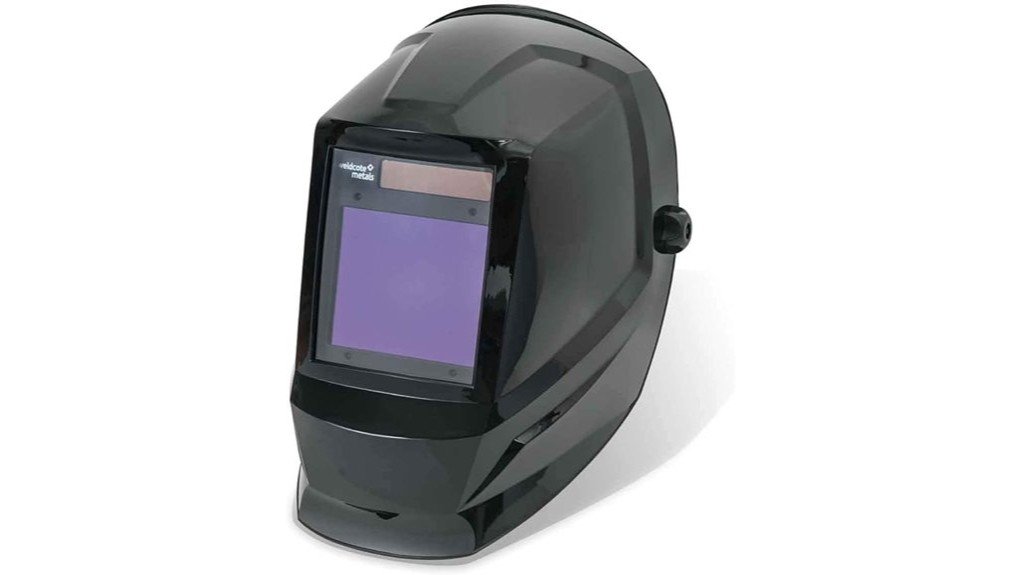
Choosing a welding helmet is not just about blocking sparks. You need clear visibility before the arc starts, dependable darkening during the weld, and enough comfort to keep the helmet on through long shop sessions. The Weldcote Metals Ultraview Auto Darkening Welding Helmet aims to cover those needs with an auto-darkening LCD lens, adjustable shade control, and a nylon shell.
This review helps you decide whether the Ultraview fits your welding setup, work style, and safety expectations. It looks strongest for general fabrication, repair work, and hobby welding where visibility and convenience matter. Its main tradeoff is that the article-supported details do not confirm advanced digital controls or a listed impact certification, so you should verify workplace requirements before buying.
Quick Verdict
Rating: 8/10, Recommended with caveats
Best For: Shop welders, hobby welders, and fabrication users who want auto-darkening convenience without complex smart features
Bottom Line: The Ultraview gives you adjustable shade coverage, UV/IR protection up to DIN 15, and a nylon shell that keeps the helmet practical for regular welding. It is not the best choice if you need confirmed heavy industrial impact certification or advanced digital controls.
| Specification | Detail |
|---|---|
| Brand | Weldcote Metals |
| Model | Ultraview |
| Product Type | Auto-darkening welding helmet |
| Shell Material | Nylon shell |
| Weight | 1.54 kg, about 3.4 lb |
| Dimensions | 10 x 12 x 10 inches |
| Shade Range | Adjustable 5-9 and 9-13 |
| Protection | UV/IR protection up to DIN 15 |
| Lens Technology | Auto-darkening LCD lens |
| Best Use | Welding, fabrication, repair work, and workshop use |
| Safety Note | Confirm listed certification, fit, and shade suitability before using it for workplace-required protection |
What Is the Weldcote Metals Ultraview Welding Helmet?
The Weldcote Metals Ultraview is an auto-darkening welding helmet made for welders who want better visibility than a basic fixed-shade hood. Its LCD lens changes shade when the arc is detected, which helps you keep the helmet down instead of lifting it between welds.
The article-supported shade ranges are 5-9 and 9-13, giving you room to adjust for different welding brightness levels. That makes the helmet more flexible than a single fixed lens, especially if you switch between lighter prep work and darker arc welding tasks.
With a nylon shell, 10 x 12 x 10 inch body, and 1.54 kg listed weight, the Ultraview targets everyday shop use rather than specialized smart-helmet performance. It is a practical pick when you want auto-darkening convenience, but not a product to buy blindly for strict industrial PPE programs without checking the current listing and manual.
Key Design and Build Quality
The nylon shell gives the helmet a practical balance of coverage and manageable weight. At 1.54 kg, it is not an ultralight helmet, but the listed build should still feel more manageable than bulky old-style hoods for many shop users.
The 10 x 12 x 10 inch size gives your face broad coverage while keeping the helmet compact enough for bench welding, repairs, and fabrication tasks. That matters when you need to move your head around clamps, work tables, and tight weld joints.
The biggest build limitation is the lack of article-supported details about heavy-duty impact certification, replacement lens parts, or headgear adjustment range. If your shop requires a specific standard or marked rating, confirm that on the product label before using it as required PPE.
Performance and Auto-Darkening Features
The auto-darkening LCD lens is the main reason to consider this helmet. It lets you position your torch or electrode with a clearer view before the arc starts, then darkens when welding begins.
The 5-9 and 9-13 shade ranges give you more control than a fixed-shade helmet. Lower settings can help with lighter tasks, while darker settings support brighter welding conditions when the work requires more eye protection.
This setup can save time during repeated tack welds because you do not need to flip the helmet up and down as often. It also helps beginners maintain position because they can keep both hands focused on the workpiece and welding tool.
Safety and Eye Protection
The Ultraview is listed with UV/IR protection up to DIN 15, which is an important safety detail for arc welding. UV and infrared exposure are major concerns during welding, so your helmet must protect your eyes even when you are doing short welds.
The adjustable shade range also matters because different welding processes and amperage levels can need different viewing darkness. Start with a darker shade when unsure, then adjust only within the safe range recommended for your process, material, and current level.
Before You Buy: The article-supported details do not confirm ANSI Z87.1, CSA, or other workplace certification markings. If you need this helmet for jobsite compliance, inspect the current listing, packaging, and manual before relying on it.
Setup Tips Before First Use
Before your first weld, adjust the headgear so the helmet sits low enough to protect your face without pressing hard on your forehead. A poor fit can make even a capable helmet feel tiring during longer welds.
Set the shade before you strike an arc, not while you are already welding. If your weld puddle looks too bright or your eyes feel strained, stop and adjust the setting instead of pushing through the job.
Inspect the lens area, shell, and headgear before each session. Cracks, loose parts, blocked lens areas, or damaged filters can reduce protection and make the helmet harder to use safely.
Pro Tip: Test the shade response and fit before starting a long weld. A quick check helps you catch comfort issues, poor viewing angle, or an incorrect shade setting before the workpiece is already hot.
How It Performs in Real Use
For Daily Workshop Use
For regular fabrication work, the auto-darkening lens helps you move from setup to welding without lifting the helmet after every small adjustment. This is useful when you are making repeated tack welds or moving between several small joints.
For Long Welding Sessions
The 1.54 kg listed weight should be manageable for many users, but long shifts still depend on fit and headgear comfort. If you weld for hours at a time, adjust the headband carefully and take breaks when neck fatigue starts.
For TIG and Detail Work
The adjustable shade range can help when you need a clearer view of the weld area before arc activation. That can support better bead placement during TIG or careful MIG work, especially when the joint line is small.
For General Repair and Maintenance
The Ultraview makes sense for mixed shop tasks where you may switch between repair brackets, frames, equipment parts, and small fabrication jobs. It is less ideal if your work regularly exposes the helmet to harsh impact, rough handling, or strict industrial inspection requirements.
Who Should Buy It?
Best For
- Hobby welders upgrading from a basic fixed-shade helmet
- Shop users who want adjustable 5-9 and 9-13 shade control
- Fabrication and repair work where auto-darkening convenience saves time
Skip If
- Your workplace requires a confirmed ANSI, CSA, or specific impact certification
- You want advanced digital controls, memory modes, or smart helmet features
- You need an ultralight helmet for all-day overhead welding
Pros and Cons
Pros
- Auto-darkening LCD lens reduces the need to flip the helmet between welds
- Adjustable 5-9 and 9-13 shade ranges support different welding brightness levels
- UV/IR protection up to DIN 15 gives useful eye-protection coverage for welding work
- Nylon shell helps keep the helmet practical for regular shop handling
- 10 x 12 x 10 inch size offers broad face coverage without an oversized profile
Cons
- Certification details are not confirmed in the article-supported product data
- 1.54 kg may still feel heavy for some users during long overhead work
- No article-supported details for advanced controls, memory settings, or included accessories
Want to compare current product details?
Common Mistakes to Avoid
Do not assume one shade setting works for every welding process. Use the adjustable range correctly and match the darkness to the job, material, and amperage level.
Do not use a damaged lens, cracked shell, or loose headgear. Even small damage can affect comfort, visibility, or protection during welding.
Do not buy this helmet only because it has auto-darkening. Confirm fit, shade needs, and required safety markings first, especially if you weld in a workplace with written PPE rules.
Is It Worth the Price?
The Weldcote Metals Ultraview sits best in the practical mid-range category based on its feature set. It is worth considering if you want adjustable shade control, UV/IR protection up to DIN 15, and auto-darkening convenience for regular welding tasks.
You get the most value if you mainly weld in a garage, school shop, repair bay, or fabrication space where ease of use matters. The helmet is a smart buy for everyday use when you do not need premium digital controls.
It is not the best fit if you need confirmed heavy-duty industrial certification, advanced settings, or the lightest possible helmet. In that case, compare current safety markings and product manuals before deciding.
How It Compares to Alternatives
Compared with a basic fixed-shade helmet, the Ultraview is easier to use because the LCD lens darkens automatically when welding starts. That can make setup, tack welding, and repeated welds feel smoother.
Compared with higher-end options from brands like Lincoln Electric, Miller, or 3M Speedglas, the Ultraview appears simpler and less feature-heavy. It makes the most sense if you want shade flexibility and basic auto-darkening function without paying for advanced controls you may not use.
Frequently Asked Questions
Is the Weldcote Metals Ultraview good for beginners?
Yes, it can work well for beginners because the auto-darkening lens reduces helmet flipping. New welders should still learn proper shade selection, fit adjustment, and basic welding eye safety before use.
What shade range does it support?
The article-supported shade range is 5-9 and 9-13. That range gives you flexibility for different welding brightness levels, but you should still match the setting to your process and amperage.
Can you use it for TIG welding?
Yes, the adjustable shade range can support TIG work when the selected shade fits the job. For very low-amp TIG or strict shop requirements, confirm the current product specifications before relying on it.
How heavy is the helmet?
The listed weight is 1.54 kg, which is about 3.4 lb. That can feel manageable for regular bench work, but some users may want a lighter helmet for long overhead welding.
Does it protect against UV and IR exposure?
The article-supported detail lists UV/IR protection up to DIN 15. You should still inspect the helmet, lens, and product markings before use to make sure it suits your welding task.
Is it suitable for heavy industrial work?
It is better described as a general shop and fabrication helmet based on the available article details. If your jobsite requires a specific impact or eye-protection certification, verify that marking before buying.
What should you check before first use?
Check the shell, lens area, headgear fit, and shade setting before welding. Do not use the helmet if the lens is damaged, the headgear will not stay secure, or the shade response seems inconsistent.
Who should skip this helmet?
Skip it if you need verified industrial certification, advanced digital controls, or the lightest possible helmet for all-day overhead welding. It is a better fit for everyday shop users who want simple auto-darkening function.
The Bottom Line
The Weldcote Metals Ultraview Auto Darkening Welding Helmet is a practical choice if you want adjustable shade control, UV/IR protection up to DIN 15, and auto-darkening convenience for general welding work. It fits hobby welders, repair users, and fabrication shops better than buyers who need confirmed industrial certification or advanced digital features.
Choose it if you value simple function and a broad shade range. Skip it if your workplace requires specific PPE markings that are not confirmed in the article-supported product details.