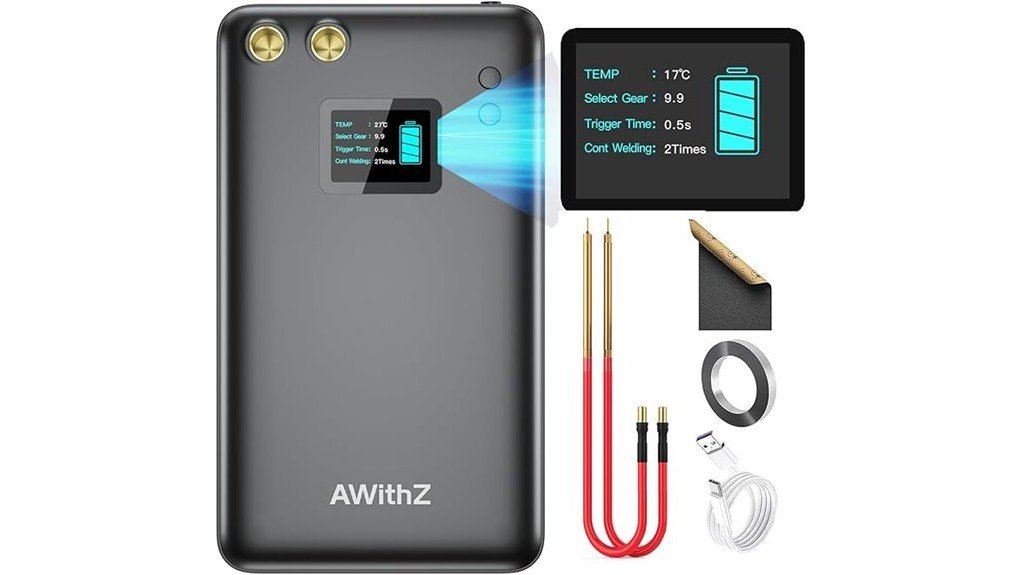
Building or repairing a battery pack requires a tool that can join thin tabs without holding heat on the cell for too long. The AWithZ U2 11000mAh Battery Spot Welder combines a rechargeable power source, separate welding pens, a 1.5-inch LCD, and 99 output settings in a portable package. Its fine adjustment and included practice strip make it appealing for hobby battery work, but the stated 0.1 to 0.25 mm range applies to thin tab material, not structural metal. This review explains where it fits, how to set it up, and which limitations you should check before buying.
Quick Verdict
Editorial Rating: 7.8/10
Best For: DIY battery pack builders, electronics hobbyists, and occasional repair work with thin nickel or nickel-plated tabs
Bottom Line: The U2 gives you unusually fine output control, a useful status screen, and a complete starter kit for portable battery tab welding. Its main tradeoff is that results depend heavily on strip material, cell condition, pen pressure, and careful testing, so it is not a plug-and-play substitute for a higher-output bench welder.
Key Specifications
| Specification | Detail |
|---|---|
| Brand | AWithZ |
| Model | U2, 11000mAh version |
| Product Type | Rechargeable portable battery spot welder |
| ASIN | B0DBCZGL4P |
| Battery Capacity | 11000mAh rechargeable lithium-polymer power source |
| Display | 1.5-inch LCD showing battery level, temperature, selected gear, trigger time, and continuous-weld setting |
| Output Adjustment | 99 settings from 1.0 through 9.9 |
| Listed Weld Range | 0.1 to 0.25 mm nickel-plated sheet, depending on output setting and technique |
| Compatible Work | Battery tab welding, cylindrical battery pack assembly, mobile-device battery repair, and other thin metal-tab work |
| Operating Features | Adjustable trigger timing and single or two-stage continuous spot welding |
| Charging | Type-C cable; listed full-charge time is about 3.5 hours; USB wall adapter is not listed as included |
| Power-Bank Function | USB output can supply power to a compatible mobile device |
| Device Size | Approximately 6.1 × 3.5 × 0.78 inches, according to the Amazon product description |
| Device Weight | Approximately 265 g (0.6 lb), according to the Amazon product description |
| Included Accessories | Spot-welding pen pair, 2 m nickel-plated strip, 50 cm Type-C cable, grinding gauze or sandpaper, and user instructions |
| Best Use | Occasional light-duty battery pack building and repair with thin tabs |
Before You Buy: The 0.25 mm maximum is listed for nickel-plated sheet. Pure nickel, copper, steel, cell condition, cable contact, and pen pressure can change the usable limit. Confirm the material specification in the current manual and do not assume this compact unit will weld every 0.25 mm strip reliably.
What Is the AWithZ U2 Battery Spot Welder?
The AWithZ U2 is a battery-powered resistance spot welder designed to attach thin conductive tabs to battery terminals with short pulses. Unlike a soldering iron, it concentrates heat at two small contact points, which can reduce the amount of heat transferred into the cell when you use the correct setting and technique.
This version combines an 11000mAh internal battery with a separate pair of welding pens. The 1.5-inch screen displays the selected output level and operating information, while the 99-step range lets you make smaller changes than a basic welder with only a few power levels.
It is made for portable, light-duty work rather than continuous production. The included nickel-plated strip and grinding material give you a way to practice and maintain the pen tips before working on a real pack.
Who Should Buy It?
Best For
- DIY builders assembling or repairing small 18650 and similar cylindrical battery packs
- Electronics hobbyists who need fine output control for thin nickel or nickel-plated tabs
- Users who value a rechargeable, portable setup with pens, practice strip, and screen feedback
Skip If
- You need repeatable production output, thick pure-nickel capability, or a foot-pedal bench machine
- You want to weld structural sheet metal, brackets, or load-bearing parts
- You are not prepared to learn lithium-battery safety, test settings, and inspect every cell before use
Feature-by-Feature Review
99 Adjustable Output Settings
The U2 divides its output into settings from 1.0 to 9.9. The listed guidance places mobile-device battery work in the 1.0 to 3.9 range, 0.1 to 0.15 mm material in the 4.0 to 7.0 range, and 0.15 to 0.25 mm material in the 7.1 to 9.9 range.
That range is a starting point, not a guarantee. A clean 0.1 mm plated strip may weld at a lower setting than a less conductive or thicker strip. The benefit is that you can move in small steps instead of jumping between a few broad power levels.
1.5-Inch LCD and Control Feedback
The color LCD shows more than the selected gear. It is listed as displaying remaining charge, unit temperature, trigger time, and the continuous-weld count. That information helps you repeat a setting and notice when the unit is heating up or running low on charge.
The screen does not judge weld quality for you. You still need to inspect each test weld and make sure the strip is firmly attached without burning through the tab or overheating the cell.
11000mAh Battery and Portable Design
The built-in 11000mAh battery removes the need to connect the welder to a car battery or a large external power supply. The listing describes a roughly 6.1 × 3.5 × 0.78-inch body weighing about 0.6 lb, which is compact enough to move between a workbench, garage, or field repair kit.
Charging is listed at about 3.5 hours through Type-C. Actual weld count per charge will vary with output level, material, temperature, and how often you use the two-stage weld function. The USB output can also serve as a power bank, although preserving charge for welding is the better choice during a battery project.
Single and Two-Stage Spot Welding
The continuous-weld control can deliver a second pulse without lifting the pens. This may help on material that needs more energy, but it also increases heat at the weld area. Start with a single pulse on scrap and move to a second pulse only after you confirm that the strip is not burning through.
Included Starter Accessories
The listed package includes the welder, a 40 cm pair of welding pens, 2 m of 0.1 mm nickel-plated strip, a 50 cm Type-C cable, grinding gauze or sandpaper, and instructions. That is enough to charge the unit, connect the pens, practice on the supplied strip, and maintain the tip surfaces.
A USB wall adapter is not listed in the package contents. You should also budget for verified cells, insulating rings, fish paper, an appropriate battery-management system, and any enclosure or wiring your pack design requires.
Setup Tips Before First Use
- Charge the unit fully. A low battery can produce weak or inconsistent welds, so begin with a full charge and use a suitable USB power adapter.
- Seat both pen connectors firmly. Loose connections add resistance and can reduce the energy that reaches the weld tips.
- Practice on the included strip. Start below the suggested range, make one test weld, and increase the setting in small steps.
- Keep pressure even. Place both tips flat on the strip and use steady, matching pressure so one tip does not carry most of the current.
- Inspect the result. A weak weld releases too easily, while excessive energy can discolor, pit, or burn through the strip.
- Let the tool cool. Stop if the temperature warning appears or the body and pen connections become unusually hot.
Pro Tip: Record the strip type, thickness, battery charge level, and successful gear setting for each project. That simple log makes repeat repairs faster and reduces guesswork when you return to the same materials.
How It Performs in Real Use
For 18650 Battery Pack Assembly
The U2 is best matched to small battery packs that use thin tabs and modest batch sizes. Fine adjustment is useful when you are moving from practice strip to actual cells, but you should still verify cell chemistry, matching, insulation, polarity, and battery-management requirements before joining the pack.
For Power-Tool Battery Repairs
It can handle tab work when replacing properly matched cells in a power-tool pack, provided the strip falls within the welder’s practical range. Pack repair is not simply a welding job, though. A damaged protection board, unbalanced cells, or an incorrect replacement cell can make the finished pack unsafe even when the welds look secure.
For Mobile-Device Battery Work
The lower settings are marketed for thin mobile-device battery tabs. This work involves delicate protection circuits and soft pouch cells, so it is better suited to experienced electronics repair users. Do not puncture, bend, crush, or heat a swollen pouch cell.
For Portable or Occasional Bench Use
The rechargeable body and separate pens make the U2 easier to position than a heavier bench machine. It is convenient for occasional repairs and small batches, but repeated high-output welds can heat the unit and reduce consistency. A capacitor or mains-powered bench welder is a better choice for regular production.
Compatibility and Safety
Use the AWithZ U2 only on materials and battery types covered by the current instructions. The listed 0.1 to 0.25 mm range is for thin nickel-plated sheet, and different metals do not behave the same way. Pure nickel and copper can require more energy than plated steel strip of the same thickness.
Wear safety glasses, remove loose jewelry, keep the work area dry and clear of flammable material, and place cells on a stable, nonconductive surface. Never weld a cell that is swollen, dented, leaking, corroded, overheated, or otherwise damaged. Keep the pen tips and bare strip away from unintended terminals to prevent a short circuit.
Battery pack design also requires correct cell matching, insulation, fusing, polarity, and a suitable battery-management system. Follow the cell manufacturer’s limits and the welder manual. When you are unsure about pack design or cell condition, use a qualified battery technician instead of experimenting on a live pack.
Cleaning, Charging, and Storage
Wipe the body with a dry cloth and keep metal dust away from the pen sockets and charging ports. Inspect the pen cables before each session. Lightly polish dull or oxidized tips with the supplied grinding material, then remove debris before welding.
Store the welder in a cool, dry area away from direct sunlight, moisture, children, and loose metal objects. For long storage, follow the current battery-care instructions instead of leaving the unit fully discharged. Stop using the tool if the internal battery swells, the case cracks, or the charging port becomes damaged.
Pros and Cons
Pros
- 99 settings allow smaller output changes than simple low, medium, and high controls
- 1.5-inch screen displays charge, temperature, gear, timing, and continuous-weld information
- Rechargeable 11000mAh design does not require a separate car battery or bench power supply
- Separate pens make it easier to position the contact points on a battery pack
- Package includes practice strip, pen leads, charging cable, and tip-cleaning material
Cons
- The 0.25 mm claim is material-specific and may not translate to pure nickel or copper
- Good results require practice, clean tips, even pressure, and trial-and-error setting changes
- Portable battery power is less suitable than a bench welder for long production runs
Is It Worth the Price?
The AWithZ U2 is worth considering when you want a portable kit with more adjustment and display feedback than a basic handheld welder. You get the core accessories needed to practice, and the rechargeable design avoids the cost and complexity of an external battery or power supply.
Its value is strongest for occasional DIY pack work rather than daily production. Buyers who regularly weld thicker pure nickel, copper sandwich tabs, or large packs may save time by moving directly to a higher-output capacitor or bench unit.
Because Amazon bundles and seller terms can change, check the current package contents, return policy, support information, and warranty language before ordering.
How It Compares to Alternatives
Current SEESII and Kerpu handheld spot welders are worth comparing if you want a smaller or simpler portable tool. SUNKKO bench-style machines make more sense when sustained output, a fixed workstation, or higher-volume work matters more than portability.
The AWithZ U2 sits between those approaches. It offers more screen-based adjustment than many entry-level handheld tools, while remaining lighter and easier to store than a full bench machine.
Frequently Asked Questions
Can the AWithZ U2 weld 0.25 mm pure nickel?
Do not assume it can. The listing’s 0.1 to 0.25 mm range is tied to nickel-plated sheet, while pure nickel usually requires more energy. Test the exact material on scrap and stay within the current manual’s limits.
What batteries can you use it with?
It is marketed for cylindrical battery pack work, including common 18650-style projects, plus thin mobile-device battery tabs. Compatibility depends on the tab material and pack design, not only the cell size.
Does the package include everything needed to build a battery pack?
No. It includes the welder, pens, practice strip, Type-C cable, grinding material, and instructions. You still need suitable cells, insulation, a battery-management system, wiring, connectors, and an enclosure matched to your design.
How long does the AWithZ U2 take to charge?
The listing and manual state about 3.5 hours for a full charge. Charging time can vary with the USB power adapter, cable condition, battery temperature, and remaining charge.
Why are the welds weak or inconsistent?
Common causes include low battery charge, dirty tips, loose pen connections, uneven pressure, a setting that is too low, or material outside the practical range. Correct one factor at a time and retest on scrap.
Can beginners use this spot welder?
The controls are approachable, but lithium battery work is not risk-free. Beginners should practice on the supplied strip, learn cell inspection and pack-safety basics, and avoid repairing damaged or swollen cells.
Can it replace a full-size spot welder?
Not for every job. It is designed for portable, light-duty tab welding and small batches. A bench or capacitor welder is a better fit for frequent use, thicker materials, and more repeatable production work.
How should you maintain the welding pens?
Inspect the tips for oxidation, pitting, or buildup before each session. Lightly polish dull tips with the included grinding material, wipe away debris, and replace damaged leads or tips rather than continuing to use them.
The Bottom Line
The AWithZ U2 11000mAh Battery Spot Welder is a practical choice for hobbyists who want portable battery-tab welding, fine output adjustment, and a useful LCD interface. Its strongest feature is control, while its main limitation is that the listed maximum thickness depends on material and technique. Skip it for structural welding, large production runs, or battery work you are not trained to complete safely.
Ready to Buy?
Check the latest price, package contents, and product details before you decide.